Hi Cath,
Security groups provide controlled access to a particular environment, So you can create a security group.
Please refer to docs.microsoft.com/.../control-user-access.
Here are steps.
1.Add a group (Sign in to the Microsoft 365 admin center)

2. Change the type to Security group, add the group Name and Description. Select Create > Close.

3. Select the group you created, and then click all and management members.

4.clcik + Add members, Select the users you need to add to the security group, and then select Save > Close several times to return to the Groups list.

5.Now you can see it.

6. Associate a security group with an environment
(1) go to Power Platform admin center to edit the environment that you selected.
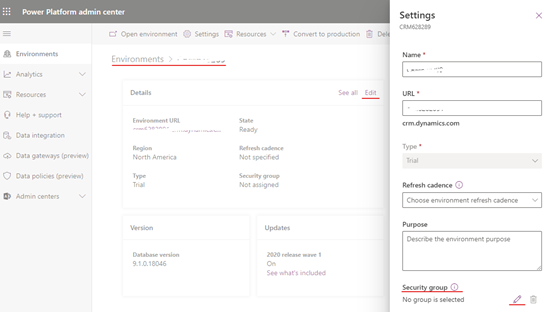
(2) In the Settings page, click pencil button and select security group that you created.

(3) click finish and save button.
In this way, all users in the environment that are not members of the group will be disabled.
Best regards
Leah


