I have a report in an AL extension that contains 3 dataitems (as below). There are RequestFilterField lines in each dataitem. The top two, in dataitems: diEmp & diLogSheetLines are working fine but if the third one (in dataitem: diLogSheet) is used the records are not filtered out. The only effect is the field in question is blanked.
Here's the report code:-
report 50052 LogSheetActivityForEmployee
{
    UsageCategory = ReportsAndAnalysis;
    ApplicationArea = All;

    DefaultLayout = RDLC;
    RDLCLayout = 'LogSheetActivityForEmployee.rdl';

    dataset
    {
        dataitem(diEmp; Employee)
        {
            // Sort the table view based on the "No." field.
            DataItemTableView = Sorting("No.");
            // Include the "No." field on the filter tab of the request page.
            RequestFilterFields = "No.";
            // Print data only if at least one of the data items generates output.
            PrintOnlyIfDetail = True;

            column(EmpNo; "No.") { }
            column(FirstName; "First Name") { }
            column(MiddleName; "Middle Name") { }
            column(LastName; "Last Name") { }
            column(ShowDetail; gblnShowDetail) { }
            dataitem(diLogSheetLines; LogSheetLines)
            {
                DataItemLink = ItemEmployeeID = field("No.");
                RequestFilterFields = DateFrom, DateTo;
                column(LogSheetNo; "ParentLogSheetNo.") { IncludeCaption = true; }
                column(DateFrom; DateFrom) { IncludeCaption = true; }
                column(DateTo; DateTo) { IncludeCaption = true; }
                column(Quantity; Quantity) { IncludeCaption = true; AutoFormatType = 0; DecimalPlaces = 2; }
                column(UnitOfMeasure; UnitOfMeasure) { IncludeCaption = true; }
                column(ItemEmployeeID; ItemEmployeeID) { IncludeCaption = true; }
                column(TimeInDays; gdecTimeInDays) { }
                column(TimeInHours; gdecTimeInHours) { }
                column(DaysRunningTotal; gdecDaysRunningTotal) { }
                column(HoursRunningTotal; gdecHoursRunningTotal) { }

                dataitem(diLogSheet; LogSheets)
                {
                    DataItemLink = "LogSheetNo." = field("ParentLogSheetNo.");
                    RequestFilterFields = Customer;                                   // <-- *** THIS LINE DOESN'T WORK !!! ***
                    column(Customer; Customer) { }
                    column(CustomerName; CustomerName) { IncludeCaption = true; }
                }

                trigger OnPreDataItem()
                var
                begin
                end;

                trigger OnAfterGetRecord()
                var
                begin

                    if StrLen(gPreviousEmpNo) = 0 then begin
                        gPreviousEmpNo := ItemEmployeeID;
                    end;

                    if gPreviousEmpNo <> ItemEmployeeID then begin
                        gdecDaysRunningTotal := 0;
                        gdecHoursRunningTotal := 0;
                    end;

                    // NOTE: Running Totals ended up being just for debug purposes

                    case UnitOfMeasure of
                        'DAY':
                            begin
                                gdecTimeInDays := Quantity;
                                gdecTimeInHours := Quantity * 7.5;

                                gdecDaysRunningTotal := gdecDaysRunningTotal   Quantity;
                                gdecHoursRunningTotal := gdecHoursRunningTotal   (Quantity * 7.5);
                            end;
                        'HOUR':
                            begin
                                gdecTimeInHours := Quantity;
                                gdecTimeInDays := Quantity / 7.5;

                                gdecHoursRunningTotal := gdecHoursRunningTotal   Quantity;
                                gdecDaysRunningTotal := gdecDaysRunningTotal   (Quantity / 7.5);
                            end;
                    end;

                    gPreviousEmpNo := ItemEmployeeID;
                end;

                trigger OnPostDataItem()
                var
                begin
                end;
            }
        }
    }

    requestpage
    {
        layout
        {
            area(Content)
            {
                group(Options)
                {
                    Caption = 'Options';
                    field("Show Detail"; gblnShowDetail)
                    {
                        ApplicationArea = Basic, Suite;
                        Caption = 'Show Detail';
                        ToolTip = 'Show Detail';
                        Visible = false;
                    }
                }
            }
        }
        trigger OnOpenPage()
        var
        begin
            gblnShowDetail := true;
        end;
    }

    var
        gdecTimeInDays: Decimal;
        gdecTimeInHours: Decimal;
        gdecDaysRunningTotal: Decimal;
        gdecHoursRunningTotal: Decimal;
        gblnShowDetail: Boolean;
        gPreviousEmpNo: Code[20];
}
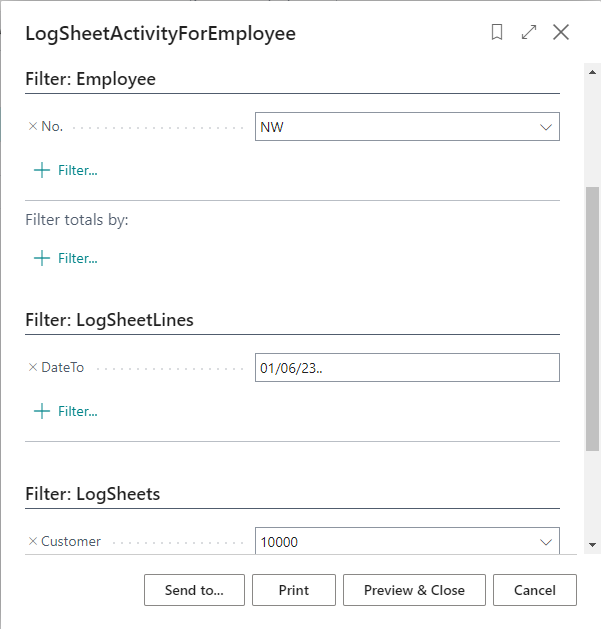
Here's a sample RequestPage. The Customer filter at the bottom is not working.
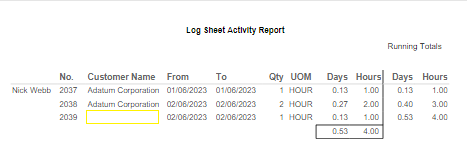
Here's some sample output. The row with the yellow box should've been filtered out as it was for a different customer.
Where am I going wrong? Thanks in advance for help.


