web
You’re offline. This is a read only version of the page.
close
Skip to main content

Announcements

No record found.

News and Announcements icon
Community site session details

Community site session details

Session Id :
Customer experience | Sales, Customer Insights,...
Suggested Answer

Form level double opt-in not working

(0) ShareShare
ReportReport
Posted on by

Dear community,

I want to set up form level double opt-in because we have marketing forms in different languages. However the form level double opt-in does not work.

When I deactivate the double opt-in on form level, confirmation emails are sent using the global level opt-in on the Default Marketing settings form. I have taken over the exact same double-opt-in settings (from global level) to form level and then the confirmation emails are not sent. The settings on form level and global level are identical (see attachment below).

The sign-up and subscription center forms are embedded (via script) on external CMS webpages.

Have you enocuntered this issue before? Can you help me get form level double opt-in to work?

Best regards,

Geron Profet
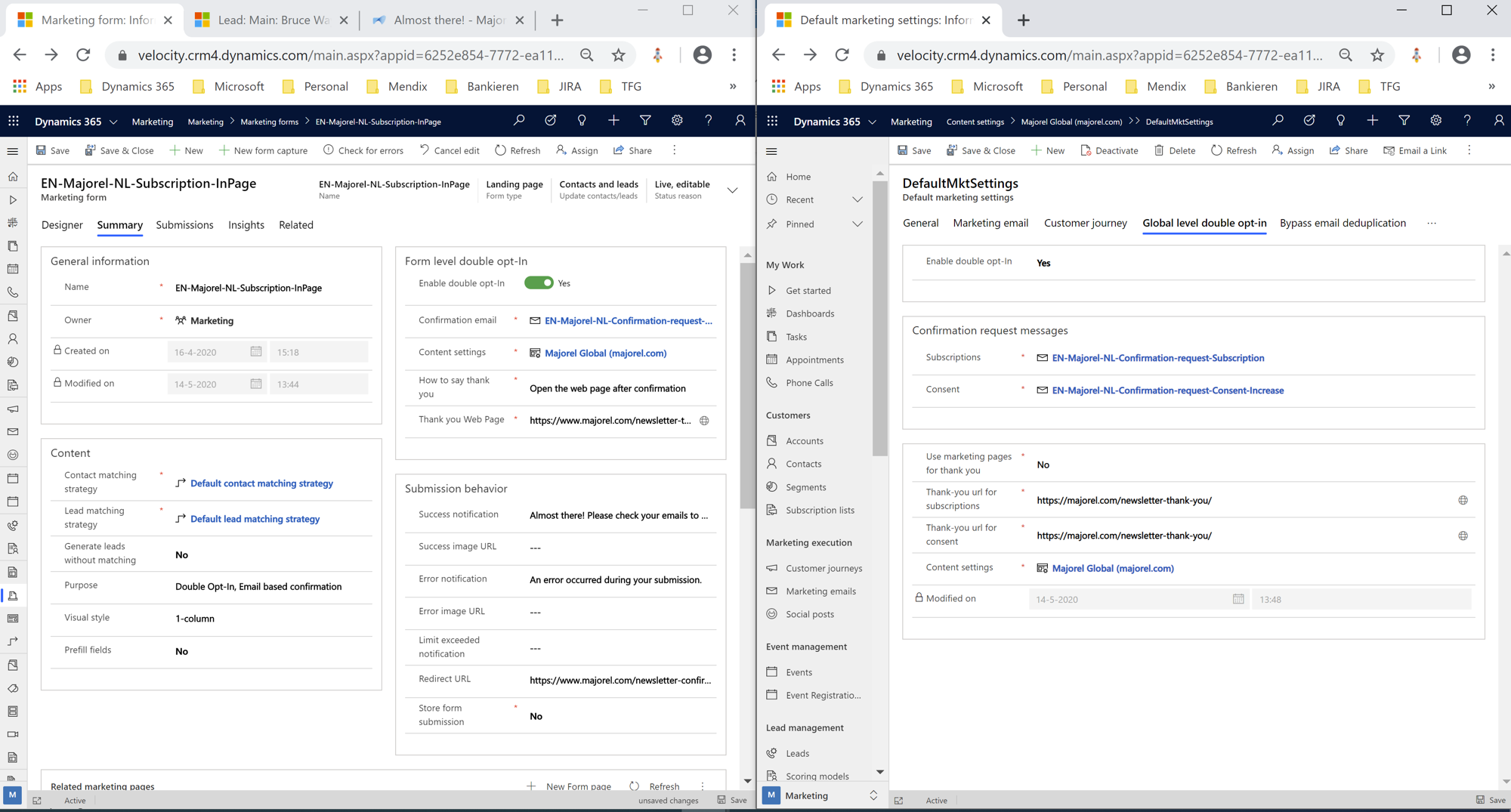
form-level-vs-global-level-double-opt_2D00_in.png

I have the same question (0)
  • Suggested answer
    AJ-22040756-0 Profile Picture
    Microsoft Employee on at

    Hi Partner

    You can setup and verify the Form level double opti-n referring the article https://docs.microsoft.com/en-us/dynamics365/marketing/form-double-opt-in

  • Suggested answer
    gprof Profile Picture
    on at

    Hi all,

    Just letting you know that the issue was resolved by updating Dynamics Marketing app to version: 1.35.10061.1037.

    This version has new functionality with regard to form-level double opt-in:

    • New Handlebars expressions are available for form double opt-in (https://docs.microsoft.com/en-us/dynamics365/marketing/form-double-opt-in)

      • {{SubscriptionListNames}}: This is a mandatory field. SubscriptionListNames resolves to show a bullet list of subscription list names that the customer checked during form submission.
      • {{ConfirmationUrl}}: This is a mandatory field. ConfirmationUrl generates the link that the user clicks to confirm double opt-in. It is important to note that no contact or lead information about the customer is created until the confirmation button in the email is clicked, confirming that the customer has opted to join at least one subscription list.
      • {{FormDoiSubmission}}: This is an assist edit dynamic entity used for form double opt-in.
    • New confirmation email template called: form-doubleoptin (see image)

    form_2D00_doubleoptin.png

    Best regards,

    Geron

Under review

Thank you for your reply! To ensure a great experience for everyone, your content is awaiting approval by our Community Managers. Please check back later.

Helpful resources

Quick Links

Introducing the 2026 Season 1 community Super Users

Congratulations to our 2026 Super Stars!

Meet the Microsoft Dynamics 365 Contact Center Champions

We are thrilled to have these Champions in our Community!

Congratulations to the April Top 10 Community Leaders

These are the community rock stars!

Leaderboard > Customer experience | Sales, Customer Insights, CRM

#1
Muhammad Shahzad Shafique Profile Picture

Muhammad Shahzad Sh... 71 Most Valuable Professional

#2
Abhilash Warrier Profile Picture

Abhilash Warrier 66 Super User 2026 Season 1

#3
ManoVerse Profile Picture

ManoVerse 51 Super User 2026 Season 1

Last 30 days Overall leaderboard

Product updates

Dynamics 365 release plans
