web
You’re offline. This is a read only version of the page.
close
Skip to main content

Notifications

Announcements

No record found.

Community site session details

Community site session details

Session Id :
Finance | Project Operations, Human Resources, ...
Suggested Answer

Excel add-in login error: AADSTS50058: A silent sign-in request was sent but no user is signed in.

(0) ShareShare
ReportReport
Posted on by 105

I am having an error when trying to sign in to use Excel add-in:

AADSTS50058: A silent sign-in request was sent but no user is signed in.
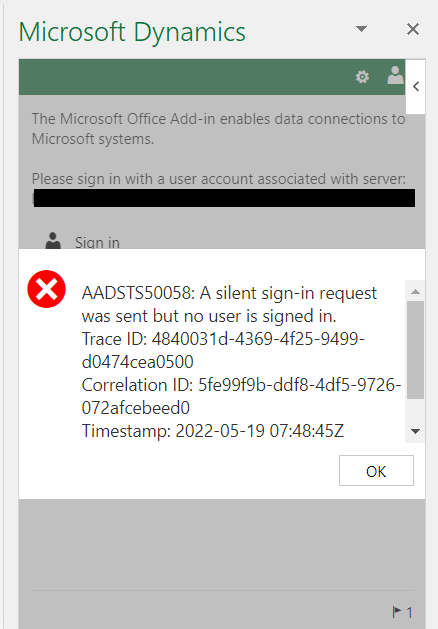
pastedimage1652946629364v1.png

I have tried:

Logging out and in again
Trying to open Excel after using a different browser
Clearing browser cache 
Using incognito mode
Closing the add-in and adding it again
etc.

The issue is present in all the client environments.
Our demo environment (separate client) works without issues.

Other users are not encountering similar issues.

I do not have any issues when accessing D365, only when opening Excel add-in. 
The issue was encountered after an environment was refreshed.

Has anyone encountered similar issues?

I have the same question (0)
  • Suggested answer
    Alireza Eshaghzadeh Profile Picture
    14,672 Super User 2025 Season 2 on at

    Hi,

    Do you use one unique user to log in to D365FO?

    Have you tried to sign out and sign in with user credential that have access to the solution?

    pastedimage1652950532595v1.png

  • Mika Hartio Profile Picture
    105 on at

    Hi,

    Each user has a separate unique account used to log in.

    I have tried signing out and logging in again as shown on your screenshot.

    The problem unfortunately persists.

    I was able to log in using another user's account, but the issue with my account persists.

  • Suggested answer
    Alireza Eshaghzadeh Profile Picture
    14,672 Super User 2025 Season 2 on at

    Hi Mika,

    Ref to Micorosft docs, the error message is related to browser Extension Cookie Blockers and Third Party Cookies Disabled. You can also check the client if they have the same issue or if they have added a blocking for Excel add-inn.

    Please check the provided solution from Microsoft docs:

    docs.microsoft.com/.../interactionrequiredautherror-aadsts50058-a-silent.html

    ''

    Possible Resolution #3 Browser Extension Cookie Blockers and Third Party Cookies Disabled

    Some users may experience this issue due to a browser extension that is blocking cookies for tracking purposes. This will cause this AADSTS50058 error to occur, you will need to whitelist the login.microsoftonline.com endpoint in your browser extension in order to avoid receiving this error again.

    This error can also occur if the third party cookies have been disabled in your browser. Re-enable third party cookies in your browser to prevent this error from occurring.

    ''

Under review

Thank you for your reply! To ensure a great experience for everyone, your content is awaiting approval by our Community Managers. Please check back later.

Helpful resources

Quick Links

Responsible AI policies

As AI tools become more common, we’re introducing a Responsible AI Use…

Neeraj Kumar – Community Spotlight

We are honored to recognize Neeraj Kumar as our Community Spotlight honoree for…

Leaderboard > Finance | Project Operations, Human Resources, AX, GP, SL

#1
Martin Dráb Profile Picture

Martin Dráb 660 Most Valuable Professional

#2
André Arnaud de Calavon Profile Picture

André Arnaud de Cal... 549 Super User 2025 Season 2

#3
Sohaib Cheema Profile Picture

Sohaib Cheema 307 User Group Leader

Last 30 days Overall leaderboard

Product updates

Dynamics 365 release plans
