web
You’re offline. This is a read only version of the page.
close
Skip to main content

Announcements

No record found.

News and Announcements icon
Community site session details

Community site session details

Session Id :
Finance | Project Operations, Human Resources, ...
Suggested Answer

Dynamic 365 Data Export to BYOD

(0) ShareShare
ReportReport
Posted on by 19

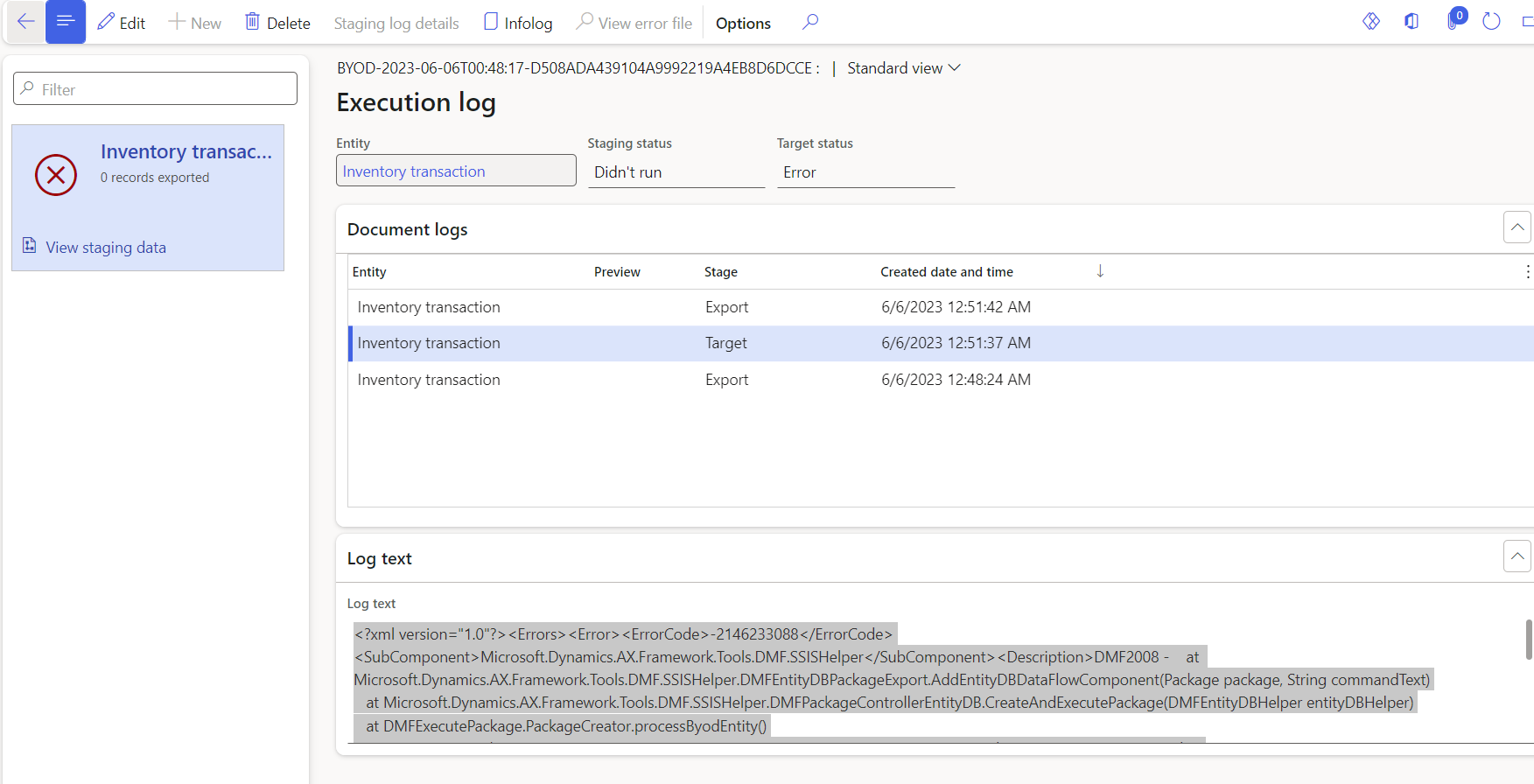
I want to export data entities to a sql database. I have configured the BYOD and published the data entities. Also the schemas have been created in Sql database. But when I try to export getting this error. 
How to resolve this?

<?xml version="1.0"?><Errors><Error><ErrorCode>-2146233088</ErrorCode><SubComponent>Microsoft.Dynamics.AX.Framework.Tools.DMF.SSISHelper</SubComponent><Description>DMF2008 - at Microsoft.Dynamics.AX.Framework.Tools.DMF.SSISHelper.DMFEntityDBPackageExport.AddEntityDBDataFlowComponent(Package package, String commandText)
at Microsoft.Dynamics.AX.Framework.Tools.DMF.SSISHelper.DMFPackageControllerEntityDB.CreateAndExecutePackage(DMFEntityDBHelper entityDBHelper)
at DMFExecutePackage.PackageCreator.processByodEntity()
at DMFExecutePackage.Program.Main(String[] args)</Description></Error><Error><ErrorCode>-1071611876</ErrorCode><SubComponent>Microsoft.SqlServer.DTSPipelineWrap</SubComponent><Description>Exception from HRESULT: 0xC020801C - at Microsoft.SqlServer.Dts.Pipeline.Wrapper.CManagedComponentWrapperClass.AcquireConnections(Object pTransaction)
at Microsoft.Dynamics.AX.Framework.Tools.DMF.SSISHelper.DMFEntityDBPackageExport.AddEntityDBDataFlowDestinationComponent(Package package, MainPipe dataFlowTask, IDTSComponentMetaData100 rowCountComponent)
at Microsoft.Dynamics.AX.Framework.Tools.DMF.SSISHelper.DMFEntityDBPackageExport.AddEntityDBDataFlowComponent(Package package, String commandText)</Description></Error></Errors>
error labelId:
I have the same question (0)
  • Suggested answer
    Alireza Eshaghzadeh Profile Picture
    14,842 Super User 2026 Season 1 on at

    Hi Nissanka,

    Do you export data in full push or incremental mode? Please check if there is/are disabled fields on for the entity and try to delete disabled field , after approval of reporting team, then publish the entity against your Azure SQL DB and create a new export job and run a full push export.

  • Nissanka Profile Picture
    19 on at

    I tried both incremental and full push after enabling change tracking. Can you please tell me how to check if there are disabled fields?

  • Suggested answer
    Alireza Eshaghzadeh Profile Picture
    14,842 Super User 2026 Season 1 on at

    Hi Nissanka,

    When you choose the entity and click on "Modify target mapping", you will get warning over disabled fields.

Under review

Thank you for your reply! To ensure a great experience for everyone, your content is awaiting approval by our Community Managers. Please check back later.

Helpful resources

Quick Links

Introducing the 2026 Season 1 community Super Users

Congratulations to our 2026 Super Stars!

Meet the Microsoft Dynamics 365 Contact Center Champions

We are thrilled to have these Champions in our Community!

Congratulations to the March Top 10 Community Leaders

These are the community rock stars!

Leaderboard > Finance | Project Operations, Human Resources, AX, GP, SL

#1
Giorgio Bonacorsi Profile Picture

Giorgio Bonacorsi 689

#2
André Arnaud de Calavon Profile Picture

André Arnaud de Cal... 478 Super User 2026 Season 1

#3
Syed Haris Shah Profile Picture

Syed Haris Shah 258 Super User 2026 Season 1

Last 30 days Overall leaderboard

Product updates

Dynamics 365 release plans
