web
You’re offline. This is a read only version of the page.
close
Skip to main content

Announcements

No record found.

News and Announcements icon
Community site session details

Community site session details

Session Id :
Finance | Project Operations, Human Resources, ...
Suggested Answer

Show Google map in D365F&O form with X++

(0) ShareShare
ReportReport
Posted on by 15

Hi all,

I´d like to know if it´s possible to show a google map htm or html file in a form in Dynamics 365 F&O using X++.

In AX2009 I did this:

1- Create a htm file in local temp folder  -->  C:\Users\xxxxxxx\AppData\Local\Temp\6\2011202053664LB_MAP.htm

2- Create a browser object 

3- I create the html file and then load it in the browser object:          

    textBuffer      = new TextBuffer();    

    textBuffer.appendText(element.getMapGoogle();           //load the htm url text

    element.openFileNameMap();

    file.write(textBuffer.getText());

    browser.Navigate(strfmt("file://%1",FilenameSave));

    MethodMap2.png

3.1 This is the code of  openFileNameMap

void openFileNameMap()

{

    // Open file for text-output

    file = new TextIo(FilenameSave, 'w', this.codepage());

    if (!file || file.status() != IO_Status::Ok)

    {

        throw error(strfmt("@SYS73665", FilenameSave));

    } 

    file.outRecordDelimiter('\r\n');

    file.outFieldDelimiter('');

}
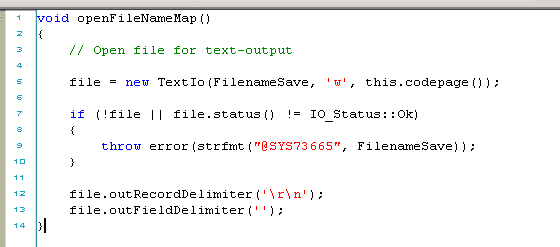
openFileNameMap.png

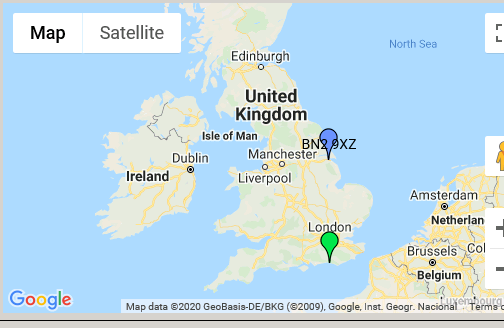
This is the result in the form:

7711.Map.png

Thank you so much in advance. 

Regards, Aitor.

I have the same question (0)
  • Gunjan Bhattachayya Profile Picture
    35,423 on at

    Hi Aitor Martin,

    On which form are you looking to show the map?

  • AitorMartin Profile Picture
    15 on at

    Hi,

    thank you for your reply.

    I am creating a new form.

  • Suggested answer
    Martin Dráb Profile Picture
    239,082 Most Valuable Professional on at

    Rather then downloading a map to a file and showing the file, render the map directly in F&O. You can even wrap it in an extensible control and work with it just as with any other form control.

    By coincidence, it's exactly what I demonstrated in a pair of blog posts:

  • AitorMartin Profile Picture
    15 on at

    Hi Martin,

    Thank you so much for your help. I´ll try that.

    Have a good weekend.

  • Blue Wang Profile Picture
    Microsoft Employee on at

    Hi Aitor,

    What is your demand background?

    In D365FO, we can open Bing Maps. Does that meet your needs?

    453505.png

  • Suggested answer
    Ludwig Reinhard Profile Picture
    Microsoft Employee on at

    Hi Aitor,

    I am wondering why you want to code anything here?

    Can't you simply leverage the PowerPlatform (PowerApps) and embed this PowerApp into F&O?

    PowerApps has all those map functionalities available out of the box. You just need to configure it and design the PowerApp.

    I believe that this can be easier and faster.

    Best regards,

    Ludwig

Under review

Thank you for your reply! To ensure a great experience for everyone, your content is awaiting approval by our Community Managers. Please check back later.

Helpful resources

Quick Links

Introducing the 2026 Season 1 community Super Users

Congratulations to our 2026 Super Stars!

Meet the Microsoft Dynamics 365 Contact Center Champions

We are thrilled to have these Champions in our Community!

Congratulations to the March Top 10 Community Leaders

These are the community rock stars!

Leaderboard > Finance | Project Operations, Human Resources, AX, GP, SL

#1
Giorgio Bonacorsi Profile Picture

Giorgio Bonacorsi 653

#2
André Arnaud de Calavon Profile Picture

André Arnaud de Cal... 493 Super User 2026 Season 1

#3
Syed Haris Shah Profile Picture

Syed Haris Shah 317 Super User 2026 Season 1

Last 30 days Overall leaderboard

Product updates

Dynamics 365 release plans