Hi Experts,
I was integrating a Fedex test Web service with Business Central Wave 2 (15.2) Version SaaS.
GITHUB Link for the project -- github.com/.../FedexSrvAvail
I have created xml request and also tested that generated xml request from BC365 in SOAPUI & Postman and I got the response.
XML Request -->
<?xml version="1.0" encoding="ISO-8859-1"?>
<soapenv:Envelope xmlns:v13="">http://fedex.com/ws/vacs/v13" xmlns:soapenv="">schemas.xmlsoap.org/.../">
<soapenv:Header/>
<soapenv:Body>
<v13:ServiceAvailabilityRequest>
<v13:WebAuthenticationDetail>
<v13:UserCredential>
<v13:Key>biup8qh4BjICtpRi</v13:Key>
<v13:Password>L0BK7eUzMb75xlLInWRdaH4nI</v13:Password>
</v13:UserCredential>
</v13:WebAuthenticationDetail>
<v13:ClientDetail>
<v13:AccountNumber>510087720</v13:AccountNumber>
<v13:MeterNumber>114035650</v13:MeterNumber>
<v13:Localization>
<v13:LanguageCode>EN</v13:LanguageCode>
<v13:LocaleCode>US</v13:LocaleCode>
</v13:Localization>
</v13:ClientDetail>
<v13:TransactionDetail>
<v13:CustomerTransactionId>ServiceAvailabilityRequest</v13:CustomerTransactionId>
<v13:Localization>
<v13:LanguageCode>EN</v13:LanguageCode>
<v13:LocaleCode>US</v13:LocaleCode>
</v13:Localization>
</v13:TransactionDetail>
<v13:Version>
<v13:ServiceId>vacs</v13:ServiceId>
<v13:Major>13</v13:Major>
<v13:Intermediate>0</v13:Intermediate>
<v13:Minor>0</v13:Minor>
</v13:Version>
<v13:Origin>
<v13:PostalCode>38017</v13:PostalCode>
<v13:CountryCode>US</v13:CountryCode>
</v13:Origin>
<v13:Destination>
<v13:PostalCode>05040</v13:PostalCode>
<v13:CountryCode>BR</v13:CountryCode>
</v13:Destination>
<v13:ShipDate>2019-01-02</v13:ShipDate>
<v13:CarrierCode>FDXE</v13:CarrierCode>
</v13:ServiceAvailabilityRequest>
</soapenv:Body>
</soapenv:Envelope>
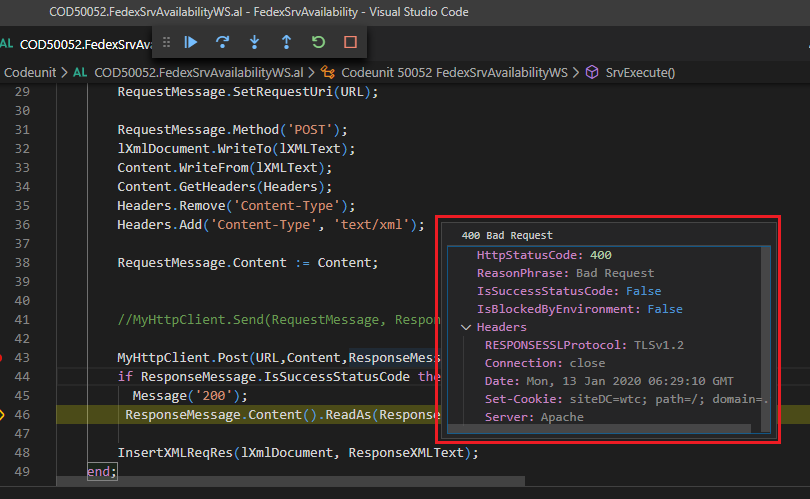
But in Business Central I am getting 400 Bad Request RESPONSSLProtocol : TLSv1.2 as Response.
In Nav, we can set Security Protocol as below.
ServicePointManager=System.Net.ServicePointManager
SecurityProtocolType=System.Net.SecurityProtocolType
ServicePointManager.SecurityProtocol := SecurityProtocolType.Tls12







