web
You’re offline. This is a read only version of the page.
close
Skip to main content

Notifications

Announcements

No record found.

Community site session details

Community site session details

Session Id :
Small and medium business | Business Central, N...
Answered

Subscription module: simple subscription - prices filled in automatically

(3) ShareShare
ReportReport
Posted on by 45
I'm trying to find my way in the subscription module but can't seem to make it work the way I want to. I have created a simple item, which can be used for a subscription.
I have found that, since it's only a subscription and not linked to the sale of an item, I need to set my item to non-inventory. I have added a price:
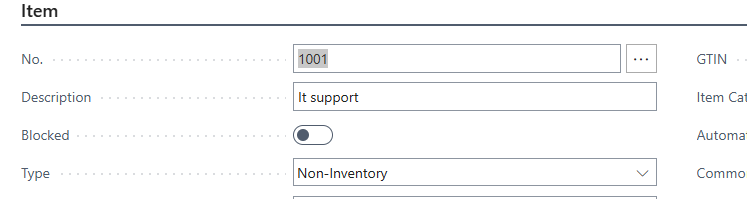

However, when I add it to a subscription contract for a customer, the price is not filled in automatically. Is there a way to do this?


I have also tried to look at the subscription pacakges but can't seem to make it work that way either or I'm messed up with my item types. If someone could explain this to me if it's possible?

 
I have the same question (0)
  • Suggested answer
    Montassar Krichi Profile Picture
    231 on at
    Hi,
    you can fix this by using a Recurring Sales Line Template
    1. Go to "Recurring Sales Lines" in BC.
    2. Create a template that includes your non-inventory item with the appropriate price.
    3. Link that template to the customer card or call it during subscription setup.
    4. This will allow Business Central to auto-fill price when the item is used.


    Please if this helps mark it as verified :)
     
  • CU28111444-0 Profile Picture
    45 on at
    @Montassar Krichi thanks for your reply, but I don't see how this would work in a subscription module since only items marked for subscription can be used in that module and only items not marked for subscripion can be used in recurring sales lines.

    I can use the recurring sales lines but then I would need to create my invoices manually each month. I wanted to automate it using the subscription module, but this seems too rigid to me
  • Suggested answer
    Montassar Krichi Profile Picture
    231 on at
     You're absolutely right and thank you for pointing out that key limitation:

    you can still automate price filling using  "Price Calculation Formula"
    Instead of entering the price manually each time, create a default Subscription Template for your service:
    1. Go to Subscription Templates.
    2. Add a line with:
      • Type = Item
      • Your Subscription-flagged Non-Inventory Item (e.g., IT Support)
      • Quantity = 1
      • Calculation Base Amount = 1200
      • Base % = 100
    3. Link this template when creating new subscription contracts.
    That way, each time a subscription is created, the line fills in with your fixed amount.
     
  • CU28111444-0 Profile Picture
    45 on at
    @Montassar Krichi that's where my problem kicks in, I can't make that work because of the following:

    In the subscription templates/packages, you can only work with items which have been set-up as subscription option - invoicing item:

     
    Other items are not selectable

    On the other hand, subscription contracts don't show this type of item. They show the other two types, but not the type used i n the subscription templates. Therefore, I can't make the link between both to do it in a simple way.
  • Verified answer
    AXEON Man Profile Picture
    1,063 on at
    Welcome to the STEEP learning curve.
     
    First, the item must be a non-stock so you can select "Subscription Item" in that option field:
    "Invoicing Item" is something I don't quite understand yet but you likely don't need it.  This is how Singhammer (the team that made the module) describes it:
     
    Subscription Packages make you think you need it, just leave that "Invoicing Item No." blank, it's not needed.

    The term "Subscription Package" is really a misnomer.  It is a collection of attributes for the Subscription Items that are activated when you select an "Assigned Item" for a Subscription or in a Sales Order.

    What's important to get your pricing is what you choose for "Calculation Base Type" in the Subscription Package.
     
    I use "Item Price".

    So, when you pull the Subscription Line into the Subscription, it will bring the Item Price with it.

    I've spent over 100 hours testing and trying to understand this module.  It's really powerful but with its capacity comes complexity.

    Good luck!
  • Verified answer
    Ramesh Kumar Profile Picture
    7,527 Super User 2025 Season 2 on at
    You're definitely not alone in wrestling with the Subscription module in Dynamics 365 Business Central — Its fairly new and we all are learning everyday. May be below will help you
     
     
    Thanks
    Ramesh
     
    If this was helpful, please check the "Does this answer your question?" box and mark it as verified.
     
     
  • Suggested answer
    Sohail Ahmed Profile Picture
    11,136 Super User 2025 Season 2 on at
  • Gerardo Rentería García Profile Picture
    25,157 Most Valuable Professional on at

Under review

Thank you for your reply! To ensure a great experience for everyone, your content is awaiting approval by our Community Managers. Please check back later.

Helpful resources

Quick Links

Responsible AI policies

As AI tools become more common, we’re introducing a Responsible AI Use…

Neeraj Kumar – Community Spotlight

We are honored to recognize Neeraj Kumar as our Community Spotlight honoree for…

Leaderboard > Small and medium business | Business Central, NAV, RMS

#1
OussamaSabbouh Profile Picture

OussamaSabbouh 3,143

#2
Jainam M. Kothari Profile Picture

Jainam M. Kothari 1,694 Super User 2025 Season 2

#3
YUN ZHU Profile Picture

YUN ZHU 1,067 Super User 2025 Season 2

Last 30 days Overall leaderboard

Featured topics

Product updates

Dynamics 365 release plans
