web
You’re offline. This is a read only version of the page.
close
Skip to main content

Announcements

No record found.

News and Announcements icon
Community site session details

Community site session details

Session Id :
Microsoft Dynamics AX (Archived)

Filter inventory value report

(0) ShareShare
ReportReport
Posted on by 465

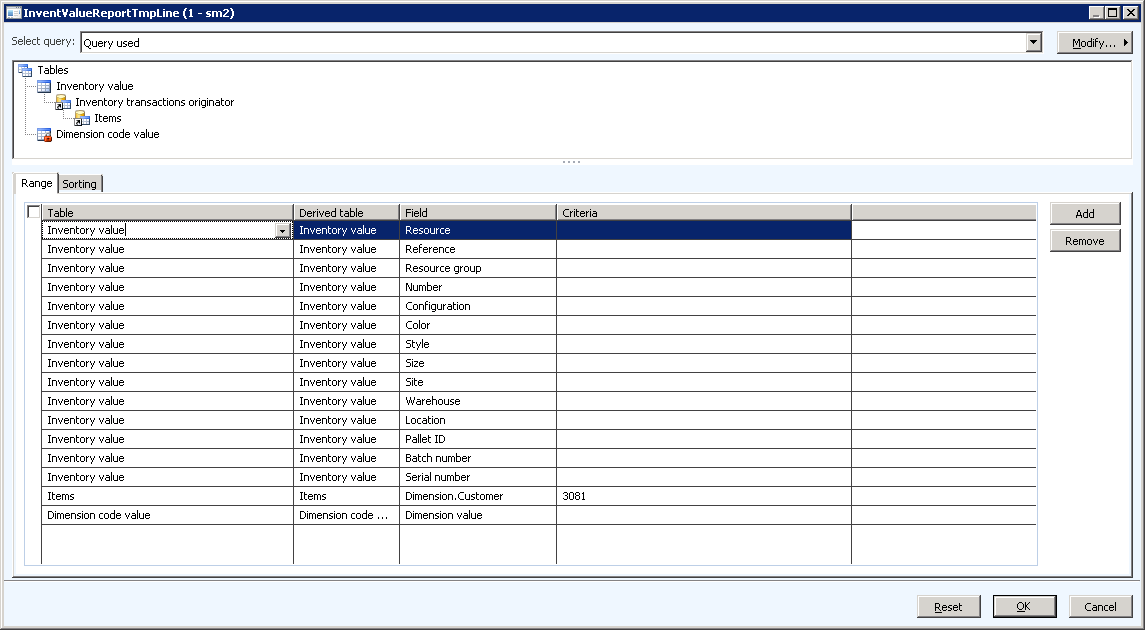
I try to filter the inventory value report on a field from the item. Isn't that possible?

The filter I try to use looks like this, but it displays items with other customer dimension than '3081'.
Inventory-value-report-filter.png

We use AX 2012 R3 CU9.

*This post is locked for comments

I have the same question (0)
  • Ludwig Reinhard Profile Picture
    Microsoft Employee on at

    Hi Henrik,

    The financial dimension 'customer 3081' is the the default financial dimension that you have setup for some of your items or is this the one that has been used for posting?

    Ludwig

  • Guy Terry Profile Picture
    28,977 Moderator on at

    I guess it might depend on the setup of your report, but I see people put the item number in the 'Resource' field.

    <Edit>

    Which is not at all what you asked! Sorry - ignore me.

  • HenkeNord Profile Picture
    465 on at

    I guess it's both. We have set the customer dimension on each item and as far as I know it's also applied on each transaction. But it really doesn't matter if the comes from the transaction or is joined from released items. Filtering on customer was just an example. I might want to filter on item group, ord physical dimension or other fields from the items.

  • Suggested answer
    Ludwig Reinhard Profile Picture
    Microsoft Employee on at

    Hello Henrik,

    I had a look at the report and do not think that this filtering works out of the box.

    Yet, the report allows you specifying financial ledger accounts and a dimension value set that might consist of your ledger account, item dimension and so on. Probably try if this report setup gives you the information that you are looking for.

    What is it that you actually want to achieve / filter / analyze?

    Ludwig

  • HenkeNord Profile Picture
    465 on at

    Since we produce customer unique items, we would like to get an inventory value for each customer.

  • Suggested answer
    Ludwig Reinhard Profile Picture
    Microsoft Employee on at

    Hello Henrik,

    Your customer is setup with a customer financial dimension, right?

    Are all your items also setup as financial dimension?

    If so, you can directly retrieve the information from the Trial Balance form in GL by filtering on the ledger account - customer & item financial dimension values.

    Would that be a possible 'workaround' for you?

    Ludwig

  • HenkeNord Profile Picture
    465 on at

    But you cannot get a list of each item and the inventory per item, could you?

    In AX2009 you could filter on any field in any related table.

  • Suggested answer
    Ludwig Reinhard Profile Picture
    Microsoft Employee on at

    Hello Henrik,

    You can get this information from the Trial Balance if - and only if - each customer and each item is setup with it's own financial dimension value.

    Here is an example - that does not include the financial dimension 'customer' but gives you an Impression how this works in xtandard AX.

    dynamicsaxfico.files.wordpress.com/.../en_32_0015.png

    A probably much better option is the inventory value cube that can calculate/analyze much more. If you already make use of the AX 2012 cubes, this might be a very interesting alternative for you. Please see: technet.microsoft.com/.../jj710385.aspx

    Hope this helps,

    Ludwig

  • HenkeNord Profile Picture
    465 on at

    No today only customer is a financial dimension, not item. Maybe we could change that, but isn't it strange that they (Microsoft) change the inventory value report that much. The fact that everything is based on resources and resource groups, which makes it impossible to select item group (you have to type it) for example.

    I'll look into the cubes...

  • Suggested answer
    Ludwig Reinhard Profile Picture
    Microsoft Employee on at

    Hello Henrik,

    The resource group/ressource extension has been made as also indirect and resource related components can be included in the new inventory value report. Therefore, they gave it a different name. If you are only using items, the resource group is basically your item group and the ressource your item.

    I believe that the inventory value cube should give you all the info needed.

    Irrespective of that, just think whether you want to use an item financial dimension in the future. If you do not have a lot of items (>100k) then it might be helpful, not only for analysis but also for reconciliation purposes.

    Best regards,

    Ludwig

Under review

Thank you for your reply! To ensure a great experience for everyone, your content is awaiting approval by our Community Managers. Please check back later.

Helpful resources

Quick Links

Introducing the 2026 Season 1 community Super Users

Congratulations to our 2026 Super Stars!

Meet the Microsoft Dynamics 365 Contact Center Champions

We are thrilled to have these Champions in our Community!

Congratulations to the April Top 10 Community Leaders

These are the community rock stars!

Leaderboard > 🔒一 Microsoft Dynamics AX (Archived)

#1
CP04-islander Profile Picture

CP04-islander 39

#2
Michel ROY Profile Picture

Michel ROY 14

#3
imran ul haq Profile Picture

imran ul haq 8

Last 30 days Overall leaderboard

Featured topics

Product updates

Dynamics 365 release plans
