web
You’re offline. This is a read only version of the page.
close
Skip to main content

Notifications

Announcements

No record found.

Community site session details

Community site session details

Session Id :
Microsoft Dynamics CRM (Archived)

How do I lose the HTML formatting in a SSRS report?

(0) ShareShare
ReportReport
Posted on by

I am using the report wizard in CRM 2013 to build a report that shows emails attached to cases along with their bodies (the description field).  The issue is the report displays all the HTML code behind the formatting of the emails which makes them very difficuly to read.  Is there a way to just show the emails with their native formatting or export them as plain text.  See below.
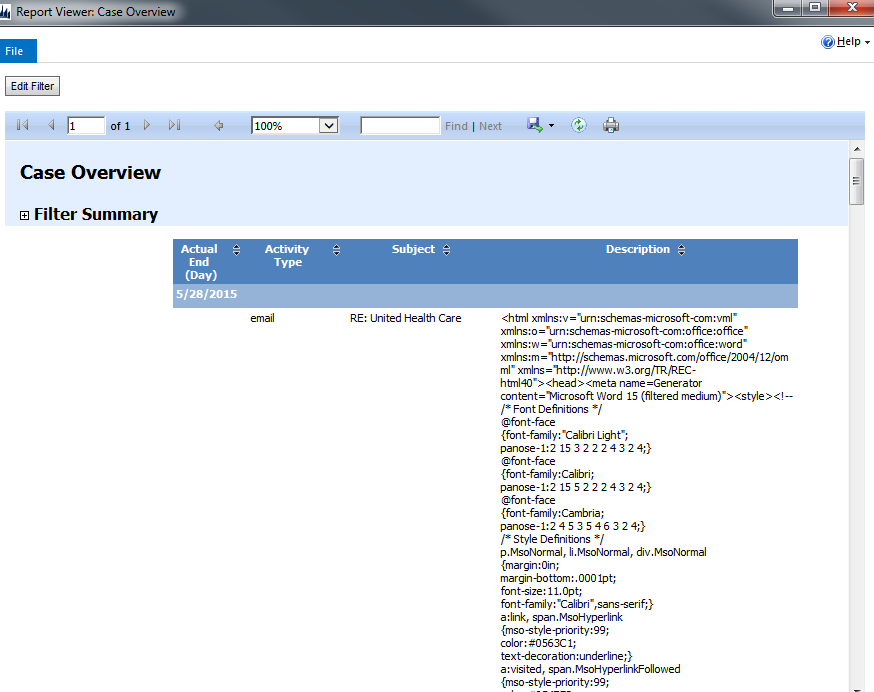
2015_2D00_05_2D00_28_5F00_13_2D00_10_2D00_56.png

*This post is locked for comments

I have the same question (0)
  • Verified answer
    Mahadeo Matre Profile Picture
    17,021 on at

    Hi..

    To show Text / description without HTML formatting, you need to download report rdl file, and then open report into Visual studio. 

    Then you will see description column, remove description text box,

    desc.PNG

      once you delete, it will look like 

    deltefield1.PNG

    right click and Create Placeholder

    createplh.PNG

    Set Value = Description and Markup Type = HTML - Interpret HTML tags as styles. 

    desc.PNG

    Save report and Import report to CRM. 

    Now you can able to see text instead of HTML markup. 

    for more details please check

    https://msdn.microsoft.com/en-us/dd207057.aspx

    http://sqlblog.com/blogs/greg_low/archive/2008/08/25/displaying-html-content-in-reporting-services-2008.aspx

    Hope this will help.. 

  • Ben Markland Profile Picture
    on at

    Thank you.  Worked perfectly.

Under review

Thank you for your reply! To ensure a great experience for everyone, your content is awaiting approval by our Community Managers. Please check back later.

Helpful resources

Quick Links

Responsible AI policies

As AI tools become more common, we’re introducing a Responsible AI Use…

Neeraj Kumar – Community Spotlight

We are honored to recognize Neeraj Kumar as our Community Spotlight honoree for…

Leaderboard > 🔒一 Microsoft Dynamics CRM (Archived)

#1
SA-08121319-0 Profile Picture

SA-08121319-0 4

#1
Calum MacFarlane Profile Picture

Calum MacFarlane 4

#3
Alex Fun Wei Jie Profile Picture

Alex Fun Wei Jie 2

Last 30 days Overall leaderboard

Featured topics

Product updates

Dynamics 365 release plans



