web
You’re offline. This is a read only version of the page.
close
Skip to main content

Announcements

No record found.

News and Announcements icon
Community site session details

Community site session details

Session Id :
Small and medium business | Business Central, N...
Answered

Unable to Generate EFT File

(6) ShareShare
ReportReport
Posted on by 663
HI team,
 
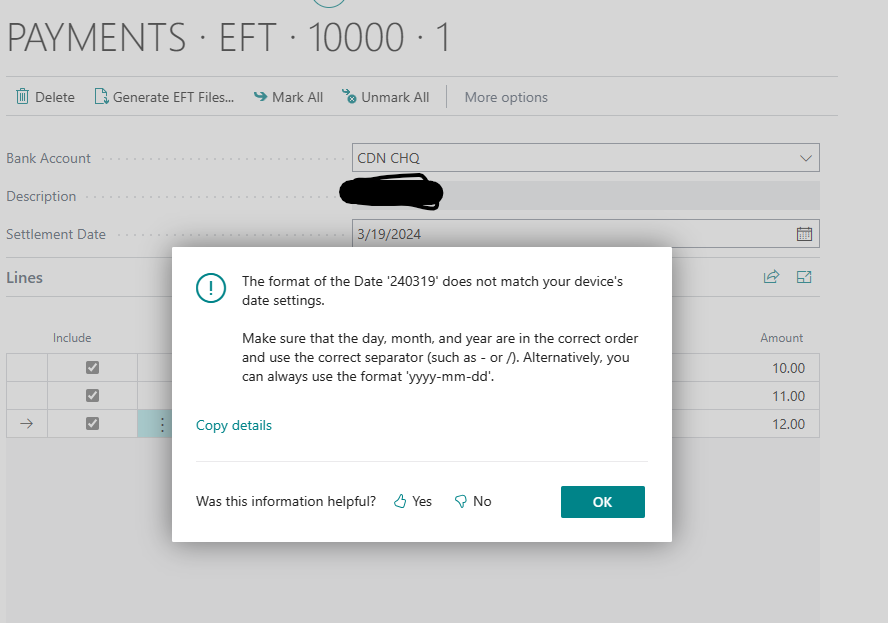
I am having issues with generating EFT file. I am getting the below error message.
/The format of the Date '240319' does not match your device's date settings. Make sure that the day, month, and year are in the correct order and use the correct separator (such as - or /). Alternatively, you can always use the format 'yyyy-mm-dd'./
 
Can anyone please help. 
I have the same question (0)
  • Gerardo Rentería García Profile Picture
    25,551 Most Valuable Professional on at
  • Suggested answer
    Jun Wang Profile Picture
    8,208 Moderator on at
    the error message says you could try 2 things
     
    1 check the date format in your computer so it matches the date format required by the data exchange definition
    2 leave the computer date as is, format the data exchange definition date field to yyyy-mm-dd
     
     
    either way, you should be able to fix the issue
     
    hope it helps,
     
    follow me on linkedin for more sharing
    Jun Wang
  • Verified answer
    YUN ZHU Profile Picture
    98,821 Super User 2026 Season 1 on at
    Hi, from your screenshot, your date format is 3·/19/2024, so I suggest you try changing it to "031924".
     
     
    In addition, if you are using the cloud version, the date format is determined by the Region in My Settings.
     
    Hope this helps.
    Thanks.
    ZHU
  • Suggested answer
    Hatimali84 Profile Picture
    663 on at
    Hi All,
    Thank you for your responses. 
     
    I was able to bypass this issue by changing the Region and date setting on the Data Exchange definition. 
     
    Regards,
  • Abzion Profile Picture
    Microsoft Employee on at

    I have now resolved the customer issue related to the specific error message encountered.

    Two proposed workarounds were tested, but neither was accepted by the customer.

    First workaround: We changed the region to a different one, which worked; however, the customer insisted that the solution must be specific to the US region.

    Second workaround: We updated the Settlement/Effective/Work Date format to yyyyMMDD and yyyy-MM-dd. Although this successfully generated the EFT file, opening the ACH file in Notepad showed yyyyMMDD instead of the actual date value.

    I tested all possible combinations and also applied Transformation Rules, but the same error persisted.


    Resolution steps:

    The fix depends on how the configuration mapping is set up.

    • Open DED
    • Navigate to Line Column
    • Check Header B
    • Select the Mapping field
    • Make sure they are mapped correctly 

    In Summary: the error message depends on your configuration in your Mapping Field and Data Format, length 


Under review

Thank you for your reply! To ensure a great experience for everyone, your content is awaiting approval by our Community Managers. Please check back later.

Helpful resources

Quick Links

Introducing the 2026 Season 1 community Super Users

Congratulations to our 2026 Super Stars!

Congratulations to our 2025 Community Spotlights

Thanks to all of our 2025 Community Spotlight stars!

Leaderboard > Small and medium business | Business Central, NAV, RMS

#1
OussamaSabbouh Profile Picture

OussamaSabbouh 1,675 Super User 2026 Season 1

#2
YUN ZHU Profile Picture

YUN ZHU 966 Super User 2026 Season 1

#3
Kamal Khakhkhar Profile Picture

Kamal Khakhkhar 610

Last 30 days Overall leaderboard

Featured topics

Product updates

Dynamics 365 release plans
