web
You’re offline. This is a read only version of the page.
close
Skip to main content

Notifications

Announcements

No record found.

Community site session details

Community site session details

Session Id :
Microsoft Dynamics GP (Archived)

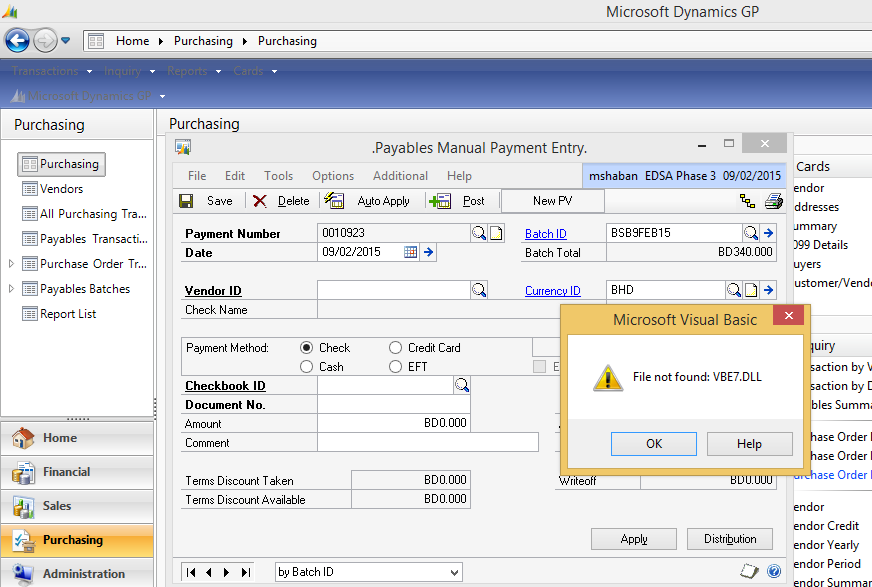
VBE7.DLL Error in Dynamics GP Modified form

(0) ShareShare
ReportReport
Posted on by 2,626

Hello All,

I have customized once GP Window and wrote some VBA code. Now i have installed Window 8.1 on my machine. after that i am not able to run my customization properly. getting below error. Thanks in advance.
*This post is locked for comments

I have the same question (0)
  • Suggested answer
    soma Profile Picture
    24,410 on at

    Its seems like VBA7.dll registration issue or reference mapping issue on your VBA project.

    1. Go to VBA project editor.

    2. Go to Tools-->Reference and check whether the "Visual Basic for Application" is marked or not.

    If this not marked, then click browse button to map the VBA7.dll from the path "C:\Program Files (x86)\Common Files\Microsoft Shared\VBA\VBA7"

    3. After added this dll file save your project and close VBA editor and GP.

    4. Now re-open GP and try again.

    Hope this helps!!!

  • Community Member Profile Picture
    on at

    Hi Vikas,

    If suppose, adding the VBA reference to the project didn't work then you may have to try the below link. It may solve your problem. I hope it helps.

    blogs.msdn.com/.../file-vba6-dll-not-found.aspx

    Thanks,

    Shan

  • Vikas Gupta Profile Picture
    2,626 on at

    Reference is already marked. i have restarted GP many times.

  • Vikas Gupta Profile Picture
    2,626 on at

    I was referring this blog and follow the same steps for VBA6.dll. But for VBA7.dll it is not working fine.

  • Suggested answer
    Josh P Profile Picture
    2,895 on at

    Just to ensure we are talking about the same thing here. The workstation where the GP client is installed is the same computer you are using with the VBA editor? The assembly references need to be available on the workstation where GP is installed.

  • Community Member Profile Picture
    on at

    Did you try the options provided on the link?

    Thanks,

    Shan

  • Vikas Gupta Profile Picture
    2,626 on at

    Yes Joshua, I have installed VBA on same client machine where the GP client is installed. and also the VBA7.DLL is available on same machine. i have check the references and dll path as well.

  • Vikas Gupta Profile Picture
    2,626 on at

    Yes, i update the registry with same steps as given.

  • Josh P Profile Picture
    2,895 on at

    Can you build a VBA project, add the same reference, and run it to see if you receive the same error in the VBA editor environment? Maybe the issue is the modified form referencing the script.

  • Community Member Profile Picture
    on at

    If the issue still exists after trying the Joshua suggestions.

    If possible, try to check the vba package in a different environment to make sure the problem is with the particular system.

    Thanks,

    Shan

Under review

Thank you for your reply! To ensure a great experience for everyone, your content is awaiting approval by our Community Managers. Please check back later.

Helpful resources

Quick Links

Responsible AI policies

As AI tools become more common, we’re introducing a Responsible AI Use…

Neeraj Kumar – Community Spotlight

We are honored to recognize Neeraj Kumar as our Community Spotlight honoree for…

Leaderboard > 🔒一 Microsoft Dynamics GP (Archived)

#1
Community Member Profile Picture

Community Member 2

#2
mtabor Profile Picture

mtabor 1

#2
Victoria Yudin Profile Picture

Victoria Yudin 1

Last 30 days Overall leaderboard

Featured topics

Product updates

Dynamics 365 release plans



