web
You’re offline. This is a read only version of the page.
close
Skip to main content

Notifications

Announcements

No record found.

Community site session details

Community site session details

Session Id :
Microsoft Dynamics 365 | Integration, Dataverse...
Answered

How can I capture and log the record number (custom text field) when the workflow is cancelled due to the record meeting cancellation criteria

(0) ShareShare
ReportReport
Posted on by 1,589

I have a synchronous/real time workflow that checks for a particular condition, and if that condition is met the workflow is cancelled. Obviously since it is synchronous, the changes are rolled back which is expected and needed.

The problem is, I need to collect and log either the record id or the record number (custom text field) from the record whose update was cancelled due to meeting the cancellation criteria. Ideally, the record number (custom text field) is of more value so that's really what I need to capture and log. The captured record number (custom text field) can be saved in a custom error entity if thats easier to do as a no-code solution, or it can be written to the Plugin Trace Log as a last/non-preferred option. 

How can I EASILY and WITH NO CODE capture and log the record number (custom text field) when the record gets caught in the "forbidden" part of the workflow due to meeting the specified condition? 

If code is required, and there is absolutely no way to do this without code, what do I need to do, exactly to achieve this objective?

I need to make sure the value of the record number (custom text field) is captured and written as a log entry or written to an error entity,  even though the workflow will cancel and roll back the transaction. 

Here is a screen shot of the portion of the workflow where I need to insert the item described above. 
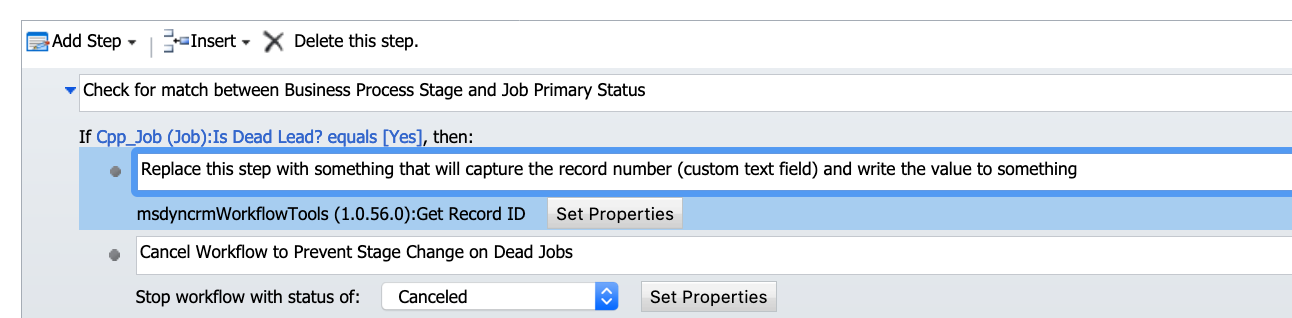
WorkflowInfo.png

I have the same question (0)
  • Verified answer
    a33ik Profile Picture
    84,331 Most Valuable Professional on at

    Hello,

    I haven't tried that myself so it's up to you to check if it works or not - put "logging" to separated async child workflow for the same entity and call it before the "Stop Workflows" step.

  • Suggested answer
    winston he Profile Picture
    220 on at

    Hi

    If you want to write the record number into the error log which is custom entity , you can add a step to  create an custom error log record and set one of the fields as the dynamic value which is from the record number of Cpp_job record. Hope it helps.

  • a33ik Profile Picture
    84,331 Most Valuable Professional on at

    Winston,

    Workflow is Real-Time. It means all of operations are executed in the same transaction and when workflow is cancelled - transaction is rolled back so... no changes are saved.

  • ACECORP Profile Picture
    1,589 on at

    Andrew, I have done this in another instance with another type of custom workflow activity item and it worked.

    Is there any OOB object that will let me pull a field from the record and write it to a log or do I need to create a custom workflow activity via Visual Studio to do that?

    I am trying to avoid making another C# Custom Workflow Activity .dll unless absolutely necessary.  

Under review

Thank you for your reply! To ensure a great experience for everyone, your content is awaiting approval by our Community Managers. Please check back later.

Helpful resources

Quick Links

Responsible AI policies

As AI tools become more common, we’re introducing a Responsible AI Use…

Neeraj Kumar – Community Spotlight

We are honored to recognize Neeraj Kumar as our Community Spotlight honoree for…

Leaderboard > Microsoft Dynamics 365 | Integration, Dataverse, and general topics

#1
Siv Sagar Profile Picture

Siv Sagar 93 Super User 2025 Season 2

#2
#ManoVerse Profile Picture

#ManoVerse 74

#3
Martin Dráb Profile Picture

Martin Dráb 64 Most Valuable Professional

Last 30 days Overall leaderboard

Product updates

Dynamics 365 release plans



