web
You’re offline. This is a read only version of the page.
close
Skip to main content

Notifications

Announcements

No record found.

Community site session details

Community site session details

Session Id :
Finance | Project Operations, Human Resources, ...
Suggested Answer

Fixed Asset Migration Profile Error

(0) ShareShare
ReportReport
Posted on by 15

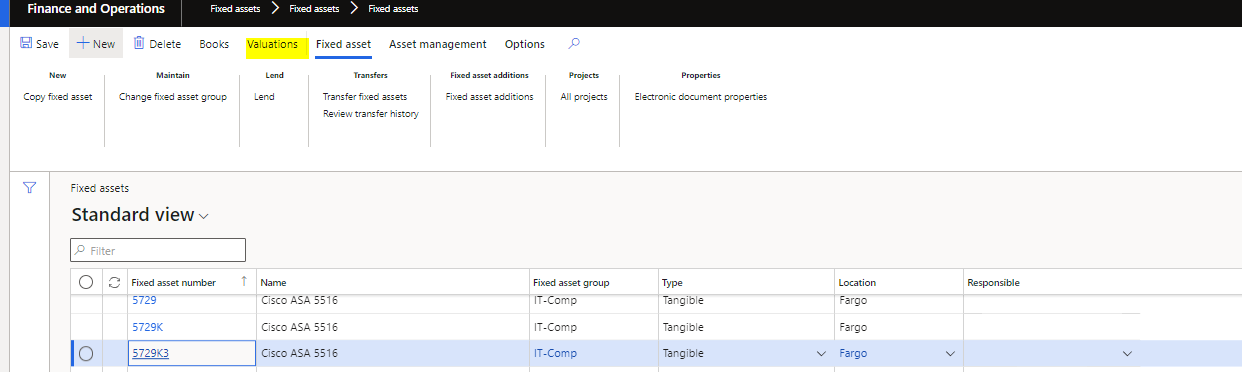
Hi All, I am trying to Migrate fixed assets. However, when I validate, I receive the following error:
 pastedimage1656004251033v4.png

pastedimage1656004012461v1.png

If I view the profile from the book page, I can see the expected depreciation. 

pastedimage1656004074162v2.pngpastedimage1656004084102v3.png

Has anyone seen this before or know what could be causing it? 

My process for migrating is:

1. Load the Fixed asset master via DMF
2. Load the Fixed Asset Book via DMF

3. Load the acquisition journal via DMF

4. Update my acquisition date, placed in service date, and depreciation last run date

5. Load the depreciation journal via DMF

6. Validate 

I have a colleague and we followed the same script, although their profile page seems to be behaving correctly. 

Any insight would be appreciated. 


Thank you. 

I have the same question (0)
  • nunomaia Profile Picture
    25 Moderator on at

    Go to Fixed Assets > Books

    For each Book, check depreciation profile value. You can have an invalid value for a book  

  • BillurSamdancioglu Profile Picture
    19,854 Most Valuable Professional on at

    Hi,

    Do you have XDS setup?

  • Kelsey Lounds Profile Picture
    15 on at

    Hi, I do not think that is the problem, as I have tested with multiple assets. When I view the profile from the book, it is fine and working correctly. But when I click valuations and then profile, it is giving an error.

  • Kelsey Lounds Profile Picture
    15 on at

    Hi Billur, I have system admin access. 

  • BillurSamdancioglu Profile Picture
    19,854 Most Valuable Professional on at

    Do you have any data related security setup?

  • Kelsey Lounds Profile Picture
    15 on at

    I do not believe so.

  • Suggested answer
    Morgan Bazin Profile Picture
    95 on at

    If your colleague walking through the same steps is getting different behaviour, I would consider the following

    1) Does your colleague have the same security roles as you? If not, this could be the issue.

    2) Try clearing your usage data (User options>Usage data>Reset), then try to view the valuations again.

  • Ankit Life Profile Picture
    681 on at

    Hi Kelsey Lounds,

    Could you please check and share the depreciation profiles of other books, AMT and TAX. Is depreciation profile showing in asset?

    Regards,

    Ankit Arora

  • Kelsey Lounds Profile Picture
    15 on at

    HI all, the issue was when the calculate depreciation toggle = NO, the depreciation profile was not filled in. Even if the toggle is set to no, a profile needs filled in or the error will occur. Thanks.

Under review

Thank you for your reply! To ensure a great experience for everyone, your content is awaiting approval by our Community Managers. Please check back later.

Helpful resources

Quick Links

Responsible AI policies

As AI tools become more common, we’re introducing a Responsible AI Use…

Neeraj Kumar – Community Spotlight

We are honored to recognize Neeraj Kumar as our Community Spotlight honoree for…

Leaderboard > Finance | Project Operations, Human Resources, AX, GP, SL

#1
Martin Dráb Profile Picture

Martin Dráb 451 Most Valuable Professional

#2
André Arnaud de Calavon Profile Picture

André Arnaud de Cal... 428 Super User 2025 Season 2

#3
BillurSamdancioglu Profile Picture

BillurSamdancioglu 239 Most Valuable Professional

Last 30 days Overall leaderboard

Product updates

Dynamics 365 release plans
