web
You’re offline. This is a read only version of the page.
close
Skip to main content

Notifications

Announcements

No record found.

Community site session details

Community site session details

Session Id :
Finance | Project Operations, Human Resources, ...
Suggested Answer

How to get a WIP report that reconciles to the TB for our auditors

(0) ShareShare
ReportReport
Posted on by 5

Our auditors want a breakdown of WIP projects/production orders as of period end (31 December) showing the total cost in that particular project, that totals and is equal to the WIP trial balance code as of period end for their testing. How do I generate such a report?

I have the same question (1)
  • Suggested answer
    Gaurangkumar Jani Profile Picture
    4,534 User Group Leader on at

    Hi fergarb 

    There are total 3 types of Positive WIP and 1 Negative WIP that you need to reconcile with GL.

    Following can be found from Report and you can easily reconcile with GL if you are using separate GL:

    1. Material in progress -  Production Control > Inquiry & Report > WIP Report > Material in progress (This is Positive WIP - Accumulation)
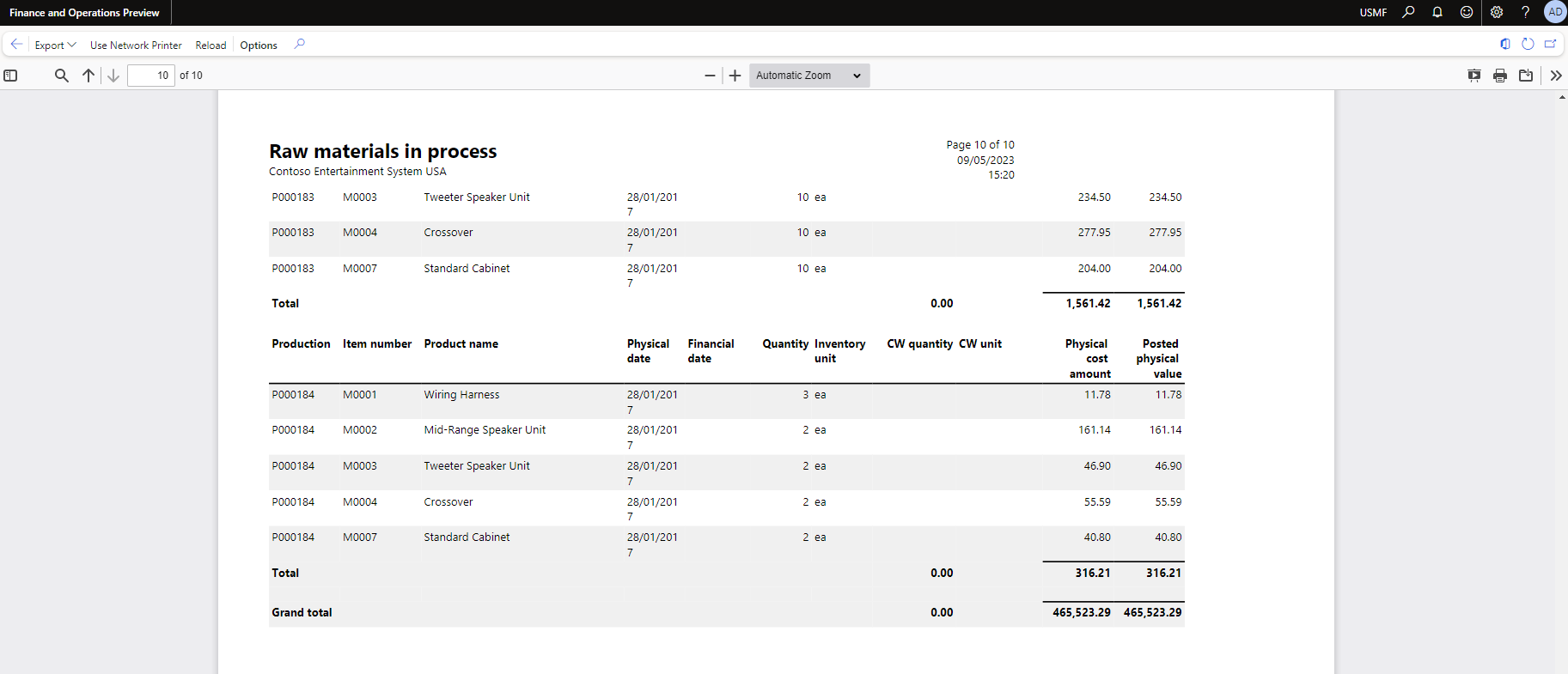
    pastedimage1683646651649v2.png

    2. Indirect costs in process - Production Control > Inquiry & Report > WIP Report > Indirect costs in process (This is Positive WIP - Accumulation)

    pastedimage1683646761773v5.png

    3. Work in Progress - Production Control > Inquiry & Report > WIP Report > work in process (Labor hours) (This is Positive WIP - Accumulation)

    pastedimage1683646746775v4.png

    Last one in Finish Goods "Reported as Finish" > we do not have any specific report available in system. I normally take from production posting inquiry form with filter on Journal as "Report as Finished" and in advance filter Production Order having status = !Finished. This is negative WIP, as this is normally deducted from GL.

    pastedimage1683646605674v1.png

    If you are not using separate ledger in that case, add all this data and try to reconcile with your GL, it will give you proper required data.

    Let us know if this helps.

    Thanks,

  • fergarb Profile Picture
    5 on at

    Hi Gaurangkumar, thank you for the detailed guide above. I have followed it through to the final step, I am struggling with the final step in adding the advanced filter to only show non finished orders as the when adding the filter field, none of the available fields have Status as an option

  • Suggested answer
    Gaurangkumar Jani Profile Picture
    4,534 User Group Leader on at

    Hi fergarb 

    You need to go to advance filter and require join the Production order table to apply this filter.

    pastedimage1683713329876v1.png

    Please let me know if this helps.

    Thanks,

Under review

Thank you for your reply! To ensure a great experience for everyone, your content is awaiting approval by our Community Managers. Please check back later.

Helpful resources

Quick Links

Responsible AI policies

As AI tools become more common, we’re introducing a Responsible AI Use…

Neeraj Kumar – Community Spotlight

We are honored to recognize Neeraj Kumar as our Community Spotlight honoree for…

Leaderboard > Finance | Project Operations, Human Resources, AX, GP, SL

#1
Martin Dráb Profile Picture

Martin Dráb 664 Most Valuable Professional

#2
André Arnaud de Calavon Profile Picture

André Arnaud de Cal... 522 Super User 2025 Season 2

#3
Sohaib Cheema Profile Picture

Sohaib Cheema 303 User Group Leader

Last 30 days Overall leaderboard

Product updates

Dynamics 365 release plans
