web
You’re offline. This is a read only version of the page.
close
Skip to main content

Notifications

Announcements

No record found.

Community site session details

Community site session details

Session Id :
Microsoft Dynamics CRM (Archived)

Could not load file or assembly RestSharp Version=106.1.0.0

(0) ShareShare
ReportReport
Posted on by 432

Hi all,

I am using RestSharp version 106.1.0.0 and .NET framework 4.6.1.

I wrote a plugin on create of contact which will fetch the email address of the contact and send an email using sendgrid. But when i created a contact in CRM it's showing the below error.
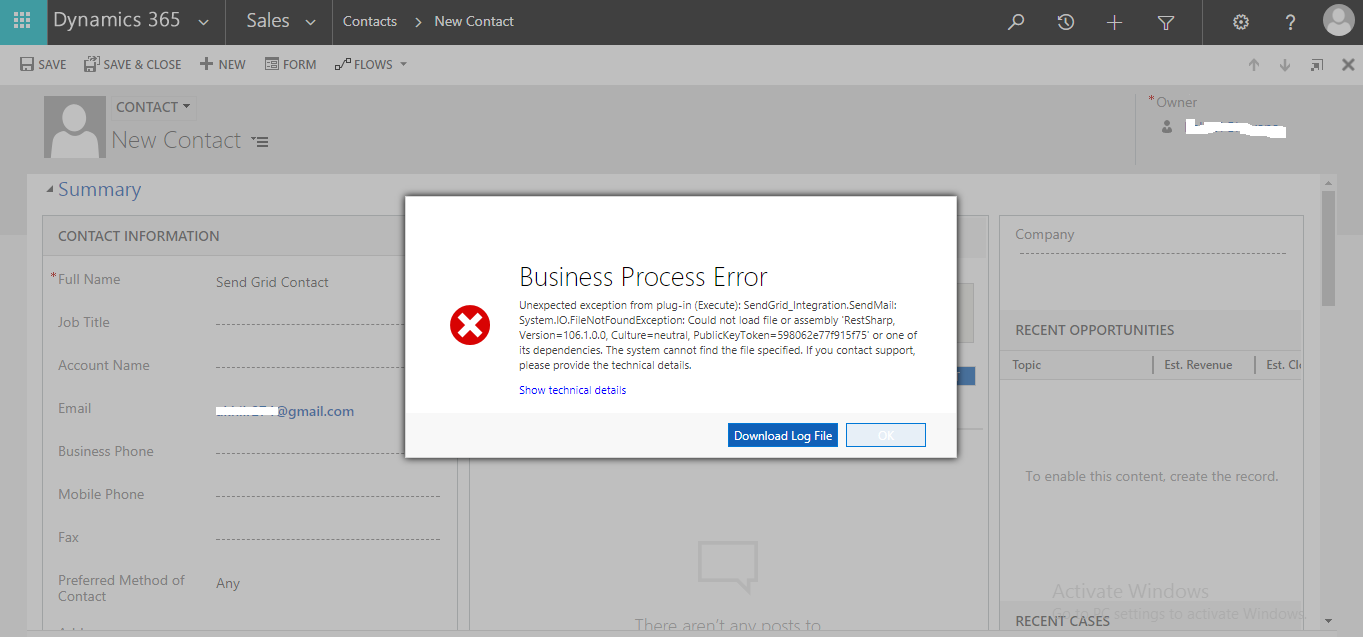
RESTSHARP.png

Below is the error log:

Unhandled Exception: System.ServiceModel.FaultException`1[[Microsoft.Xrm.Sdk.OrganizationServiceFault, Microsoft.Xrm.Sdk, Version=9.0.0.0, Culture=neutral, PublicKeyToken=31bf3856ad364e35]]: Unexpected exception from plug-in (Execute): SendGrid_Integration.SendMail: System.IO.FileNotFoundException: Could not load file or assembly 'RestSharp, Version=106.1.0.0, Culture=neutral, PublicKeyToken=598062e77f915f75' or one of its dependencies. The system cannot find the file specified.Detail:
<OrganizationServiceFault xmlns:i="www.w3.org/.../XMLSchema-instance" xmlns="schemas.microsoft.com/.../Contracts">
<ActivityId>59c76ab5-5568-455d-a6ec-45b117cc39d1</ActivityId>
<ErrorCode>-2147220956</ErrorCode>
<ErrorDetails xmlns:d2p1="schemas.datacontract.org/.../System.Collections.Generic" />
<Message>Unexpected exception from plug-in (Execute): SendGrid_Integration.SendMail: System.IO.FileNotFoundException: Could not load file or assembly 'RestSharp, Version=106.1.0.0, Culture=neutral, PublicKeyToken=598062e77f915f75' or one of its dependencies. The system cannot find the file specified.</Message>
<Timestamp>2017-12-12T07:20:02.9579604Z</Timestamp>
<ExceptionRetriable>false</ExceptionRetriable>
<ExceptionSource i:nil="true" />
<InnerFault i:nil="true" />
<OriginalException i:nil="true" />
<TraceText>

[SendGrid Integration: SendGrid_Integration.SendMail]
[02411298-75de-e711-a94f-000d3af0392a: SendGrid_Integration.SendMail: Create of contact]


</TraceText>
</OrganizationServiceFault>

Can anyone tell me what exactly is the issue here??

Thanks in advance 

AKHIL R

*This post is locked for comments

I have the same question (0)
  • Suggested answer
    imayur Profile Picture
    630 on at

    Hi,

    RestSharp is external assembly, plugin registration takes on one assembly at a time. If you are on CRM on Premise you can add RestSharp Assembly in GAC or you need to merge RestSharp assembly with your plugin assembly.

    Note :  Meging assembly is unsupported customization

    Steps to merge assembly

    1.  Add MSBuild.ILMerge.Task  nuget package from nuget package manager into your plugin project.
    2. In Solution Explorer->References right click on assembly references then click on properties, In properties set CopyLocal to false. 
    3. Repeat second step for all assembly references except the External Assemblies you want merge(In your case its RestSharp)
    4. Clean and Build Project (You will the message in output window displays which assemblies are merged togeter)
    5. Register your plugin again
  • Akhil101 Profile Picture
    432 on at

    Hi Mayur,

    Thanks a lot for your response !

    I tried your above steps to merge the dll and registered the plugin again but now when i tried creating a new contact I am getting another error.

    SendGrid2.png

    Below is the error log:

    Unhandled Exception: System.ServiceModel.FaultException`1[[Microsoft.Xrm.Sdk.OrganizationServiceFault, Microsoft.Xrm.Sdk, Version=9.0.0.0, Culture=neutral, PublicKeyToken=31bf3856ad364e35]]: Unexpected exception from plug-in (Execute): SendGrid_Integration.SendMail: System.Security.SecurityException: Request for the permission of type 'System.Security.Permissions.EnvironmentPermission, mscorlib, Version=4.0.0.0, Culture=neutral, PublicKeyToken=b77a5c561934e089' failed.Detail:
    <OrganizationServiceFault xmlns:i="www.w3.org/.../XMLSchema-instance" xmlns="schemas.microsoft.com/.../Contracts">
    <ActivityId>697a590a-c6cb-4f6e-9474-97a894c7f3c6</ActivityId>
    <ErrorCode>-2147220956</ErrorCode>
    <ErrorDetails xmlns:d2p1="schemas.datacontract.org/.../System.Collections.Generic" />
    <Message>Unexpected exception from plug-in (Execute): SendGrid_Integration.SendMail: System.Security.SecurityException: Request for the permission of type 'System.Security.Permissions.EnvironmentPermission, mscorlib, Version=4.0.0.0, Culture=neutral, PublicKeyToken=b77a5c561934e089' failed.</Message>
    <Timestamp>2017-12-12T10:46:57.1511722Z</Timestamp>
    <ExceptionRetriable>false</ExceptionRetriable>
    <ExceptionSource i:nil="true" />
    <InnerFault i:nil="true" />
    <OriginalException i:nil="true" />
    <TraceText>

    [SendGrid Integration: SendGrid_Integration.SendMail]
    [02411298-75de-e711-a94f-000d3af0392a: SendGrid_Integration.SendMail: Create of contact]


    </TraceText>
    </OrganizationServiceFault>

    Appreciate your help here :)

    Thanks in advance 

    AKHIL R

  • Verified answer
    imayur Profile Picture
    630 on at

    I think merge is successful. This is another issue, Your plugin is might be running in sandbox mode. Don't run plugin in sand box mode, try it in None Isolation mode if you can.

    If RestSharp causing this, you should use Json.Net(Newton.json) for rest instead of RestSharp.

    Can you elaborate more, what exactly you are doing in this plugin?

  • Emre GULCAN Profile Picture
    2,379 on at

    Hi,

    Did you add (copylocal = true) to all required referenced assemblies? Usually I set "false" only XrmSDK assembly, others always be true.

    And one more advice, sometimes when you "clean your project" your bin files not deleted, please check and delete all files in your bin folder after clean process and rebuild your project again. after that there will be only 1 assembly.

  • Verified answer
    Akhil101 Profile Picture
    432 on at

    Thanks a lot Mayur :)

    I think its related to Environment variable. I am actually storing Api Key in Environmental variable and trying to access it in my plugin.

    var apiKey = Environment.GetEnvironmentVariable("SENDGRID_API_KEY");

    Please suggest any other way to retrieve the environmental variable ?

    Thanks a lot

    AKHIL R

  • Suggested answer
    imayur Profile Picture
    630 on at

    you should use Secure Config or Unsecure Config to store api keys or credentials. Secure Config is more preferable.

  • Akhil101 Profile Picture
    432 on at

    Thanks a lot for your response. Yes you're right.

    But is it possible to use Environmental variable instead of Secure Config or Insecure Config?

    Thanks in advance

    AKHIL R

  • imayur Profile Picture
    630 on at

    Yes, Its the recommended approach to store credentials or pass parameters which needs to be configurable without touching code

    Plugin mostly works in isolated environment, probably it does not have access to windows level environment variables.

    Alternately you can set plugin Isolation Mode to "None" while registering it and try with Environment variables but its not recommended.

    For Plugin its Secured and Unsecured Config and for Custom Activities you can use Input Parameters.

Under review

Thank you for your reply! To ensure a great experience for everyone, your content is awaiting approval by our Community Managers. Please check back later.

Helpful resources

Quick Links

Responsible AI policies

As AI tools become more common, we’re introducing a Responsible AI Use…

Neeraj Kumar – Community Spotlight

We are honored to recognize Neeraj Kumar as our Community Spotlight honoree for…

Leaderboard > 🔒一 Microsoft Dynamics CRM (Archived)

#1
SA-08121319-0 Profile Picture

SA-08121319-0 4

#1
Calum MacFarlane Profile Picture

Calum MacFarlane 4

#3
Alex Fun Wei Jie Profile Picture

Alex Fun Wei Jie 2

Last 30 days Overall leaderboard

Featured topics

Product updates

Dynamics 365 release plans
