web
You’re offline. This is a read only version of the page.
close
Skip to main content

Notifications

Announcements

No record found.

Community site session details

Community site session details

Session Id :
Microsoft Dynamics CRM (Archived)

Showing Error message after clearNotification() on field notification

(0) ShareShare
ReportReport
Posted on by 310

Hello Sir,

I have  a date field ,   

when I compare "Est. close date field" with current date in if condition i.e. "Est close date" >= new Date() using Javascript

and set setNotification(msg,type,id) on date field 

it works but after clearNotification(id); still shows error message even after "Est close date" = todays date
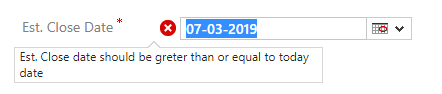
3146.opp.png

*This post is locked for comments

I have the same question (0)
  • Sreevalli Profile Picture
    3,256 on at

    Hello Manoj,

    could you share the code snip, that helps in finding the issue

  • Screen one Profile Picture
    310 on at

    okay for est. close date <= new Date()

    function OnChange_EstimatedCloseDate(executionContext) {

       debugger

      // alert("step 1");

       var formContext = executionContext.getFormContext();

       var EstDate = formContext.getAttribute("estimatedclosedate").getValue();

       var today = new Date();

      // alert(EstDate);

       formContext.getControl("estimatedclosedate").clearNotification();

       if (EstDate <= today)

       {

           formContext.getControl("estimatedclosedate").setNotification("Est. Close date should be greter than or equal to today date");

       }

       else

       {

           formContext.getControl.clearNotification();

    }

  • Suggested answer
    gdas Profile Picture
    50,091 Moderator on at

    Hi ,

    Try with this  , for field notification you can show like this without id -

      Xrm.Page.getControl("new_fieldName").setNotification("Incorrect Bank Account Format.");

       Xrm.Page.getControl("new_fieldName").clearNotification();

  • Suggested answer
    Rawish Kumar Profile Picture
    13,758 on at

    Since you are calling the function on onchange event of this field. Make sure you hit TAB after entering the data. the notification should go away.

  • gdas Profile Picture
    50,091 Moderator on at

    Are you sure that your code entering "Else" part? Try to debug please . Also in your code one bracket is missing -

    function OnChange_EstimatedCloseDate(executionContext) {
        debugger;
        // alert("step 1");
        var formContext = executionContext.getFormContext();
        var EstDate = formContext.getAttribute("estimatedclosedate").getValue();
        var today = new Date();
        // alert(EstDate);
        formContext.getControl("estimatedclosedate").clearNotification();
        if (EstDate <= today)
        {
    
            formContext.getControl("estimatedclosedate").setNotification("Est. Close date should be greter than or equal to today date");
        }
        else
        {
      
            formContext.getControl.clearNotification();
        }
    }


  • Screen one Profile Picture
    310 on at

    not working

  • Screen one Profile Picture
    310 on at

    no bracket missing

  • gdas Profile Picture
    50,091 Moderator on at

    My friend , you have to debug yourself.

  • Suggested answer
    gdas Profile Picture
    50,091 Moderator on at

    Uffff you missed to mentioned the control name -

    function OnChange_EstimatedCloseDate(executionContext) {
        debugger;
        // alert("step 1");
        var formContext = executionContext.getFormContext();
        var EstDate = formContext.getAttribute("estimatedclosedate").getValue();
        var today = new Date();
        // alert(EstDate);
        formContext.getControl("estimatedclosedate").clearNotification();
        if (EstDate <= today)
        {
    
            formContext.getControl("estimatedclosedate").setNotification("Est. Close date should be greter than or equal to today date");
        }
        else
        {
      
            formContext.getControl("estimatedclosedate").clearNotification();
        }
    }


  • Suggested answer
    Sreevalli Profile Picture
    3,256 on at

    Hi,

    Little modification to Goutam's code, try with Unique Ids

    function OnChange_EstimatedCloseDate(executionContext) {
        debugger;
        // alert("step 1");
        var formContext = executionContext.getFormContext();
        var EstDate = formContext.getAttribute("estimatedclosedate").getValue();
        var today = new Date();
        // alert(EstDate);
        formContext.getControl("estimatedclosedate").clearNotification("1");
        if (EstDate <= today) {
    
            formContext.getControl("estimatedclosedate").setNotification("Est. Close date should be greter than or equal to today date", "ERROR", "1");
        }
        else {
    
            formContext.getControl("estimatedclosedate").clearNotification("1");
        }
    }

Under review

Thank you for your reply! To ensure a great experience for everyone, your content is awaiting approval by our Community Managers. Please check back later.

Helpful resources

Quick Links

Responsible AI policies

As AI tools become more common, we’re introducing a Responsible AI Use…

Neeraj Kumar – Community Spotlight

We are honored to recognize Neeraj Kumar as our Community Spotlight honoree for…

Leaderboard > 🔒一 Microsoft Dynamics CRM (Archived)

#1
SA-08121319-0 Profile Picture

SA-08121319-0 4

#1
Calum MacFarlane Profile Picture

Calum MacFarlane 4

#3
Alex Fun Wei Jie Profile Picture

Alex Fun Wei Jie 2

Last 30 days Overall leaderboard

Featured topics

Product updates

Dynamics 365 release plans
