web
You’re offline. This is a read only version of the page.
close
Skip to main content

Notifications

Announcements

No record found.

Community site session details

Community site session details

Session Id :
Microsoft Dynamics GP (Archived)

GP Upgrade - Utility popped up the message "Unable to open log file"

(0) ShareShare
ReportReport
Posted on by 1,895

Hi,

We're upgrading from 2015 R2 to 2016 R2 and I'm running 2 parallel GP utilities from different server login to reduce the upgrade time for multiple companies. I got this message during the upgrade and clicked Ok and the upgrade continues to run now. Can someone shed some light on this please. 

Is it possible that duinstall log file getting locked by 2nd instance or something?
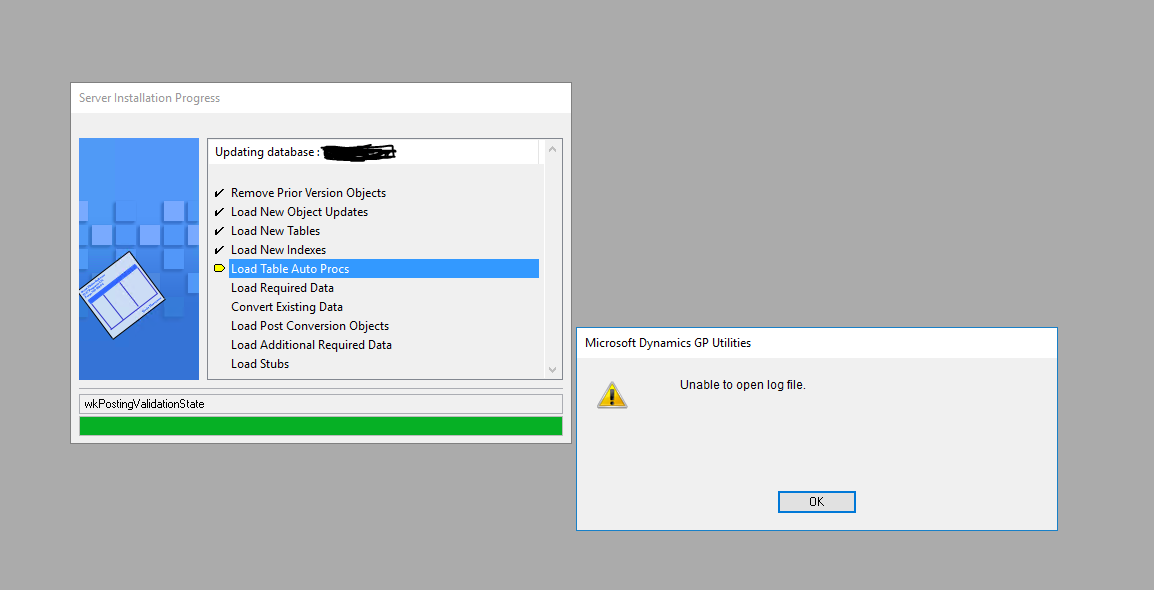
0871.Capture.PNG

Update: Now getting another message "The following SQL statement produced an error: ure dbo.seeGLCOGSKPIMultiCo" on both instances running.

Thanks,

Jothikrishnan

*This post is locked for comments

I have the same question (0)
  • Heather Roggeveen Profile Picture
    9,146 on at

    Hi Jothikrishnan

    I am by no means an expert on upgrading Dynamics GP, but I do know that it needs to link in with the Dynamics database and other system level processes.  I wouldn't have thought that running two database updates at the same time from different servers would be a recommended approach. It is certainly not a method that our internal upgrade expert has ever used - and he has done LOADS of upgrades.

    Cheers

    Heather

  • Suggested answer
    Beat Bucher  GP Geek  GPUG All Star Profile Picture
    28,058 Moderator on at

    Hi Jothikrishnan,

    I agree with Heather.. upgrading from 2 different GP Utilities isn't going to save you time.. you're more likely to run into a ton of troubles.

    In your case the particular SP that's causing the trouble comes from the DYNAMICS DB : seeGLCOGSKPIMultiCoCaller

    it mainly deals with the SY00500 table and seems to produce some COGS data to maybe feed another SP... is your GP setup installed with another system DB name (i.e. different of DYNAMICS) ?

  • Verified answer
    Jothi Krishnan N Profile Picture
    1,895 on at

    Hi Heather, Beat,

    Thank you for your response. No, system db is just DYNAMICS.  After those errors, upgrade failed. and then this time, I created 2nd GP instance copied from the Original GP folder on the same machine. And then reran the utilities with different server login from separate GP instance and selected approx 15 companies in each utility...everything worked fine. Upgrade completed now I'm going to check if everything looks fine. It indeed saved lot of time it looks.  2 companies which were thrown error messages also upgraded fine this time.  I'll check those 2 and probably re-upgrade if needed but it may not be required I believe.

    This is the first time I tried this approach as few has advised me in another forum that they have already done the same in the past with 100+ companies.

    Regards,

    Jothikrishnan

  • Beat Bucher  GP Geek  GPUG All Star Profile Picture
    28,058 Moderator on at

    Thanks for the update Jothikrishnan,

    Are you saying that somebody was able to run a parallel upgrade into the same GP/SQL instance from different GP Utility instances ? (i.e. running 4 times 25 company upgrades in parallel)..

    Sounds a little dangerous to me, not sure this is supported if something breaks during the upgrade..

  • Jothi Krishnan N Profile Picture
    1,895 on at

    Yes, Beat. Not sure how many parallel run they have used. But I tried only 2 for safer side. And we need to take our server configuration also into account. I didn't want to overload it.  But it helped. Otherwise upgrade would still be running.  It definitely reduced the time into half compared to last time when I upgraded.

  • Beat Bucher  GP Geek  GPUG All Star Profile Picture
    28,058 Moderator on at

    Thanks,

    I'm going to run some testing with that scenarios in mind next time when I stumble across a setup that has more than a dozen GP companies to upgrade.. under a certain quantity, it probably doesn't make sense, considering the troubles you may run into..

  • Beat Bucher  GP Geek  GPUG All Star Profile Picture
    28,058 Moderator on at

    Hi Jothi Krishnan N,

    I know this question is over 2 years old, but I wanted to get back regarding the multiple-client upgrade process.. It is something that I ran succesfuly on a larger GP instance with 50 companies and never had any problems like your reported.

    However, I just upgraded a GP 2015R2 (14.00.1159) instance with only 5 companies to 2018R2 (18.00.0704) (not very large except one of 25GB) and 3 out of 5 companies threw up 2-3 times the error message you had in your OP.

    pastedimage1566414183226v1.pngpastedimage1566414195091v2.pngpastedimage1566414203513v3.png

    To me the affected tables have no relation at all between them and on the 3rd company it was even a Stored Procedure that was causing the message.. 

    pastedimage1566414237127v4.png

    I'm wondering what the root cause could be ?? did you ever found out ? 

    I though it could the latest Service pack that I had installed before upgrading, as the build 18.00.0628 wouldn't let me upgrade from 14.00.1159. Maybe someone from Microsoft could shed a light here, as I've not been able to find much about this error on the net.

Under review

Thank you for your reply! To ensure a great experience for everyone, your content is awaiting approval by our Community Managers. Please check back later.

Helpful resources

Quick Links

Responsible AI policies

As AI tools become more common, we’re introducing a Responsible AI Use…

Neeraj Kumar – Community Spotlight

We are honored to recognize Neeraj Kumar as our Community Spotlight honoree for…

Leaderboard > 🔒一 Microsoft Dynamics GP (Archived)

#1
Community Member Profile Picture

Community Member 2

#2
Victoria Yudin Profile Picture

Victoria Yudin 1

#2
mtabor Profile Picture

mtabor 1

Last 30 days Overall leaderboard

Featured topics

Product updates

Dynamics 365 release plans
