web
You’re offline. This is a read only version of the page.
close
Skip to main content

Announcements

No record found.

News and Announcements icon
Community site session details

Community site session details

Session Id :
Microsoft Dynamics AX (Archived)

Login error in Dynamics 365 for operation

(0) ShareShare
ReportReport
Posted on by 56

Dear All,

I installed VM for Dynamics 365 for Operation in Windows 8. It's successfully installed and 1st time successfully login in to Dynamics 365. Then i logout.
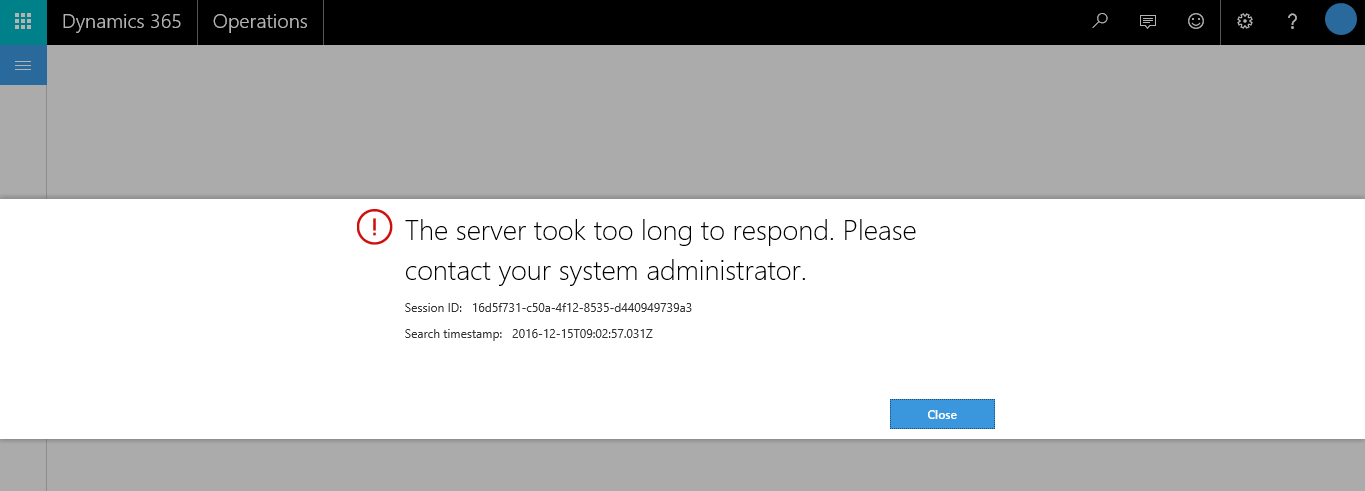
From next time when i again trying to login then getting below error :
6747.Capture.PNG

Could you please let me know why it's happening. How to resolve this issue.

Please give me more shed on this.

Thanks!

Arpan Sen

*This post is locked for comments

I have the same question (0)
  • Ludwig Reinhard Profile Picture
    Microsoft Employee on at

    Hi Arpan Sen,

    Is this a 'local' VM that you downloaded to your computer?

    Best regards,

    Ludwig

  • @rp@n Profile Picture
    56 on at

    Thanks Ludwig

    Yes, i downloaded from below link

    connect.microsoft.com/.../DownloadDetails.aspx

    and configure in to Hyper-V in Windows 8.

    Thanks!

    Arpan Sen

  • Ludwig Reinhard Profile Picture
    Microsoft Employee on at

    Hi Arpan Sen,

    Have you then used the admin user provisioning feature (located at the Desktop) and linked your Office 365 email to this? Or how did you Login the first time?

    Ludwig

  • @rp@n Profile Picture
    56 on at

    Thanks Ludwig

    Yes, I linked O365 account with provisioning feature. Then login in D3FO.

    Thanks!

    Arpan Sen

  • Ludwig Reinhard Profile Picture
    Microsoft Employee on at

    Hi Arpan Sen,

    I see. Have you tried restarting Hyper-V and/or tried a different internet connection?

    Please also search for the prior posts on this forum as similar issues have already been raised and answered before.

    If you cannot find anything that helps, please keep us updated through this thread.

    Many thanks,

    Ludwig

  • André Arnaud de Calavon Profile Picture
    304,774 Super User 2026 Season 1 on at

    Hi Arpan,

    First of all check if you have an open internet connection on this VM. If not, you will get this error.

    You can eventually create a new virtual network or change the existing one to use your computers connection.

  • @rp@n Profile Picture
    56 on at

    Thanks Andre,

    Yeah, already i created external switch in to VM. Internet is working. Sometime i got this error and sometime it's working fine.

    Please give me more shed on this.

    Thanks!

    Arpan Sen

  • André Arnaud de Calavon Profile Picture
    304,774 Super User 2026 Season 1 on at

    Hi Arpan,

    I'm not a networking specialist, but also has a VM which regularly does not want to connect to the outside world. Then in my Win 10 environment I first change adapter settings of my Wifi which is used as sharing the network to not allow sharing. Then I disable the virtual switch. After that I re-enable the virtual switch adapter and set sharing allowed on the WIFI adapter again.

    When this is completed, I have to disable/enable the network adapter in the VM.

    Probably there are easier ways, but this works for me.

Under review

Thank you for your reply! To ensure a great experience for everyone, your content is awaiting approval by our Community Managers. Please check back later.

Helpful resources

Quick Links

Introducing the 2026 Season 1 community Super Users

Congratulations to our 2026 Super Stars!

Meet the Microsoft Dynamics 365 Contact Center Champions

We are thrilled to have these Champions in our Community!

Congratulations to the April Top 10 Community Leaders

These are the community rock stars!

Leaderboard > 🔒一 Microsoft Dynamics AX (Archived)

#1
CP04-islander Profile Picture

CP04-islander 39

#2
Michel ROY Profile Picture

Michel ROY 14

#3
imran ul haq Profile Picture

imran ul haq 8

Last 30 days Overall leaderboard

Featured topics

Product updates

Dynamics 365 release plans
