web
You’re offline. This is a read only version of the page.
close
Skip to main content

Notifications

Announcements

No record found.

Community site session details

Community site session details

Session Id :
Small and medium business | Business Central, N...
Suggested Answer

Performance Issue executing tasks

(0) ShareShare
ReportReport
Posted on by 5

Hi everybody.

I am new here. I am Italian and we moved to Microsoft BC mid 21. I hope to find support here for this issue.

We have Microsoft Business Central 19 Release installed on-premises and a SQL 2022 Standard Database. ERP and DB are installed on virtual machines with different virtual cores. Physical machine is multicore with nvme.

I am experiencing performance issues with some tasks. The point is that while my client is running this task for 20/25 minutes, the resource usage on both virtual and physical machines is very low (14%cpu, ram is available). But the task requires a lot of time to be executed. SLQ is set on multicore. I tired running the same task on the server, with the same account and the problem is still there.

The task I am running is "cost allocation" and it's set on a month period. I also tried the task "GR Calculate End Year costs" both live and scheduled and it is using the same amount of resources.

Why does it takes so long, if the system has more resources that can be used? Is there something that it is possible to do?

Thank you for your help.

Kind regards.

Andrea

I have the same question (0)
  • Suggested answer
    Inge M. Bruvik Profile Picture
    1,111 Moderator on at

    Have you checked your system for storage bottle necks?

    Heavy BC operations can put a lot of load on your storage solution, so you should check for disk queues during the processing.

  • GAndrea Profile Picture
    5 on at

    Hi, thanks for reply.

    Server has virtual machines on nvme drives, that have quite high r/w speed. compared to traditional scsi drives.

    To me it's like the task is using only one core, and not multicore.

  • Suggested answer
    Inge M. Bruvik Profile Picture
    1,111 Moderator on at

    Then you should look into the config of the SQL server to figure out how many cores SQL is using and hove many it has avalible.

    Mayb this can be of help:

    learn.microsoft.com/.../sql-server-not-using-all-cores

  • Suggested answer
    YUN ZHU Profile Picture
    95,729 Super User 2025 Season 2 on at

    Hi, is this a standard environment? This may be a problem caused by customization. I hope the following information can give you some hints.

    Performance Overview

    https://learn.microsoft.com/en-us/dynamics365/business-central/dev-itpro/performance/performance-overview

    pastedimage1679270691186v1.png

    Thanks.

    ZHU

  • GAndrea Profile Picture
    5 on at

    Hi, I check that.

    Apparently I have 1 socket, 8 cores on the virtual machine. Virtual machine is a HyperV one.
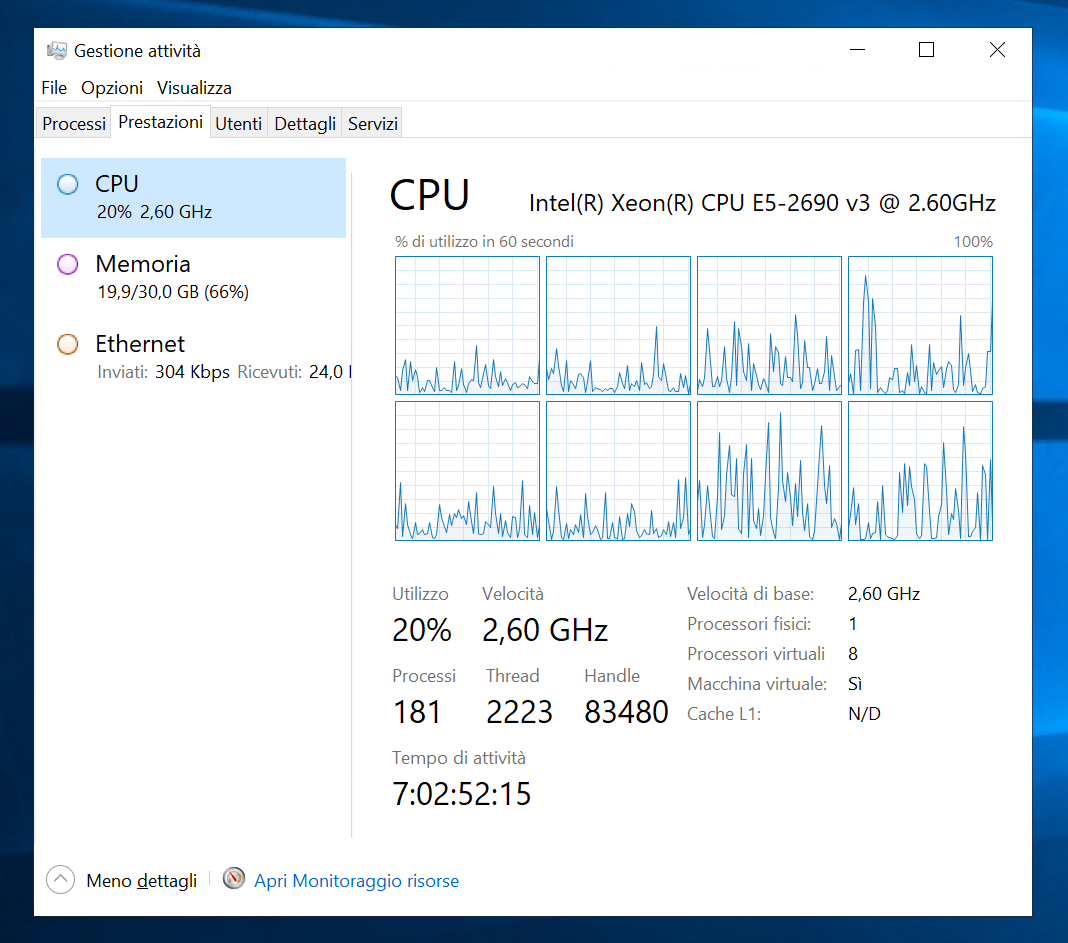
    Screenshot-2023_2D00_03_2D00_20-160601.png

    Cores are all online in SQL.

    select scheduler_id, cpu_id, status, is_online

    from sys.dm_os_schedulers

    scheduler_id cpu_id status is_online

    0 0 VISIBLE ONLINE 1

    1 1 VISIBLE ONLINE 1

    2 2 VISIBLE ONLINE 1

    3 3 VISIBLE ONLINE 1

    4 4 VISIBLE ONLINE 1

    5 5 VISIBLE ONLINE 1

    6 6 VISIBLE ONLINE 1

    7 7 VISIBLE ONLINE 1

    1048578 0 HIDDEN ONLINE 1

    1048576 0 VISIBLE ONLINE (DAC) 1

    1048579 1 HIDDEN ONLINE 1

    1048580 2 HIDDEN ONLINE 1

    1048581 3 HIDDEN ONLINE 1

    1048582 4 HIDDEN ONLINE 1

    1048583 5 HIDDEN ONLINE 1

    1048584 6 HIDDEN ONLINE 1

    1048585 7 HIDDEN ONLINE 1

    1048586 0 HIDDEN ONLINE 1

    1048587 1 HIDDEN ONLINE 1

    1048588 2 HIDDEN ONLINE 1

    1048589 3 HIDDEN ONLINE 1

    1048590 4 HIDDEN ONLINE 1

    1048591 5 HIDDEN ONLINE 1

    1048592 6 HIDDEN ONLINE 1

    1048593 7 HIDDEN ONLINE 1

    1048594 0 HIDDEN ONLINE 1

    1048595 1 HIDDEN ONLINE 1

    1048596 2 HIDDEN ONLINE 1

    1048597 3 HIDDEN ONLINE 1

    1048598 4 HIDDEN ONLINE 1

    1048599 5 HIDDEN ONLINE 1

    1048600 6 HIDDEN ONLINE 1

    1048601 7 HIDDEN ONLINE 1

    1048602 0 HIDDEN ONLINE 1

    The picture is taken form task manager and it shows usage during a 20 min query run by a user. Usage is very low.

    Don't know what to do.

    thanks

  • Suggested answer
    Inge M. Bruvik Profile Picture
    1,111 Moderator on at

    Then you should contact your partner and have them investigate this together with you. If you have customizations in your system that they have made those customizations may cause what you experience here.

Under review

Thank you for your reply! To ensure a great experience for everyone, your content is awaiting approval by our Community Managers. Please check back later.

Helpful resources

Quick Links

Responsible AI policies

As AI tools become more common, we’re introducing a Responsible AI Use…

Neeraj Kumar – Community Spotlight

We are honored to recognize Neeraj Kumar as our Community Spotlight honoree for…

Leaderboard > Small and medium business | Business Central, NAV, RMS

#1
OussamaSabbouh Profile Picture

OussamaSabbouh 2,135

#2
YUN ZHU Profile Picture

YUN ZHU 733 Super User 2025 Season 2

#3
Sumit Singh Profile Picture

Sumit Singh 612

Last 30 days Overall leaderboard

Featured topics

Product updates

Dynamics 365 release plans
