web
You’re offline. This is a read only version of the page.
close
Skip to main content

Notifications

Announcements

No record found.

Community site session details

Community site session details

Session Id :
Microsoft Dynamics AX (Archived)

Counting journal: Incorrect Inventory On-hand Qty

(0) ShareShare
ReportReport
Posted on by

Hi All,

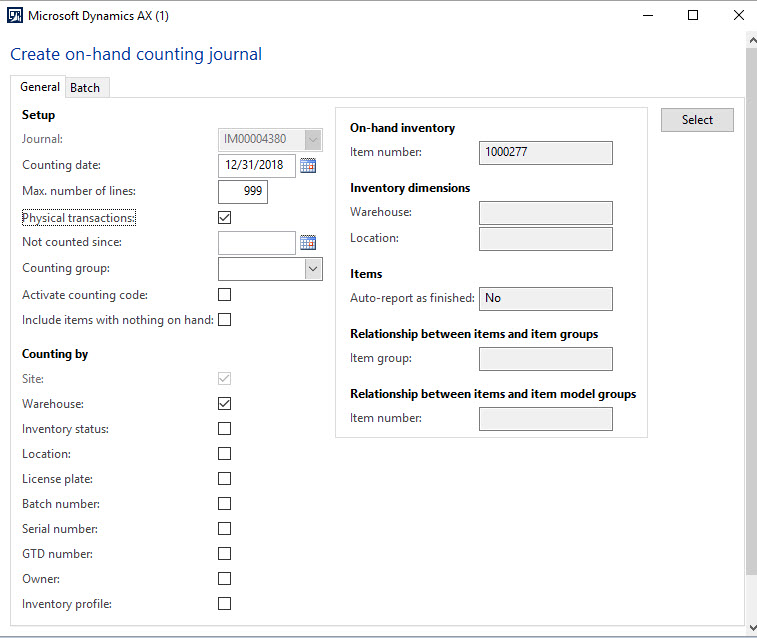
When I create a Counting journal by click Create button> On hand as below screenshot but the On-hand Qty shows incorrect result:
3515.11.jpg

78532.1.jpg

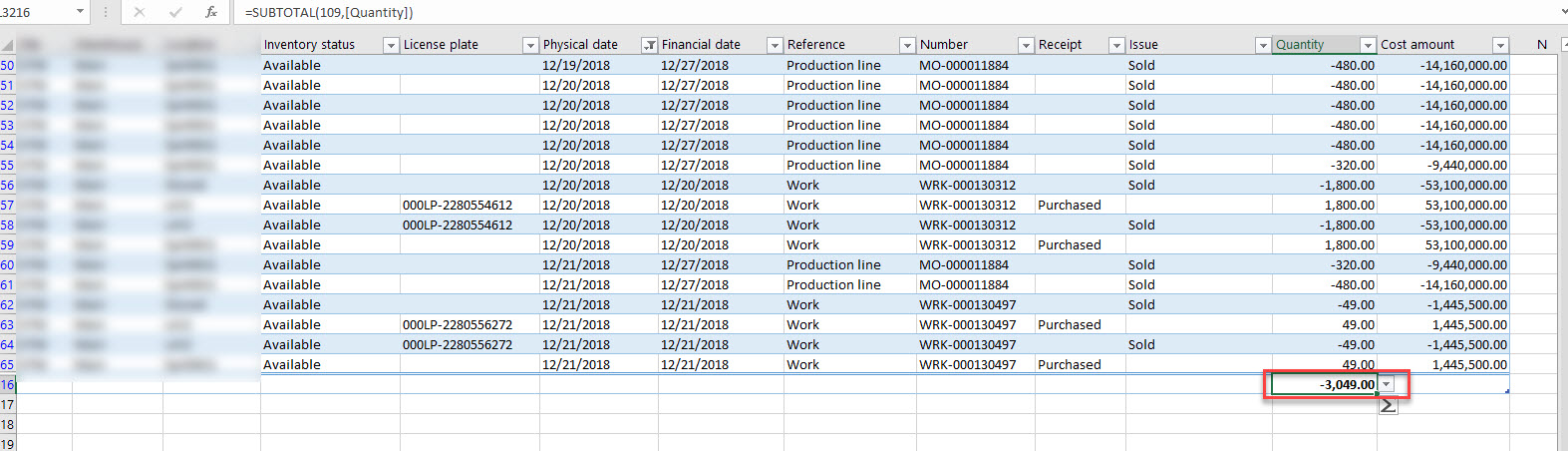
I checked Inventory transaction, the On-hand there is -3049Qty
6557.2.jpg

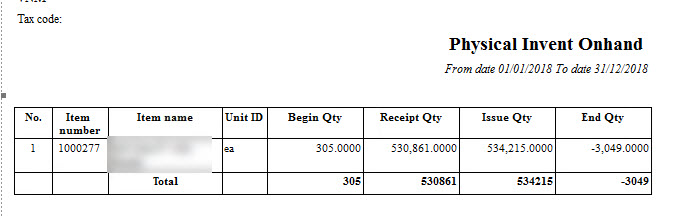
And Physical Inventory report is also -3049Qty
11_5F00_edited.jpg

Could you please let me know why Counting journal shows wrong Qty like this? How can I fix that error? 

Thank you.

*This post is locked for comments

I have the same question (0)
  • Ludwig Reinhard Profile Picture
    Microsoft Employee on at

    Hi,

    If the on-hand quantity is wrong you can simply enter the correct quantity in the counted column and post the journal to get this right.

    Before doing that can you explain why you have a negative quantity of minus 3049?

    What kind of item is that and why does it have a negative quantity?

    Best regards,

    Ludwig

  • Community Member Profile Picture
    on at

    Hi Ludwig,

    I know how to correct On-hand but I am investigating why Counting function shows incorrect on-hand quantity like that?

    The correct On-hand should be minus 3049 as detail transactions and Physical report, user did issue qty more than receive during that Period then the ending Qty is negative.

  • Suggested answer
    Ludwig Reinhard Profile Picture
    Microsoft Employee on at

    Hi,

    When you create a new counting journal, you have to select the inventory dimensions.

    Please double check the ones selected and compare the on-hand quantity shown with the one that pops up in the journal.

    Also consider possible date changes.

    The journal has been created on 31 Dec 2018.

    Today is 15 Jan 2019 and transactions might have occured in between.

    Best regards,

    Ludwig

  • Community Member Profile Picture
    on at

    I selected Warehouse only, in the Physical report/ Inventory Transactions I checked Warehouse also.

    Yes, Counting Date or  Reporting Date, Invent Trans I checked until 31 Dec 2018. I didn't run until Today Date

  • Suggested answer
    Ludwig Reinhard Profile Picture
    Microsoft Employee on at

    Hi,

    Can you check what happens if you delete the journal line and recreate it?

    Do you see the correct qty?

    Best regards,

    Ludwig

  • Community Member Profile Picture
    on at

    Hi Ludwig,

    I did many time but still shows incorrect On-hand.

    5545.12.jpg

    5545.12.jpg

  • Suggested answer
    fatihgork Profile Picture
    3,817 on at

    Hi,

    If you select warehouse only, application populates warehouse Id and total on-hand quantity in this warehouse.

    Does not that total line up?

  • Suggested answer
    Ludwig Reinhard Profile Picture
    Microsoft Employee on at

    Hi,

    Do you have backdated transactions where physical and financial dates are in different years?

    What quantity does the inventory value report give you?

    I think the inventory value report is better than the one you used because yours had some issues.

    Best regards,

    Ludwig

  • Community Member Profile Picture
    on at

    Hi Ludwig,

    The Inventory Value report is same as Physical report & Invent Trans.

    1321.12.jpg

  • Community Member Profile Picture
    on at

    Hi Fatih Gork,

    The result is the same when I select "Location" / Inventory status.

    All are in one Location (Qty1,451) with Inventory status "Available"

Under review

Thank you for your reply! To ensure a great experience for everyone, your content is awaiting approval by our Community Managers. Please check back later.

Helpful resources

Quick Links

Responsible AI policies

As AI tools become more common, we’re introducing a Responsible AI Use…

Neeraj Kumar – Community Spotlight

We are honored to recognize Neeraj Kumar as our Community Spotlight honoree for…

Leaderboard > 🔒一 Microsoft Dynamics AX (Archived)

#1
Martin Dráb Profile Picture

Martin Dráb 4 Most Valuable Professional

#1
Priya_K Profile Picture

Priya_K 4

#3
MyDynamicsNAV Profile Picture

MyDynamicsNAV 2

Last 30 days Overall leaderboard

Featured topics

Product updates

Dynamics 365 release plans

