web
You’re offline. This is a read only version of the page.
close
Skip to main content

Notifications

Announcements

No record found.

Community site session details

Community site session details

Session Id :
Small and medium business | Business Central, N...
Answered

Questions regarding "Base Calendar Code" in Customer Card of Navision 2018

(0) ShareShare
ReportReport
Posted on by 4,979

Hi Community,

I understand that "Base Calendar Code" is to denote that (Correct me if I'm wrong) the number of days that the Customer/ Vendor is not working.

If this understanding is correct, I would like to know how does Navision prompts the user that the day that was created in the Base Calendar was a non-working day for customer and vendor?
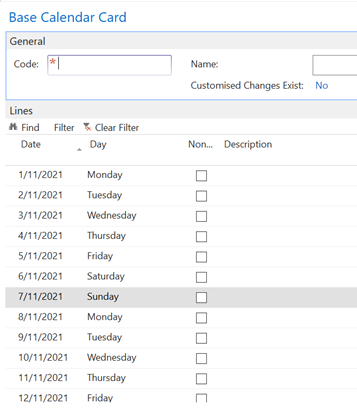
pastedimage1636292138396v1.png

Thank you!

I have the same question (0)
  • Verified answer
    Marco Mels Profile Picture
    on at

    Hello,

    Any base calendar defined for the vendor or the location affects how the dates are calculated and rounded to working days. Accordingly, the two date fields on purchase order lines are calculated as follows under different conditions.

    docs.microsoft.com/.../across-how-to-assign-base-calendars

    Thanks.

  • Verified answer
    Community Member Profile Picture
    on at

    Josh,

    Adding to what Marco replied... The Base Calendar is critical to setup so that Non-Working Days are not displayed or used on any Date field calculation. So for Sales Orders if a Customer has a Requested Delivery Date and the Shipping Agent Service lead time is applied, if the Shipment Date falls on a weekend the actual Shipment will move to a Working Day. This also holds true for Purchase Order Expected Receipt Dates as Marco noted in his reply. You should enter all Non-Working Days (Weekends) and Holidays.

    Thanks,

    Steve

  • joshtechsolutions Profile Picture
    4,979 on at

    I see. That makes sense. In that scenario, there is no prompt needed as Navision already let you know you can't choose those dates since they are not displayed to be chosen in the first place.

    Thank you !

Under review

Thank you for your reply! To ensure a great experience for everyone, your content is awaiting approval by our Community Managers. Please check back later.

Helpful resources

Quick Links

Responsible AI policies

As AI tools become more common, we’re introducing a Responsible AI Use…

Neeraj Kumar – Community Spotlight

We are honored to recognize Neeraj Kumar as our Community Spotlight honoree for…

Leaderboard > Small and medium business | Business Central, NAV, RMS

#1
OussamaSabbouh Profile Picture

OussamaSabbouh 2,132

#2
Khushbu Rajvi. Profile Picture

Khushbu Rajvi. 675 Super User 2025 Season 2

#3
YUN ZHU Profile Picture

YUN ZHU 665 Super User 2025 Season 2

Last 30 days Overall leaderboard

Featured topics

Product updates

Dynamics 365 release plans



