web
You’re offline. This is a read only version of the page.
close
Skip to main content

Announcements

News and Announcements icon
Community site session details

Community site session details

Session Id :
Small and medium business | Business Central, N...
Suggested Answer

Assign serial numbers to purchase order line via extension

(0) ShareShare
ReportReport
Posted on by 5

Trying to find a proper solution for assigning serial numbers to a purchase order line through extension or API method.
BC version is 19.3.0.2 on-prem.

Here is the extension method code:
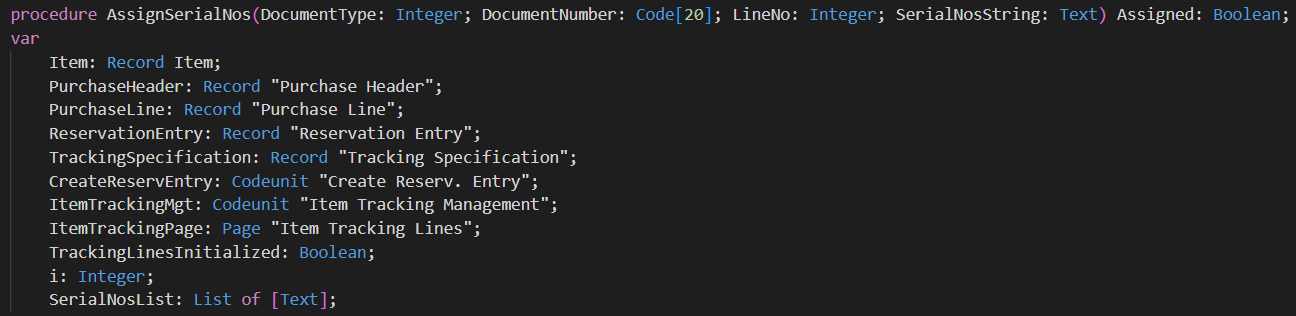
1738.png

pastedimage1652952221636v2.png

In NAV, you would pass serial number directly into CreateReservEntry.CreateReservEntryFor method, like this:

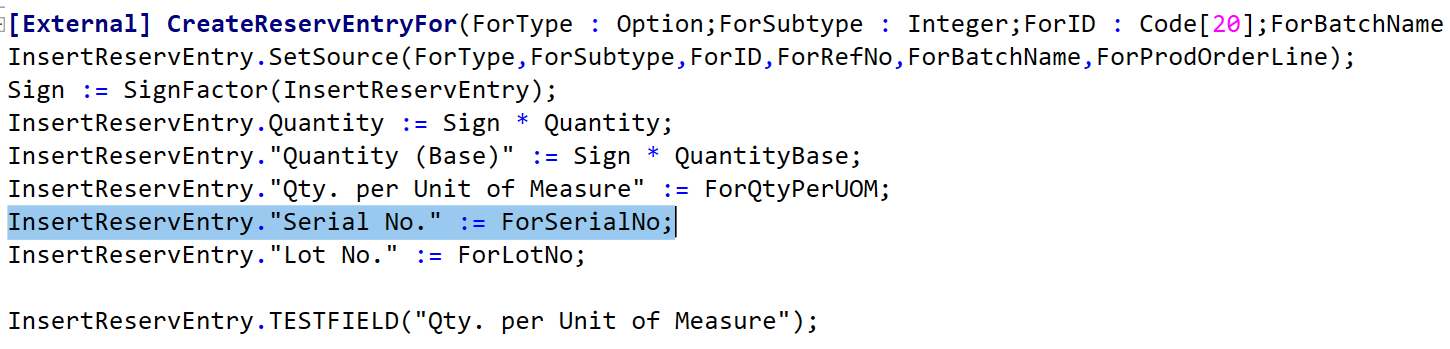
pastedimage1652952265119v3.png

pastedimage1652952282067v4.png

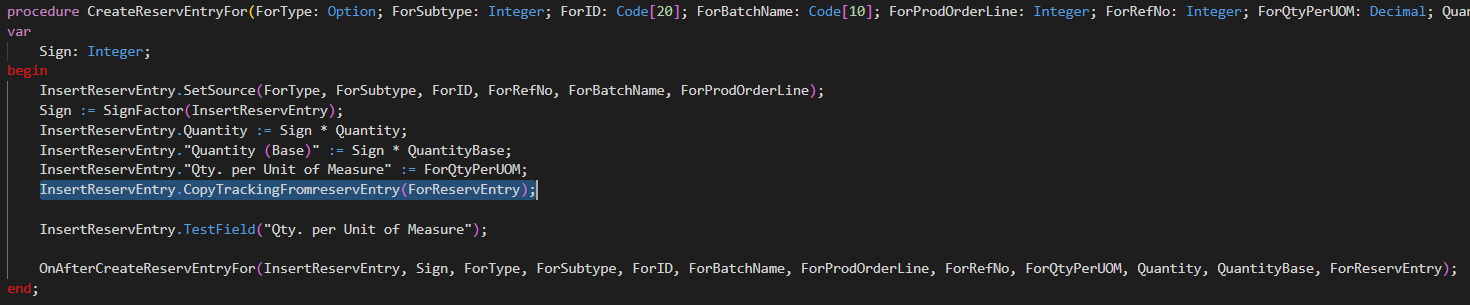
But in BC, CreateReservEntry.CreateReservEntryFor method is changed, so you no longer can pass Serial No., but instead it is copied from ReservEntry:

Codeunit 99000830 Create Reserv. Entry
pastedimage1652952339972v5.png

Table 337 Reservation Entry

pastedimage1652952366587v6.png

So, the question is what would be the correct way to 'feed' Reservation Entry with serial nos. before executing CreateReservEntryFor?

Is there a method in Codeunit 99000830 Create Reserv. Entry or Table 337 Reservation Entry that can be utilized for this?

I have the same question (0)
  • Suggested answer
    Marco Mels Profile Picture
    Microsoft Employee on at

    Hello,

    We currently do not have dedicated Dev support via the Dynamics 365 Business Central forums, but I wanted to provide you some additional resources to assist. If you need assistance with debugging or coding I would recommend discussing this on one of our communities.

    www.yammer.com/dynamicsnavdev

    www.dynamicsuser.net/.../14

    I will open this up to the community in case they have something to add.

    Thanks.

  • DmitriySozinov Profile Picture
    5 on at

    Hi Marco,

    Will try dynamicsuser.net then.

    Thanks.

Under review

Thank you for your reply! To ensure a great experience for everyone, your content is awaiting approval by our Community Managers. Please check back later.

Helpful resources

Quick Links

Season of Sharing Community Challenge Launch!

Jump in, show your community spirit, and win prizes!

Women in Power Builds Momentum

Expanding mentorship, skilling, and AI innovation

Congratulations to the May Top 10 Community Leaders

These are the community rock stars!

Leaderboard > Small and medium business | Business Central, NAV, RMS

#1
OussamaSabbouh Profile Picture

OussamaSabbouh 2,119 Super User 2026 Season 1

#2
YUN ZHU Profile Picture

YUN ZHU 1,522 Super User 2026 Season 1

#3
Grigorios Mavrogeorgis Profile Picture

Grigorios Mavrogeorgis 1,177 Super User 2026 Season 1

Last 30 days Overall leaderboard

Featured topics

Microsoft Training Manuals

Product updates

Dynamics 365 release plans