web
You’re offline. This is a read only version of the page.
close
Skip to main content

Announcements

No record found.

News and Announcements icon
Community site session details

Community site session details

Session Id :
Microsoft Dynamics GP (Archived)

Workflow Setup Menus Missing - GP 2015 R2

(0) ShareShare
ReportReport
Posted on by 77

Hello,

I'm in the process of configuring Dynamics GP to use the PTE timesheet module. I've got GP 2015 R2 installed, and Web Client configured so that I can log in. 

I'm following a couple of tutorials, mainly this one, to get it working:

www.erpsoftwareblog.com/.../microsoft-dynamics-gp-workflow-2-0-configuration-tutorial

I'm up to the part where I need to set up workflows, but I seem to be missing a couple of menu items:

  • Workfow Maintenance
  • Workflow Calendar

However I do have the Email Message Setup menu item:
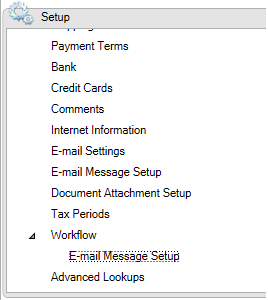
7711.Workflow.png

I need these menus to configure the workflows, so I'm stumped as to what to do now.

As far as I understand, Workflow 2.0 is included in the base install for GP 2015, so I'm not sure what I'm missing at this point.

Any ideas?

*This post is locked for comments

I have the same question (0)
  • Shaun arinex Profile Picture
    77 on at

    Further to the above, I've been reviewing the security options, and can confirm that Workflow Maintenance is selected:

    5187.Workflow2.png

    Same behaviour for sa/POWERUSER members. 

    Also, the Workflow Maintenance option is missing from the menu navigation as well. 

  • Bill Campbell Profile Picture
    12 on at

    If you look at the Administration Menu - there is another option - Workflow Setup - that appears above the menu option for Workflow.

    Have you completed the necessary setup in that menu already?

    Just wondering and completing the steps I went through to get workflow working for my clients.

  • Shaun arinex Profile Picture
    77 on at

    Yep, that bit went smoothly, and the test email worked fine. I haven't enabled the GP Web Services settings, as we won't be needing them, but I don't think this should affect anything at this point.

    Workflow3.png

  • Suggested answer
    Shaun arinex Profile Picture
    77 on at

    Turns out we needed to update our keys. Problem solved.

  • Bill Campbell Profile Picture
    12 on at

    Would have been a next option - you show it with security, but new security with old keys - so glad it was that easy to resolve.

Under review

Thank you for your reply! To ensure a great experience for everyone, your content is awaiting approval by our Community Managers. Please check back later.

Helpful resources

Quick Links

Introducing the 2026 Season 1 community Super Users

Congratulations to our 2026 Super Stars!

Meet the Microsoft Dynamics 365 Contact Center Champions

We are thrilled to have these Champions in our Community!

Congratulations to the March Top 10 Community Leaders

These are the community rock stars!

Leaderboard > 🔒一 Microsoft Dynamics GP (Archived)

#1
talty09 Profile Picture

talty09 2

#1
Anthony Beatty Profile Picture

Anthony Beatty 2

#3
CP04-islander Profile Picture

CP04-islander 1

Last 30 days Overall leaderboard

Featured topics

Product updates

Dynamics 365 release plans
