web
You’re offline. This is a read only version of the page.
close
Skip to main content

Announcements

No record found.

News and Announcements icon
Community site session details

Community site session details

Session Id :
Customer experience | Sales, Customer Insights,...
Answered

How to segment on birthday

(0) ShareShare
ReportReport
Posted on by 245

Hello Community,

i am working on some different Use cases with our customer and one of the tricky parts is the segmentation on birthdays.

If I am building my query depending on "within last month" the segmentation is working on the year 2020. Of course my segment isn't born in 2020, instead of that

i want to segment all people which have birthday in december. How can I manage that? There is no option to build the query on a month or a year?
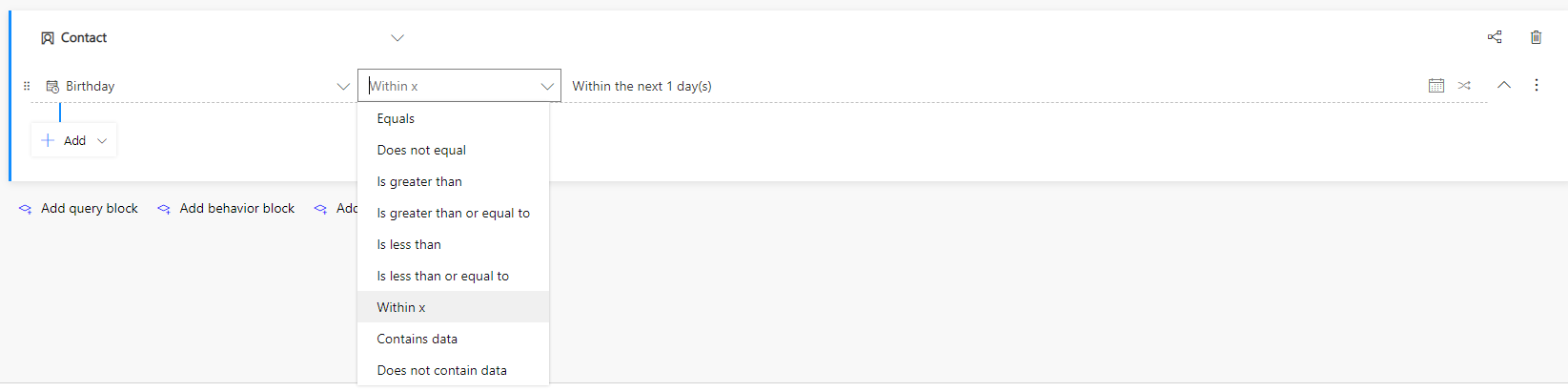
pastedimage1609751604660v1.png

Regards,

Joannis

I have the same question (0)
  • Verified answer
    Community Member Profile Picture
    on at

    Hi Joannis,

    You can do this by clicking the two little arrows on the right (next to the date checker) and check "Partial Date".

    Check my screenshot below:

    pastedimage1609754095509v1.png

    Good Luck with segmenting ;) 

  • Verified answer
    cloflyMao Profile Picture
    25,210 on at

    Hi Joannis,

    You could create a whole number field to Contact entity to support the extension:

    1. Create the field called "Birth Month".

    2. Import Dynamics 365 Workflow Tools solution.

    3. Extract month of date and time field with Month function of the solution:

    https://github.com/demianrasko/Dynamics-365-Workflow-Tools/blob/master/docs/DateFunctions.md

    4. Create a workflow for Contact:

    Step 1: Set birthday of contact as input parameter to the function:

    pastedimage1609754201385v1.png

    Step 2: Update the custom field with output of the function:

    pastedimage1609754281149v2.png

    Now the query can be based on the field value:

    pastedimage1609754348386v3.png

    Regards,

    Clofly

  • Joannis Papazissis Profile Picture
    245 on at

    amazing! didn't even know this function on dates. Thanks for that ;)

Under review

Thank you for your reply! To ensure a great experience for everyone, your content is awaiting approval by our Community Managers. Please check back later.

Helpful resources

Quick Links

Introducing the 2026 Season 1 community Super Users

Congratulations to our 2026 Super Stars!

Congratulations to our 2025 Community Spotlights

Thanks to all of our 2025 Community Spotlight stars!

Leaderboard > Customer experience | Sales, Customer Insights, CRM

#1
ManoVerse Profile Picture

ManoVerse 168 Super User 2026 Season 1

#2
NeerajPawar Profile Picture

NeerajPawar 65

#3
Jimmy Passeti Profile Picture

Jimmy Passeti 51 Most Valuable Professional

Last 30 days Overall leaderboard

Product updates

Dynamics 365 release plans
