web
You’re offline. This is a read only version of the page.
close
Skip to main content

Announcements

No record found.

News and Announcements icon
Community site session details

Community site session details

Session Id :
Microsoft Dynamics AX (Archived)

SO confirmation after a few Qty picked.

(0) ShareShare
ReportReport
Posted on by

Hi All,

I have an SO of two lines of Qty 10, 5 respectively.

Both item have an Over delivery of 0.00% and under delivery of 100.00%

And then I picked a 5 Qty from my first line.

Untitled-picture1.png

After wards I went for confirmation of the same order once again. This give me a warning message that,
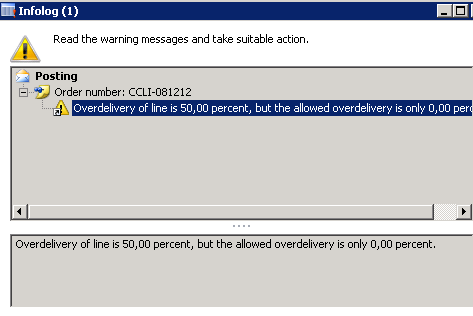
When I done some R&D in code I got to know the qty calculated for the 1st line is 15(10ordered+5picked) instead of 10 which sensed wrong for me.

Trace on code:

1.       Table/InventSum/addInventTransQtyOnSum

case StatusIssue::Picked:

                this.Picked -= _inventTrans.Qty;(-5)

2.       Classes/InventTransIdSum/physicalInventNotFinancial

return  inventSum.Registered//(0)

           +inventSum.Received//(0)

           -inventSum.Picked//(5)

           -inventSum.Deducted;//(0)

3.       Invent Movement/qtyPost(Line 21)

qtyPost     = abs(qtyPost + _physicalNow);( -5 + -10)

4.       Invent Movement/checkNotOverDelivery(Line 116)

qtyOverDelivery = qtyPost - qtyPre;(15-10)

Due to this calculation we have an over delivery of 50%

Can anyone help me out, am I getting confused with any functionality or it’s a bug in AX?

*This post is locked for comments

I have the same question (0)
  • cpironmo Profile Picture
    2 on at

    Why are you attempting to re-confirm the order, when nothing has changed?

  • Community Member Profile Picture
    on at

    Thanks for your response,

    Actually,SO is changed(changes not in the line which i'm taking about) changes like one more line added in the SO, then we have to reconfirm the order.

    That is  what i trying to do.

  • Suggested answer
    Rachit Profile Picture
    4,015 User Group Leader on at

    Hi Abhida,

    Cannot comment on your findings but a possible workaround can be to unpick the sales line and then confirm the sales order. You can then pick the quantities again.

    Please note try this in TEST system first and think about any possible issues with your pickings.  

  • Guy Terry Profile Picture
    28,998 Moderator on at

    Hi Abhida,

    I found one hotfix on LCS which affected the method  InventMovement/checkNotOverDelivery (KB2777206), but it did not appear to describe your scenario.

    I would be tempted to ask Microsoft through your support channel. I cannot see why posting Order Confirmation should care about delivered quantities.

  • Community Member Profile Picture
    on at

    Hi Rachit,

    Thanks for your suggestion, this can be done only for a moment, but i cant take it further.(if my order has 20 lines of picked qty then even i cant take for the moment also).

    I just want to make sure that i'm not getting confused with any standard functionality, And this is really a bug !!

  • Community Member Profile Picture
    on at

    Thanks Terry,

    I think once i should go with your suggestion.

    Let check the hotfix and I ll let you guyz know.

    Thanks a lot.. :)

Under review

Thank you for your reply! To ensure a great experience for everyone, your content is awaiting approval by our Community Managers. Please check back later.

Helpful resources

Quick Links

Introducing the 2026 Season 1 community Super Users

Congratulations to our 2026 Super Stars!

Meet the Microsoft Dynamics 365 Contact Center Champions

We are thrilled to have these Champions in our Community!

Congratulations to the April Top 10 Community Leaders

These are the community rock stars!

Leaderboard > 🔒一 Microsoft Dynamics AX (Archived)

#1
CP04-islander Profile Picture

CP04-islander 24

#2
Michel ROY Profile Picture

Michel ROY 14

#3
Jagadabi Profile Picture

Jagadabi 6

Last 30 days Overall leaderboard

Featured topics

Product updates

Dynamics 365 release plans
