web
You’re offline. This is a read only version of the page.
close
Skip to main content

Announcements

No record found.

News and Announcements icon
Community site session details

Community site session details

Session Id :
Microsoft Dynamics NAV (Archived)

NAV 2013 R2 Reports giving blank rows

(0) ShareShare
ReportReport
Posted on by 952

I've created a new report for Nav 2013 R2 using SQL report Builder.

The report is based on Sales Invoice Header/Line and Sales Credit Memo Header/Line. The layout is as shown below:
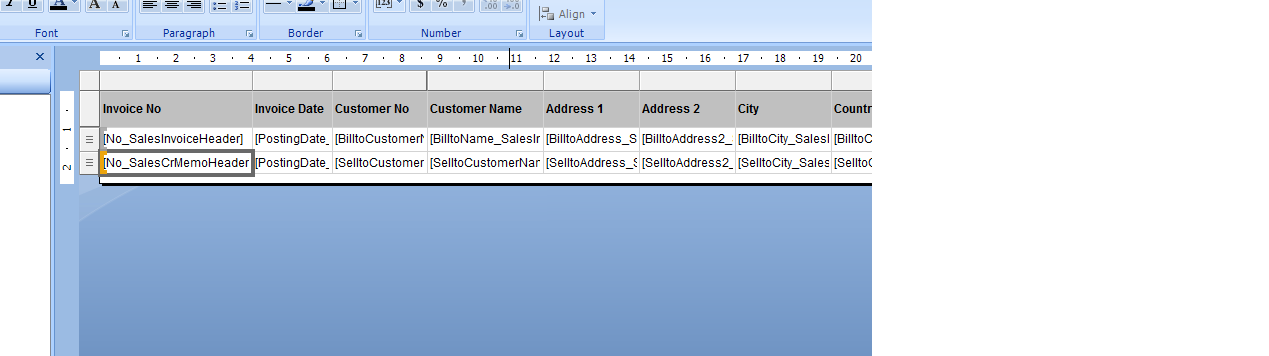
However when the report is generated, there a many blank rows between the record of Sales Invoice Header/Line and Sales Credit Memo Header/Line as shown below:


Does anyone has any idea how to remove the blank rows.


*This post is locked for comments

I have the same question (0)
  • Community Member Profile Picture
    on at

    HI,

    You must set hide & show condition for row in your report.

    After set it, your problem will resolve.

  • Suggested answer
    Tharanga Chandrasekara Profile Picture
    23,118 on at

    First of all I really can't see your second image.  If you getting blank rows, that means ur data set indentation is wrong. If you want to overcome this, what you can do is you can write a filter to filter those values (Hide and Show).

  • Suggested answer
    Rajasekhar@MS Profile Picture
    5,569 on at

    Hi

    As per your screen, you didn't specify any groupings, you need to create groups for the Invoices & Creditmemos

    refer the below link how to group & how to set visibility on the rdlc report

    http://www.ecanarys.com/blog-entry/design-microsoft-dynamics-navision-2013r2-rdlc-report

    Regards

    Rajasekhar.Y

  • Suggested answer
    keoma Profile Picture
    32,729 on at

    hi,

    first divide the main table into 2 tables, one for invoice,one for shipment.

    to control viewing of data use row-visibility, filters and groups. you can set filtering in the dataitems, in the tablix  properties and the group properties of the tablix.

    follow http://msdn.microsoft.com/en-us/library/dd239395(v=sql.105).aspx

  • Marshal Profile Picture
    442 on at

    Try to use

    Use PrintOnlyIfDetail property of report data item

  • Community Member Profile Picture
    on at

    I have also same problem then i set hide & show condition for row then my sr no. not work properly

  • RockwithNav Profile Picture
    9,097 Super User 2026 Season 1 on at

    Hi Mosaheb,

    There could be many possibilities for the blank rows, You need to identify first the structure you designed and the data you are getting from the Data-set. First you should execute the Report and check About this Page of the Report (Execute twice as it starts first time). Identify here what exactly are the Data's you are getting and match this with your Report Outcome.

    Once you will analyze this, you will easily understand the cause and what exactly to implement either the Row Visibility Condition or the Filters.

  • Suggested answer
    Community Member Profile Picture
    on at

    If you are able to set report row visibility proporty correctly and not getting blank rows, it means your report logic / design is correct and you only need correct your Sr. No. Logic.

    You need to skip / filter the unwanted records and generate your correct Sr. no. accordingly.

    Hope this helps.

Under review

Thank you for your reply! To ensure a great experience for everyone, your content is awaiting approval by our Community Managers. Please check back later.

Helpful resources

Quick Links

Introducing the 2026 Season 1 community Super Users

Congratulations to our 2026 Super Stars!

Meet the Microsoft Dynamics 365 Contact Center Champions

We are thrilled to have these Champions in our Community!

Congratulations to the April Top 10 Community Leaders

These are the community rock stars!

Leaderboard > 🔒一 Microsoft Dynamics NAV (Archived)

#1
TAHER_El_Mehdi Profile Picture

TAHER_El_Mehdi 2

#1
sliderxb Profile Picture

sliderxb 2

#1
broberts Profile Picture

broberts 2

Last 30 days Overall leaderboard

Featured topics

Product updates

Dynamics 365 release plans
