web
You’re offline. This is a read only version of the page.
close
Skip to main content

Announcements

No record found.

News and Announcements icon
Community site session details

Community site session details

Session Id :
Microsoft Dynamics AX (Archived)

The ledger posting group VAT Postings does not have an account for sales tax direction Use tax specified

(0) ShareShare
ReportReport
Posted on by 1,339

i have this killing error and it is related to VAT, i have setup 2 companies and one company is having no problem and it can post invoice journals with VAT and VAT is calculating and posting properly and there in no issue,

i have done the same vat setup in the other company and each time i am trying to post the invoice journal, i am facing an error and this error is killing me now

"The ledger posting group VAT Postings does not have an account for sales tax direction Use tax specified."

I checked everything, broke my head but could not find a reason of this error... and believe me there is no difference of setup in both the companies

i will start a new thread as well right now......

before posting invoice journal, when i click the VAT tab, here is the image which shows up and there is VAT direction, i think i need to disable this Direction, how, i don't know. Keep in mind i am in Saudi Arabia and very recently, the government has introduced VAT here. I am using 2012 R2
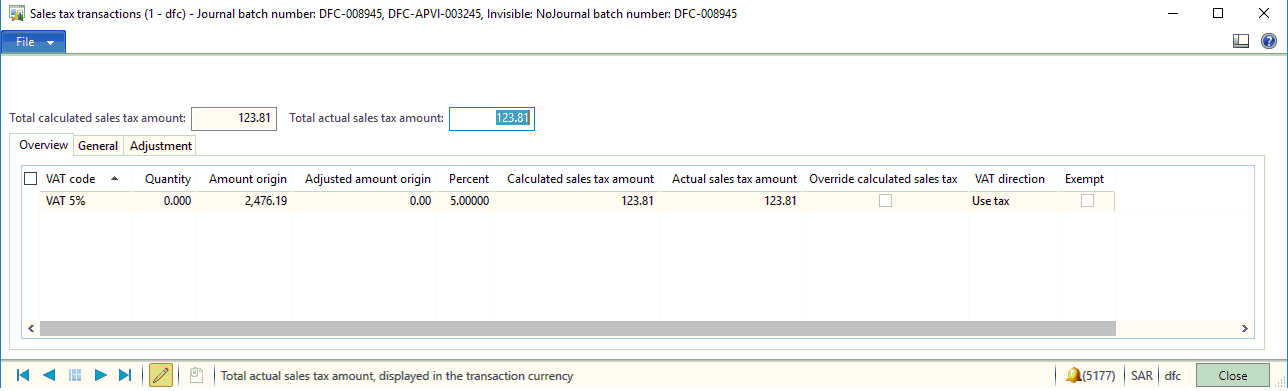
VAT-Issue-for-AX-community.png

*This post is locked for comments

I have the same question (0)
  • Suggested answer
    Pranav Kumar Profile Picture
    Microsoft Employee on at

    Hi,

    On the ledger account setup for VAT posting, have you specified posting type as sales tax/vat?

    Pranav

  • Muhammad Yousaf Profile Picture
    1,339 on at

    Thanks for your reply

    If you could kindly explain this in steps

    Regards

    Yousaf

  • Suggested answer
    Pranav Kumar Profile Picture
    Microsoft Employee on at

    Sure.

    My steps here maynot be exact, but probably will help you figure out the required step:

    1. Check the ledger posting group account for vat 5%. Let's say the account mentioned there is 201010.

    2. Go to GL Module -> Main account and filter out the main account. In this case it will be 201010.

    3. The ledger account form will have a field called posting type.

    4. Specify posting type as Sales Tax. The posting type can be VAT also, I am not too sure, but I believe posting type should be mentioned for sales tax account.

    Hope it helps.

    Pranav

  • Suggested answer
    Ludwig Reinhard Profile Picture
    Microsoft Employee on at

    Hi,

    Do you have all accounts setup in the ledger posting groups form?

    4265.tax.png

    Please check your sales tax code and the linked ledger posting group and verify that your posting setup is complete.

    Best regards,

    Ludwig

  • Suggested answer
    ZvikaR Profile Picture
    184 on at

    It looks like that you are trying to post regular VAT and not use tax?

    Sounds like In one company, by mistake, someone configured the VAT to be recorded as a "use tax" and not as "normal" VAT.

    Go to the sales tax group that is used on the problem transaction (or VAT group) form (depends on the language you use).

    Find in the "setup" box, if in the line for "VAT 5%" code the "use tax" check box is selected - this sounds like a the mistake.

    2018_2D00_03_2D00_18_5F00_15_2D00_20_2D00_03.jpg

  • ZvikaR Profile Picture
    184 on at

    did you manage to resolve your issue?

  • Community Member Profile Picture
    on at

    Hello,

    I am also getting same error and unable to resolve the same. I have AX 2012 R2. I have 3 companies with same set-up out of which in one company I am getting this error.

    Regards

    Sujeet

  • Suggested answer
    ZvikaR Profile Picture
    184 on at

    Can you post screen shots of:

    1. the sales tax group setup

    2. the item sales tax group setup

    3. the resulting sales tax code

    4. the ledger posting group related to the sales tax code.

  • Community Member Profile Picture
    on at

    Hi Zvika

    Please find attached below:

    1. VAT Group Set-up (VDOM):

    Ledger-Posting-Grop.jpg

    2. Item VAT Group (V20_MS):

    Item-VAT-Group.png

    3. Resulting sales tax code (V20):

    VAT-Code.png

    4. Ledger Posting Group for VAT Code V20 (UKVAT_New):

    Ledger-Posting-Grop.jpg

  • Verified answer
    Muhammad Yousaf Profile Picture
    1,339 on at

    Hi Rimalt

    Yeah i did 

    And let me write down the procedure i followed

    i think i have already written in some of the answers, but let me write down here as well 

    Go to GL Setup

    Under VAT (the name could be any based on your Tax setup in your AX Setup)

    Select VAT Codes (You could have a different name)

    (I have setup 3 VAT codes here, you might have more or less)

    VAT 0%     (in my Case, you might have different names all together)

    VAT 5%     (in my Case, you might have different names all together)

    VAT NC     (in my Case, you might have different names all together)

    so i select the first VAT code - VAT 0%

    Then go to inquiries menu --> Select "Include in sales tax group"

    and there is check box named "use tax"  which is already checked - JUST UN CHECK THAT CHECK BOX

    PROBLEM RESOLVED - Good Luck, if you need any further assistance, you can ask me again

Under review

Thank you for your reply! To ensure a great experience for everyone, your content is awaiting approval by our Community Managers. Please check back later.

Helpful resources

Quick Links

Introducing the 2026 Season 1 community Super Users

Congratulations to our 2026 Super Stars!

Meet the Microsoft Dynamics 365 Contact Center Champions

We are thrilled to have these Champions in our Community!

Congratulations to the March Top 10 Community Leaders

These are the community rock stars!

Leaderboard > 🔒一 Microsoft Dynamics AX (Archived)

#1
Joris dG Profile Picture

Joris dG 5

#2
Andrew Jones a1x Profile Picture

Andrew Jones a1x 2

#3
GL-01081504-0 Profile Picture

GL-01081504-0 1

Last 30 days Overall leaderboard

Featured topics

Product updates

Dynamics 365 release plans
