web
You’re offline. This is a read only version of the page.
close
Skip to main content

Notifications

Announcements

No record found.

Community site session details

Community site session details

Session Id :
Microsoft Dynamics NAV (Archived)

SSL connection to Web Client in a Test Environment

(0) ShareShare
ReportReport
Posted on by 100

Hello Experts,

I am trying to configure SSL connection to Web clients, however facing an error.

**Background:

- All the NAV components are installed and deployed in one server, my local machine (laptop).

- This environment is only for demo purpose, so security certificates is issued based on the instruction of Walkthrough: Implementing Security Certificates in a Test Environment.

Steps completed:

How to: Configure Authentication of Microsoft Dynamics NAV Web Client Users

How to: Configure SSL to Secure the Connection to Microsoft Dynamics NAV Web Client

Configuring the Web Browser for the Microsoft Dynamics NAV Web Client

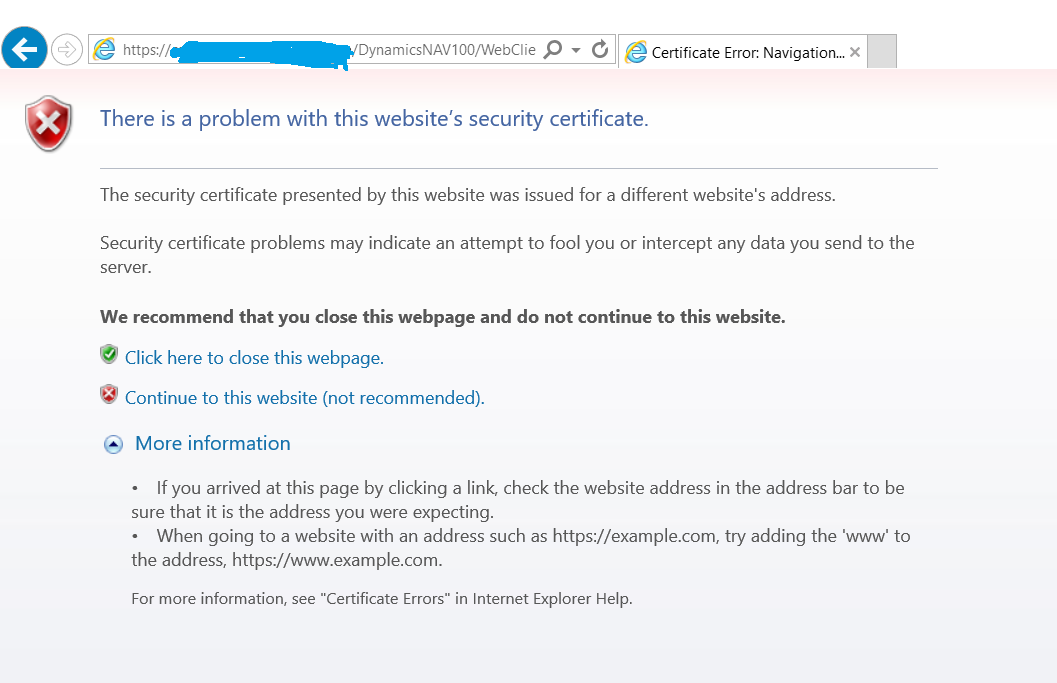
However, when I enter URL (https://<ComputerName>/DynamicsNAV100/WebClient) in IE, I still see below error:
img.png

Even after security certificates (root CA) is imported into IE as administrator, the error is still coming up.

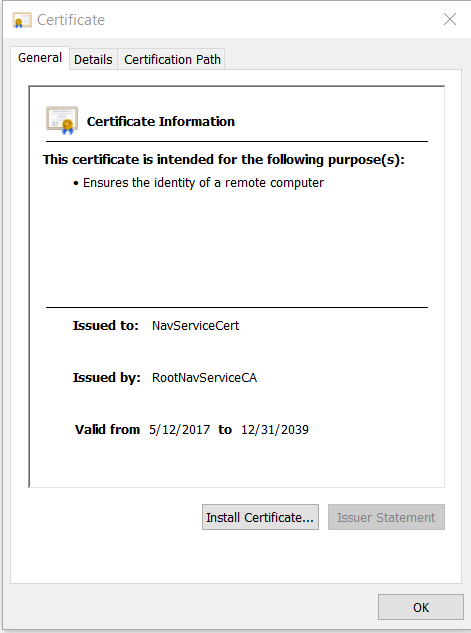
Below is the certification info I use(based on Walkthrough: Implementing Security Certificates in a Test Environment.):
img2.png

I have no idea what is wrong or missing. Could anyone give me advice?

Thanks,

Haruka

*This post is locked for comments

I have the same question (0)
  • Verified answer
    Marcellus Profile Picture
    2,735 on at

    Hi Haruka,

    The Issued To property in your certificate is NavServiceCert but I think this should be your computer name. 

    In this article you linked: How to: Configure SSL to Secure the Connection to Microsoft Dynamics NAV Web Client there is a section called Obtaining an SSL certificate using the IIS Manager. Can you go through that one and add that certificate to your bindings?

  • Suggested answer
    ShanAbeywicrema Profile Picture
    948 on at

    Hello

    Please refer this article ,

    blogs.msdn.microsoft.com/.../

    I also got same problem and I resolved using this article. 

    Regards

    Shan

    Please mark my answer as verified if it helped you to resolve your issue.

  • Haruka Matsumoto Profile Picture
    100 on at

    >Marcell

    Thank you, by making a new certificate with my computer name, IE does not show the error message anymore.

    >Shan

    Thanks, this website helped me a lot.

  • Suggested answer
    ShanAbeywicrema Profile Picture
    948 on at

    It is pleasure to hep you. Thanks

    Please,

    Please mark my answer as verified if it helped you to resolve your issue.

Under review

Thank you for your reply! To ensure a great experience for everyone, your content is awaiting approval by our Community Managers. Please check back later.

Helpful resources

Quick Links

Responsible AI policies

As AI tools become more common, we’re introducing a Responsible AI Use…

Neeraj Kumar – Community Spotlight

We are honored to recognize Neeraj Kumar as our Community Spotlight honoree for…

Leaderboard > 🔒一 Microsoft Dynamics NAV (Archived)

Last 30 days Overall leaderboard

Featured topics

Product updates

Dynamics 365 release plans
