web
You’re offline. This is a read only version of the page.
close
Skip to main content

Notifications

Announcements

No record found.

Community site session details

Community site session details

Session Id :
Microsoft Dynamics CRM (Archived)

Open Quick Create Form in Sub-grid entity on N:N relationship

(0) ShareShare
ReportReport
Posted on by 12

I tried to get the Quick Create Form in the subgrid, but it showed up the message that I need to leave the page to create a new record. Because I have N:N relationship between two entities, it might cause this issue. So I'm looking for a solution to solve it. 

Add-screen.PNGLeave-this-page.PNG

*This post is locked for comments

I have the same question (0)
  • Suggested answer
    Priyesh Profile Picture
    7,396 User Group Leader on at

    Hi,

    Looks like the Quick Create Form hasn't kicked in and the Dynamics is actually trying to get to the Main Form. To ensure your QC form is correctly set, ensure the following -

    1. Quick Create should be enabled at entity level.

    2. The Lookup which points to the current entity (on which you have the sub-grid) is set to Business Required.

    3. Since this is a Unified Interface App, make sure the Quick Create form is also added to the App from the App Designer.

    Hope this helps.

    Thanks.

  • Suggested answer
    gdas Profile Picture
    50,091 Moderator on at

    In addition  make sure you did the relationship fields  mandatory . For more information you can have a look below thread-

    community.dynamics.com/.../open-a-quick-create-form

  • Inogic Profile Picture
    703 on at

    Here, on click of “NEW” button of lookup view you are getting this message because on click of “NEW” button you are redirected to the “Main” form of related entity instead of “Quick Create” form. So, here you need to check below things:

    1. “Allow Quick Create” option must be checked for related entity as shown below:

    1sub-grid-entity.jpg

    2. “Quick create” form must be present on related entity.

    3.Related entity must be added in your Dynamics CRM App. If related entity is not added in your app then, on click of “NEW” you will be redirected to “Main” form of related entity by default instead of Quick Create form.

    Please follow below steps, to add entity in Your Dynamics CRM App(i.e. Sale Hub).

    Here, I have configured N:N relationship between “Account” and “Employee (Custom Entity)”. After that, I have added Subgrid of Employee entity on Account entity form. So, here I need to add this entity in Dynamics CRM App (i.e. Sales Hub).

    Steps to add Entities and their components in Dynamics CRM App:

    Navigate to Settings à My Apps and then Open your App in App Designer as shown below:

    2sub-grid-entity.jpg

    Then, go to Entities from Components and click on add entities icon as shown below.
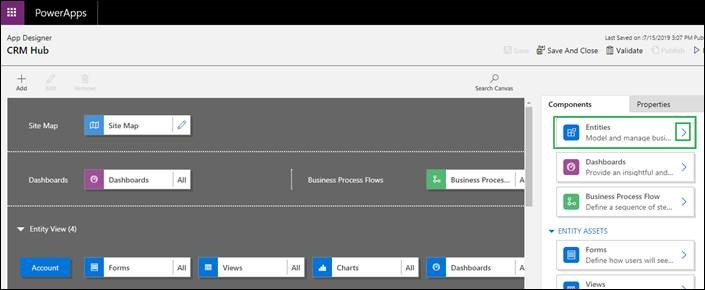
    3sub-grid-entity.jpg

    After that, select related entity from entities list. Here, I have selected “Employee” entity as shown below:
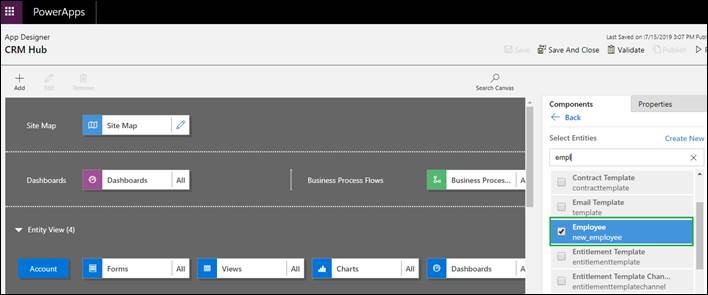
    4sub-grid-entity.jpg

    Once you select your entity from entities list, the entity will be available in “Entity View” of your App as shown below.

    5sub-grid-entity.jpg

    Note: You can select specific components of entity by clicking on them as shown below. But, here to redirect to the “Quick Create” form of the entity on click of “New” button of Subgrid, you must select “Quick Create” form of that entity.

    After that on click of “New” button of lookup view, you will be redirected to “Quick Create” form of related entity instead of “Main” form and will not get this message.

    Hope this helps.                              

    Please mark as verified if the answer is helpful.

    Thanks!

Under review

Thank you for your reply! To ensure a great experience for everyone, your content is awaiting approval by our Community Managers. Please check back later.

Helpful resources

Quick Links

Responsible AI policies

As AI tools become more common, we’re introducing a Responsible AI Use…

Neeraj Kumar – Community Spotlight

We are honored to recognize Neeraj Kumar as our Community Spotlight honoree for…

Leaderboard > 🔒一 Microsoft Dynamics CRM (Archived)

#1
SA-08121319-0 Profile Picture

SA-08121319-0 4

#1
Calum MacFarlane Profile Picture

Calum MacFarlane 4

#3
Alex Fun Wei Jie Profile Picture

Alex Fun Wei Jie 2

Last 30 days Overall leaderboard

Featured topics

Product updates

Dynamics 365 release plans



