web
You’re offline. This is a read only version of the page.
close
Skip to main content

Announcements

No record found.

News and Announcements icon
Community site session details

Community site session details

Session Id :
Microsoft Dynamics AX (Archived)

Purchase Requisition Workflow History Report

(0) ShareShare
ReportReport
Posted on by 12

Hello,

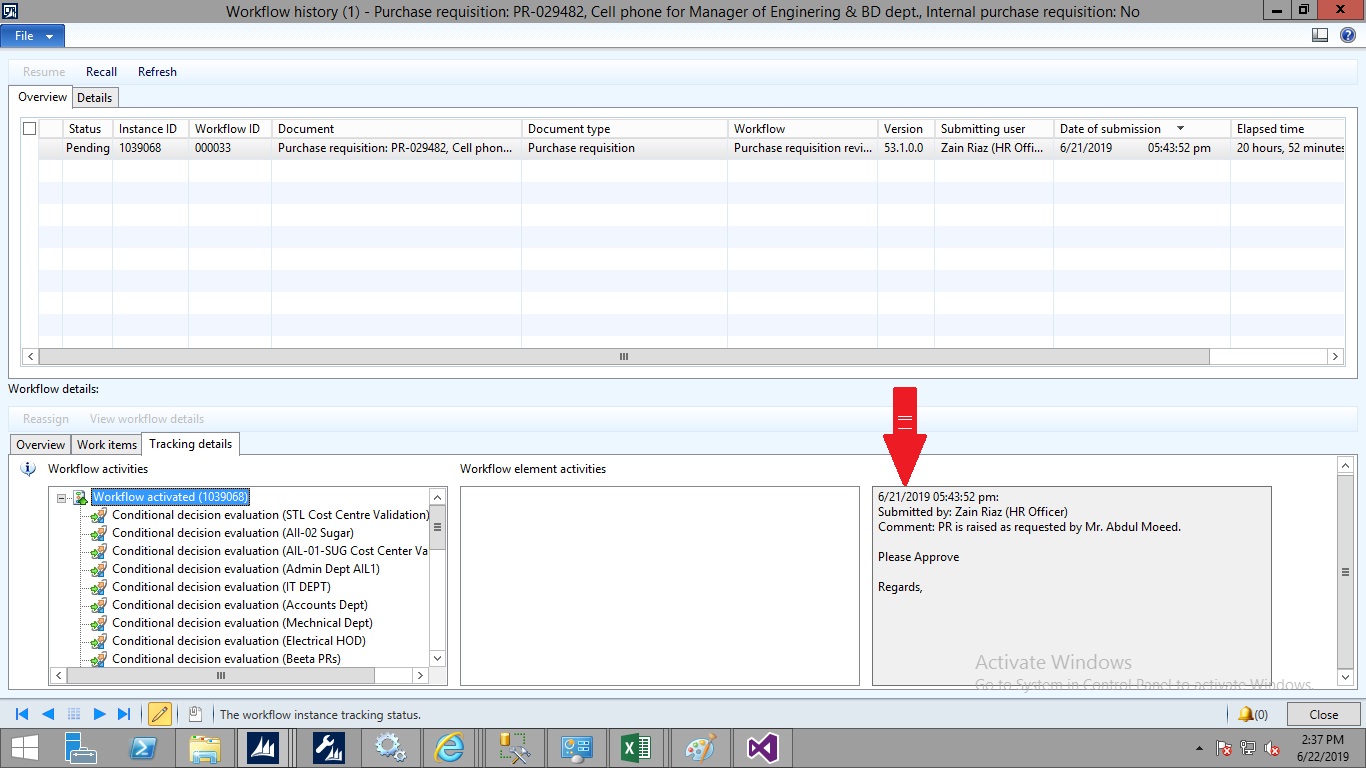
I am trying to developssrs report in which user input PR Number as parameter to get workflow steps(Status,Approved By,Approved Date).

All the required info is available in "WorkflowStatus" form but I am unable to locate tables in which these info is saved. as you can see in image below. Please guide me if anyone already have developed this kind of report.PRHistory.jpg
*This post is locked for comments

I have the same question (0)
  • Suggested answer
    Satish Panwar Profile Picture
    14,673 Moderator on at

    Hi Sufian,

    You need to join few tables to get this going (see below). There is already a workflow history form (Inquiry screen) that you should leverage rather than trying to create this in a report because this doesn't look like a typical request from business. Propose alternate way and see if you can avoid building custom report. See if these tables are still valid in your AX version.

    WorkflowTrackingStatusTable

    WorkflowTrackingTable

    WorkflowTrackingWorkItem

    If not, just right click the form, setup and try to identify the query behind the form.

  • Sufian Ahmad Profile Picture
    12 on at

    Hi Satish,

    thanks for your suggestion but I need to develop this report because I can not give access to user on above form. I have checked above mentioned tables by you. These tables still exists but I am not getting relations between these tables with each other. Please mention path of "WorkFlow history Form".

  • Suggested answer
    Sufian Ahmad Profile Picture
    12 on at

    I have created a job in ax, which take PR number as parameter and display all approvals datetime, user and user's full name. Code is given below.

    static void WorkFlowStatusReportJob(Args _args)
    {
        WorkflowTrackingTable           trackingTable;
        WorkflowElementTable            elementTable;
        WorkflowTrackingStatusTable     trackingStatusTable;
       // WorkflowTrackingStatusTable     trackingStatusTable2;
        PurchReqTable                   purchTable;
        UserInfo                        userInfo;
    
        while select RecId from trackingStatusTable join purchTable where
            trackingStatusTable.ContextRecId == purchTable.RecId
            && trackingStatusTable.ContextTableId == purchTable.TableId
            join createdDateTime, WorkflowElementTable, User, Name from trackingTable where
            trackingTable.WorkflowTrackingStatusTable == trackingStatusTable.RecId
            && trackingTable.TrackingType == WorkflowTrackingType::Approval
            join name from userInfo where trackingTable.User == userInfo.id
            join Name from elementTable where trackingTable.WorkflowElementTable == elementTable.RecId
            && purchTable.PurchReqId == '‪‪‪PR-029449'
        {
            
            info(strFmt('%1 - %2 - %3 - %4',trackingTable.User,userInfo.name, elementTable.Name, trackingTable.createdDateTime));
            
        }
    }


  • Satish Panwar Profile Picture
    14,673 Moderator on at

    great Sufian. Do you have any further questions on this request or you are all set ?

  • Sufian Ahmad Profile Picture
    12 on at

    Hello Satish,

    above code is giving me all required information. So I do not have any further question.

    Thanks

  • Satish Panwar Profile Picture
    14,673 Moderator on at

    great. If my responses above helped you in identifying the information needed, please help verify the answer for other community members. Also mark your answer as verified as well as it's working for you.

  • Michael Spalding Profile Picture
    15 on at

    Sufian,

    Is it possible to edit the script you created to generate a report for P.O. as well ?

Under review

Thank you for your reply! To ensure a great experience for everyone, your content is awaiting approval by our Community Managers. Please check back later.

Helpful resources

Quick Links

Introducing the 2026 Season 1 community Super Users

Congratulations to our 2026 Super Stars!

Meet the Microsoft Dynamics 365 Contact Center Champions

We are thrilled to have these Champions in our Community!

Congratulations to the April Top 10 Community Leaders

These are the community rock stars!

Leaderboard > 🔒一 Microsoft Dynamics AX (Archived)

#1
CP04-islander Profile Picture

CP04-islander 39

#2
Michel ROY Profile Picture

Michel ROY 14

#3
imran ul haq Profile Picture

imran ul haq 8

Last 30 days Overall leaderboard

Featured topics

Product updates

Dynamics 365 release plans
