web
You’re offline. This is a read only version of the page.
close
Skip to main content

Notifications

Announcements

No record found.

Community site session details

Community site session details

Session Id :
Microsoft Dynamics GP (Archived)

"the accounts receivable distribution(s) does not equal the actual amount" when posting Receivable transactions

(0) ShareShare
ReportReport
Posted on by

 Hello,

I have a batch with some receivable transactions created via Integration manager. They all fail to post with a message "the accounts receivable distribution(s) does not equal the actual amount". the sum of the distributions seems to match the amount the amount of the transaction, so I'm at a loss to find the cause of this. 

Here's an example of the Receivables Posting Journal.
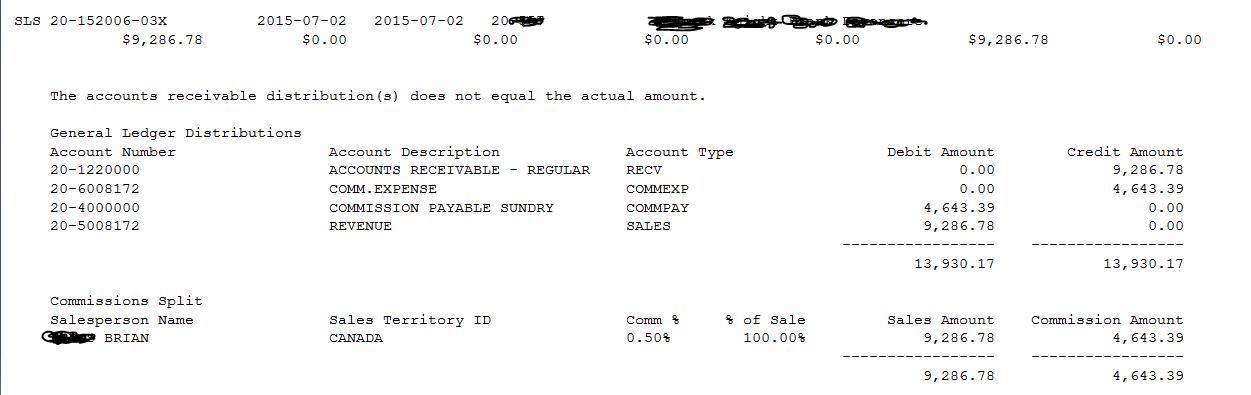
Receivables-Posting-Journal.PNG


*This post is locked for comments

I have the same question (0)
  • Suggested answer
    Bill Campbell Profile Picture
    12 on at

    Can you open the transaction for this distribution and post the screen.  Knowing that it comes from Integration Manager opens the possibility that you have entered data into the form and not accounted for it in the distribution.

    Another option is for you to open the distribution button and click on default for this transaction. This can 'kick the data' in different buckets that align with how the form data is entered.

    Post the results.  Hope this helps.

  • Community Member Profile Picture
    on at

    07_2D00_152305_2D00_26X-Receivable-Transaction-Entry.PNG

    Distribution.PNG

    Commissions.PNG

    Here are the screens from the GP entry. Resetting to Default did work, although the amounts didn't change at all. Only the order of entries had changed I had to reenter the all account numbers except 20-1220000. I still need to figure out what's wrong with the original data rather than having to ask users to reset to default the distribution for every transaction. Here's an example of another document, where the default doesn't work. It sums up all COMMEXP accounts.

    07_2D00_152305_2D00_26X-Receivable-Transaction-Entry.PNG

    BEFORE DEFAULT

    07_2D00_152305_2D00_26X-Distribution-before-reset-to-Default.PNG

    AFTER DEFAULT

    07_2D00_152305_2D00_26X-Distribution-after-reset-to-Default.PNG

  • Suggested answer
    Bill Campbell Profile Picture
    12 on at

    Ok, so if this is the orginal data, then a CREDIT to RECV would be a CREDIT Memo not an invoice.

    Transaction default was likely DEBIT to RECV and CREDIT to SALES.

    Have a look at the source data and see if that works better.

  • Suggested answer
    Bill Campbell Profile Picture
    12 on at

    I should note that the reason for the error message is that the system does not see this as a typical Invoice - and does not really know what else to tell you other than to look at the distribution and correct the problem there.

  • Suggested answer
    Community Member Profile Picture
    on at

    Now that you mentioned it, I do see that the RECV switched sides on the default reset. I'll correct my integration  with changing the transaction type to CREDIT MEMO when the RECV is -ve and post the update. Thank you

  • Bill Campbell Profile Picture
    12 on at

    That should make a huge difference.  If the RECV amount was intended as a refund / return then that makes all the other numbers make sense.

  • Community Member Profile Picture
    on at

    I've tried to set the Document Type to "Credit Memo" but my integration then returns an error: "The selected distribution type is invalid for this document type. Please select another distribution type".

  • Community Member Profile Picture
    on at

    Also the the, RECV amount is not really a refund or a credit, but rather a reversal of the original amount. The way we handle payments is we originally enter an invoice without taxes for the purpose of tracking unpaid transactions. When a payment arrives, we reverse the original invoice and reenter it with taxes.

  • Suggested answer
    Bill Campbell Profile Picture
    12 on at

    CreditNote_5F00_Distribution.GIF

    When you reverse an INVOICE in GP it is done by recording a CREDIT MEMO and the distribution should look something like this.

    Your first distribution is correct, but the error is in SALES line - that TYPE should be CRNOTE - even when posted to the SALES GL Account.

    Documents have to have specific distribution types and this is where Integration Manager is a bit of a pain when you are trying to do all types of transaction from a single source doucment all in one pass.

    I have been know to break them down so that if the amount in the 1200 account (my case) is Negative ( - ) I will filter that out and run it in a second IM file.  Just my preference.

    Hope this helps.

  • Community Member Profile Picture
    on at

    Thank you. One problem though: in the Integration manager there's no CRNOTE Distribution type. There's CRMEMO (19), but when I try to use it, I still get the same message "The selected distribution type is invalid for this document type. Please select another distribution type".

Under review

Thank you for your reply! To ensure a great experience for everyone, your content is awaiting approval by our Community Managers. Please check back later.

Helpful resources

Quick Links

Responsible AI policies

As AI tools become more common, we’re introducing a Responsible AI Use…

Neeraj Kumar – Community Spotlight

We are honored to recognize Neeraj Kumar as our Community Spotlight honoree for…

Leaderboard > 🔒一 Microsoft Dynamics GP (Archived)

#1
Community Member Profile Picture

Community Member 2

#2
mtabor Profile Picture

mtabor 1

#2
Victoria Yudin Profile Picture

Victoria Yudin 1

Last 30 days Overall leaderboard

Featured topics

Product updates

Dynamics 365 release plans



