web
You’re offline. This is a read only version of the page.
close
Skip to main content

Announcements

No record found.

News and Announcements icon
Community site session details

Community site session details

Session Id :
Microsoft Dynamics CRM (Archived)

Role Based forms in a branched Business Process Flow

(0) ShareShare
ReportReport
Posted on by 50

Hi All,

I would like to get some advice on an issue that I am struggling a bit with.

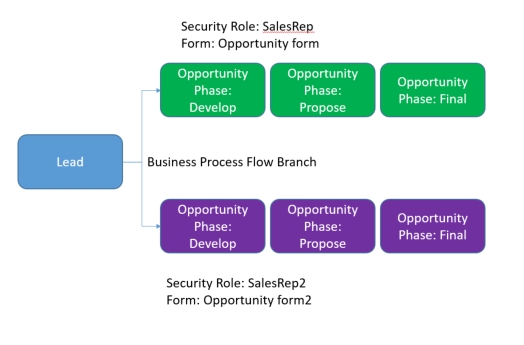
Attached you will see the quick design of the scenario I am looking at.

There is a Business Process Flow with the 4 stages (Qualify- Lead, Develop, Propose and Final - Opportunity)
The requirement is that for a group of users there is different process required for managing the opportunities.
So the Qualify stage will remain untouched and be the same for all the users and for the Opportunity a group of users will need a different Opportunity form.
Ideally I would like to avoid having a step in this to change the Business Process manually

I was thinking of the following:

- Branch the Business Process Flow so we have to paths
- create a new Security Role called Salesrep2
- create a new main form (form2) for the opportunity (Security Role = Salesrep2)
- the original main form on the opportunity is usable by everyone (All Security Roles, this maybe needs to change?)
- change the form order that form2 will be on top of the ordering


Is this a proper way of doing this and did I miss any areas which potentially need to have some thoughts as well?
Please advice!

Regards,

JeroenBusiness-Process-Flow.jpg
*This post is locked for comments

I have the same question (0)
  • Suggested answer
    JeroenS Profile Picture
    50 on at

    The steps above seems to be the route to take.

  • ThomasN Profile Picture
    3,190 on at

    Hi Jeroen,

    Thanks for reaching out. This all looks good, but simplest is to create two process flows and assign them like the forms to each security role accordingly. One will need to be default so something appears if new user is added but no security role matches, etc.

    The other thing is you can't branch BPF on related fields, the logic only evaluates fields on the record.  Good Luck.

    -Tom

Under review

Thank you for your reply! To ensure a great experience for everyone, your content is awaiting approval by our Community Managers. Please check back later.

Helpful resources

Quick Links

Introducing the 2026 Season 1 community Super Users

Congratulations to our 2026 Super Stars!

Congratulations to our 2025 Community Spotlights

Thanks to all of our 2025 Community Spotlight stars!

Leaderboard > 🔒一 Microsoft Dynamics CRM (Archived)

#1
Varsha deshpande Profile Picture

Varsha deshpande 5

#2
NeerajPawar Profile Picture

NeerajPawar 2

#2
jlattimer Profile Picture

jlattimer 2

Last 30 days Overall leaderboard

Featured topics

Product updates

Dynamics 365 release plans
