web
You’re offline. This is a read only version of the page.
close
Skip to main content

Notifications

Announcements

No record found.

Community site session details

Community site session details

Session Id :
Customer experience | Sales, Customer Insights,...
Suggested Answer

Can't load or Create Domains (Domain authentication): There's a problem communicating with the server

(0) ShareShare
ReportReport
Posted on by 115

Hi Everyone

For our customer we're receiving the following issue: When we're trying to load the list of domains, we get an error message. 

  • "There's a problem communicating with the server"

We got this error since we've changed the URL of our Dynamics Environment. It looks like this: 

domains.png 

I tried to retrieve the domains trough Advanced Find. Same error here. However, this time we get a log file: 
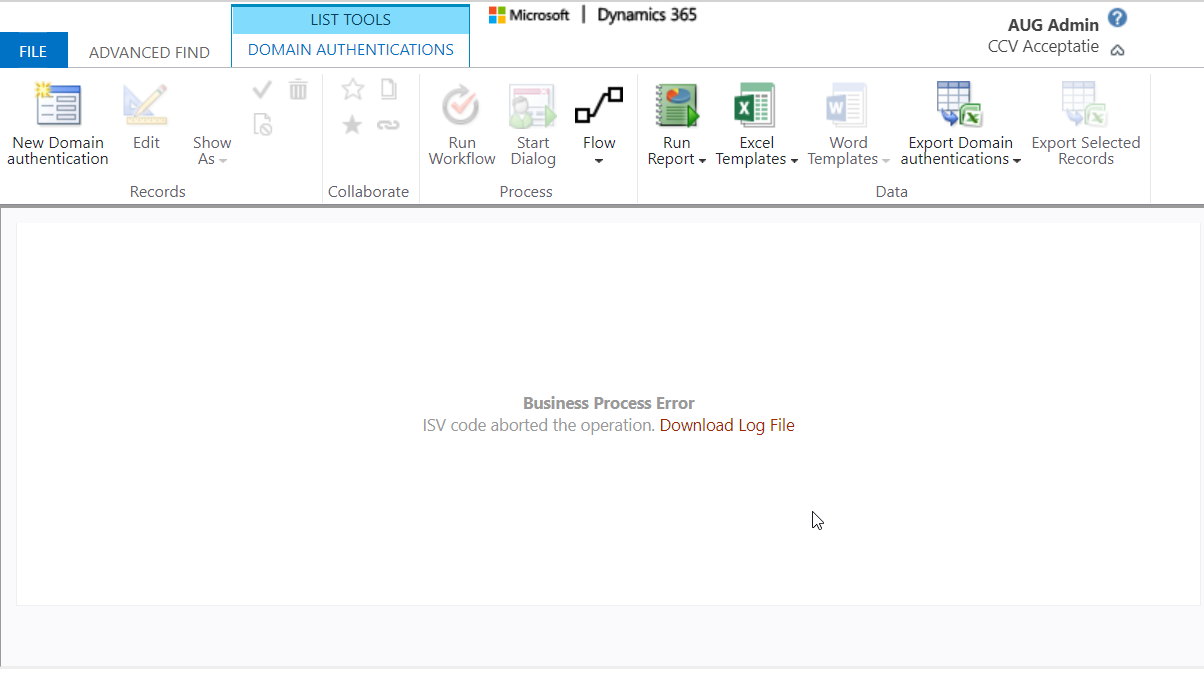
domains_5F00_advanced_5F00_find.png

Log file content:

Unhandled exception: 
Exception type: System.ServiceModel.FaultException`1[Microsoft.Xrm.Sdk.OrganizationServiceFault]
Message: Exception 'InvalidPluginExecutionException' occured: There's a problem communicating with the server. Please try again. , CorrelationId: 5da59574-46e8-4a11-8cc8-923dadaa1808Detail: 

  45b00625-c86c-4a22-b724-cf5fb1d56b72
  -2147220891
  
    
      OperationStatus
      0
    
    
      SubErrorCode
      -2146233088
    
  
  http://go.microsoft.com/fwlink/?LinkID=398563&error=Microsoft.Crm.CrmException:80040265&client=platform
  Exception 'InvalidPluginExecutionException' occured: There's a problem communicating with the server. Please try again. , CorrelationId: 5da59574-46e8-4a11-8cc8-923dadaa1808
  2021-03-24T12:53:46.7945533Z
  false


[Microsoft.Dynamics.Crm.MarketingPlugins: Microsoft.Dynamics.Crm.MarketingPlugins.Plugins.DomainSetup.RetrieveDomainPlugin]
[263e2e56-601f-4fcc-8ff1-d99229500924: Microsoft.Dynamics.Crm.MarketingPlugins.Plugins.DomainSetup.RetrieveDomainPlugin: RetrieveMultiple of msdyncrm_setupdomain]

	
	2021-03-24T12:53:40.9604819Z :: RetrieveDomainStrategy - starting...
	User language is: 1033
	2021-03-24T12:53:46.6948772Z :: HTTP request failed with exception 'The remote server returned an error: (404) Not Found.'
	2021-03-24T12:53:46.6948772Z :: Disconnected organization response received. Status code NotFound
	2021-03-24T12:53:46.6948772Z :: Logging exception with Message:Disconnected organization response received.
	Begin: GetLocalizedMessage
	Retrieving localized message using the user language
	User language is: 1033
	User language is the same as default language: 1033
	Retrieving localized message using the default language
	Begin: RetrieveJsonWebResourceByName, languageCode: 1033
	Webresources returned from server. Count: 1
	End: RetrieveJsonWebResourceByName , webresourcePath: msdyncrm_/Localizations/DynamicsMarketing.plugins1033
	Message value: There's a problem communicating with the server. Please try again.  
	End: GetLocalizedMessage, message: There's a problem communicating with the server. Please try again. 
	2021-03-24T12:53:46.7730158Z :: Exception 'InvalidPluginExecutionException' occured: There's a problem communicating with the server. Please try again. , CorrelationId: 5da59574-46e8-4a11-8cc8-923dadaa1808


Anyone else experienced this issue? 

Thanks a lot in advance!

Kind regards
Sven V. 

I have the same question (0)
  • Suggested answer
    Nya Profile Picture
    29,060 on at

    Hi Sven,

    Before you changed your URL of your Dynamics Environment, have you registered any custom plug-ins with Plugin Registration tool?

    If so, try to re-register them and select the new Organization Name you set.

     pastedimage1616661678072v1.png

    If this helped you, I'd appreciate it if you'd mark this as a Verified Answer, which may in turn help others as well.

    Best Regards,

    Nya

  • Sven Vervynckt Profile Picture
    115 on at

    Hi Nya, thank you for your prompt reply.

    We don't have any custom Plugins registered on this entity. The error thrown is from an out-of-the-box Microsoft Plugin.

    Kind regards

    Sven V.

  • Suggested answer
    Nya Profile Picture
    29,060 on at

    Hi,

    I wasn't able to reproduce your problem, the only thing I can say for sure is that your Error Code can be converted to 0x80040265.

    I have done some searching and there is a lot of feedback from users with the same Error Code problem, but there is no very effective solution.

    Here is a documentation about debugging a plug-In

    Debug a plug-In | Microsoft Docs


    In addition to the plug-In, it is also recommended that you see if there is a workflow or BPF for this part, and if so, try deactivating them first.


    If the problem persists, please create a ticket for MS to request more help.


    Best Regards,

    Nya

  • Suggested answer
    Sven Vervynckt Profile Picture
    115 on at

    It turned out that it's not allowed to change an URL for a Dynamics Marketing environemnt. 

    See official documentation here.

    In the end we had no other solution then re-installing Dynamics Marketing

    Kind regards

    Sven V. 

  • Nya Profile Picture
    29,060 on at

    Thank you for your answer. It helped me to expand my knowledge on the issue!

    Best Regards,

    Nya

Under review

Thank you for your reply! To ensure a great experience for everyone, your content is awaiting approval by our Community Managers. Please check back later.

Helpful resources

Quick Links

Responsible AI policies

As AI tools become more common, we’re introducing a Responsible AI Use…

Neeraj Kumar – Community Spotlight

We are honored to recognize Neeraj Kumar as our Community Spotlight honoree for…

Leaderboard > Customer experience | Sales, Customer Insights, CRM

#1
Tom_Gioielli Profile Picture

Tom_Gioielli 170 Super User 2025 Season 2

#2
#ManoVerse Profile Picture

#ManoVerse 61

#3
Gerardo Rentería García Profile Picture

Gerardo Rentería Ga... 52 Most Valuable Professional

Last 30 days Overall leaderboard

Product updates

Dynamics 365 release plans
