web
You’re offline. This is a read only version of the page.
close
Skip to main content

Announcements

No record found.

News and Announcements icon
Community site session details

Community site session details

Session Id :
Small and medium business | Business Central, N...
Answered

Fixed Asset Depreciation

(0) ShareShare
ReportReport
Posted on by

Hi Everyone!

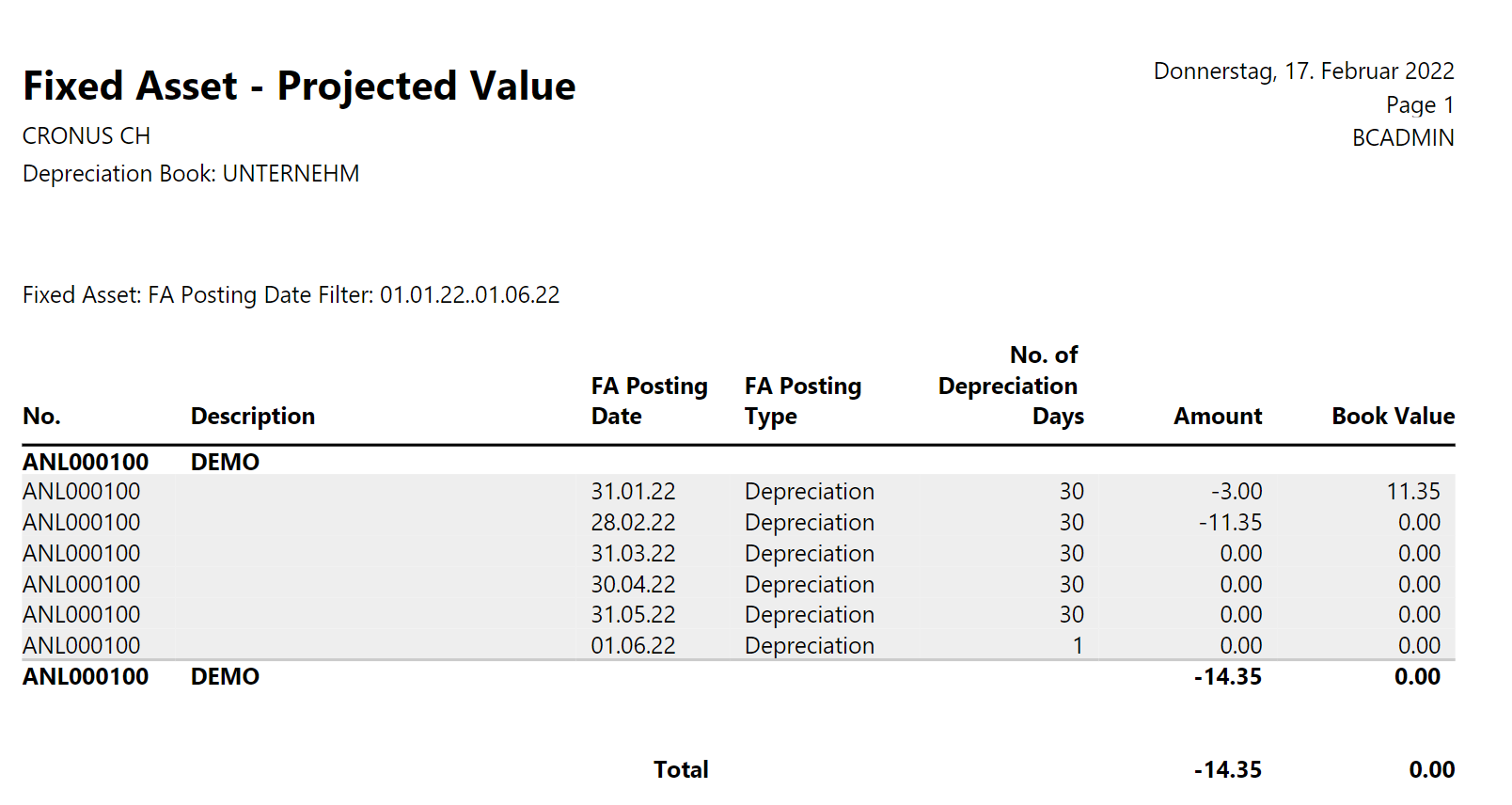
Can someone explain to me, why the following depreciation is not straight line as it's supposed to?

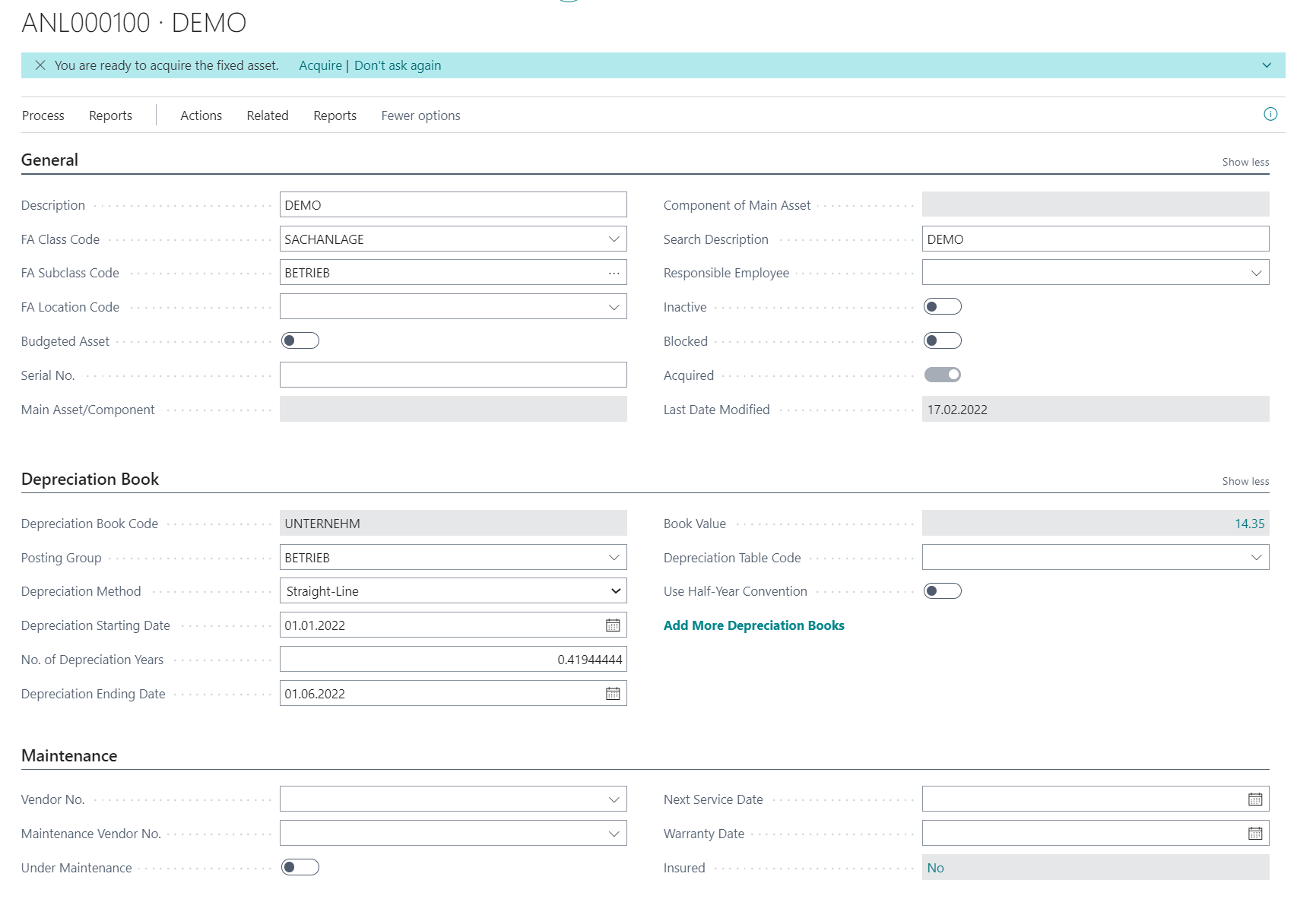
From my understanding, if I add the Depreciation Starting Date + the Depreciation End Date the System automatically calculates the depreciation days.

Therefore it should be 6 months with let's say 30days a month so = 180 days total.

I want my depreciation monthly and since it should be linear, the values per month (6 months = 14.35 / 6 = 2.39 per month).

Am I doing anything wrong ?

Thank you so much for your help!
pastedimage1645113847750v5.png

pastedimage1645113866900v6.png

pastedimage1645113830138v4.png

pastedimage1645113788214v3.png

I have the same question (0)
  • Verified answer
    Rob F. Profile Picture
    520 on at

    I was reading through the hotfix notes for the upcoming 19.4 minor release and noticed this:

    pastedimage1645116248463v1.png

    I wonder if it could be related to the issue you've described.

  • Verified answer
    Dallefeld Profile Picture
    233 User Group Leader on at

    I had an associate who posted, just this week, on navug.com about this projected value report.

    He found that changing the starting date to the last day of the month, changed his report. However his issue was the splitting of the first month into two pieces, not the amount per period.

    On another note, If you enter starting date and number of years, the ending date is calculated. And 1/1 to 6/1 is only five months.

Under review

Thank you for your reply! To ensure a great experience for everyone, your content is awaiting approval by our Community Managers. Please check back later.

Helpful resources

Quick Links

Introducing the 2026 Season 1 community Super Users

Congratulations to our 2026 Super Stars!

Meet the Microsoft Dynamics 365 Contact Center Champions

We are thrilled to have these Champions in our Community!

Congratulations to the April Top 10 Community Leaders

These are the community rock stars!

Leaderboard > Small and medium business | Business Central, NAV, RMS

#1
OussamaSabbouh Profile Picture

OussamaSabbouh 2,086 Super User 2026 Season 1

#2
YUN ZHU Profile Picture

YUN ZHU 1,290 Super User 2026 Season 1

#3
AndrewThomas81 Profile Picture

AndrewThomas81 1,218

Last 30 days Overall leaderboard

Featured topics

Product updates

Dynamics 365 release plans