I am facing an issue while deploying a package on an on-prem UAT.
My package passes the preparation stage successfully but it is failing when I proceed with Update Environment.
I have tried creating package from several different machines i.e. a fresh environment with only required customization, cloud development environment but unfortunately its failing in the deployment stage.
In logs from LCS after failure i am getting this error
Could not find FileLocations.xml in the package '[ModelName]'
I have checked the events log of Orchestrator and AOS machines but there is reason for this failure. However I got below errors from these machines.
It would be a great favor if someone can help me in this regard.
The description for Event ID 65002 from source Microsoft-Dynamics-AX-LocalAgent cannot be found. Either the component that raises this event is not installed on your local computer or the installation is corrupted. You can install or repair the component on the local computer.
If the event originated on another computer, the display information had to be saved with the event.
The following information was included with the event:
SVWERPORCHSRV01
Task OrchestrationService.DeployModulesRunnerTask,OrchestrationService failed for command id a4f91f00-604e-40c3-90a1-bf44bba13bd5
System.InvalidOperationException: Unable to deploy modules
at OrchestrationService.DeployModulesRunnerTask.Run(OrchestratorRunbookResource runbookResource, String commandId, String jobId, String runbookTaskId)
at OrchestrationService.OrchestrationJobManager.<>c__DisplayClass23_0.<CreateNewTaskThread>b__4()
0
ErrorPrettify
E:\Work\70\s\Source\LocalAgentEvents\LocalAgentEventSource.cs
79
The publisher has been disabled and its resource is not available. This usually occurs when the publisher is in the process of being uninstalled or upgraded
---------------------------------------------------------------------------------------------------------------------------------------------------------------------------------------------------------------------
The description for Event ID 65002 from source Microsoft-Dynamics-AX-LocalAgent cannot be found. Either the component that raises this event is not installed on your local computer or the installation is corrupted. You can install or repair the component on the local computer.
If the event originated on another computer, the display information had to be saved with the event.
The following information was included with the event:
SVWERPORCHSRV01
Module aos failed
System.InvalidOperationException: Aos app is not healthy
at AOSSetupHybridCloud.Program.Main(String[] args)
at System.AppDomain._nExecuteAssembly(RuntimeAssembly assembly, String[] args)
at System.AppDomain.ExecuteAssembly(String assemblyFile, String[] args)
at System.AppDomain.ExecuteAssembly(String assemblyFile, String[] args)
at SetupCore.SetupManager.LaunchProcessInAppDomain(String startupExe, String workingDir, String currentFolder, String[] moduleArgs)
at SetupCore.SetupManager.<>c__DisplayClass12_1.<InvokeModules>b__6()
0
ErrorPrettify
E:\Work\70\s\Source\LocalAgentEvents\LocalAgentEventSource.cs
79
The publisher has been disabled and its resource is not available. This usually occurs when the publisher is in the process of being uninstalled or upgraded
The description for Event ID 56002 from source Microsoft-Dynamics-AX-SetupInfrastructureEvents cannot be found. Either the component that raises this event is not installed on your local computer or the installation is corrupted. You can install or repair the component on the local computer.
If the event originated on another computer, the display information had to be saved with the event.
The following information was included with the event:
SVWERPORCHSRV01
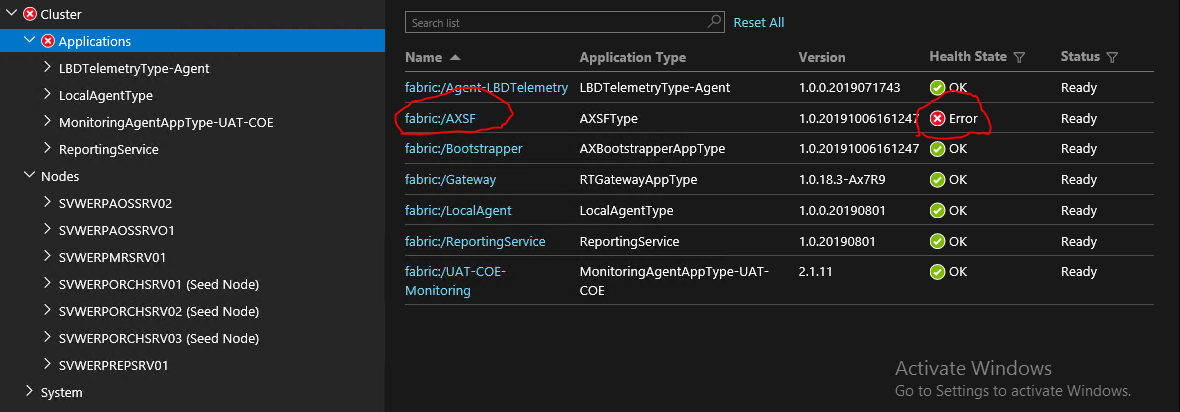
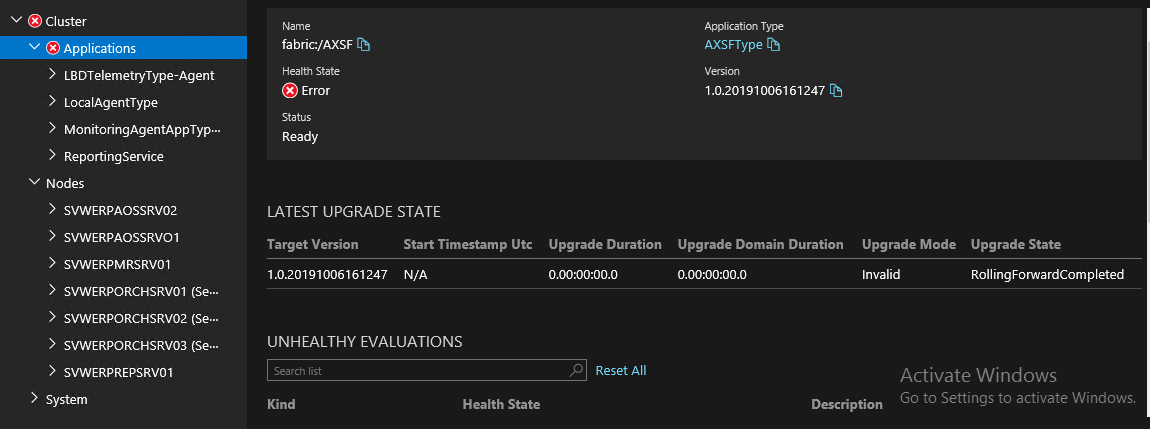
Application fabric:/AXSF is not OK after 20 minutes
at System.Environment.GetStackTrace(Exception e, Boolean needFileInfo)
at System.Environment.get_StackTrace()
at SetupInfrastructure.SetupInfrastructureEventsHelper.ErrorPrettify(SetupInfrastructureEventSource source, Exception ex, Int32 errorCode, String format, Object[] values)
at SetupInfrastructure.ServiceFabricApplicationSetupManager`1.<CheckApplicationState>d__32.MoveNext()
at System.Threading.ExecutionContext.RunInternal(ExecutionContext executionContext, ContextCallback callback, Object state, Boolean preserveSyncCtx)
at System.Threading.ExecutionContext.Run(ExecutionContext executionContext, ContextCallback callback, Object state, Boolean preserveSyncCtx)
at System.Runtime.CompilerServices.AsyncMethodBuilderCore.MoveNextRunner.Run()
at System.Threading.Tasks.AwaitTaskContinuation.RunOrScheduleAction(Action action, Boolean allowInlining, Task& currentTask)
at System.Threading.Tasks.Task.FinishContinuations()
at System.Threading.Tasks.Task`1.TrySetResult(TResult result)
at System.Threading.Tasks.TaskCompletionSource`1.TrySetResult(TResult result)
at System.Threading.Tasks.TaskCompletionSource`1.SetResult(TResult result)
at System.Fabric.Interop.AsyncCallOutAdapter2`1.Finish(IFabricAsyncOperationContext context, Boolean expectedCompletedSynchronously)
at System.Fabric.Interop.SharedNativeObject`1.TryAcquireAndInvoke(Action`1 action)
0
ErrorPrettify
E:\Work\72\s\Source\SetupInfrastructure\SetupInfrastructureEventsHelper.cs
25
The publisher has been disabled and its resource is not available. This usually occurs when the publisher is in the process of being uninstalled or upgraded
In Service Fabric Explorer fabric/AXSF is in error state