web
You’re offline. This is a read only version of the page.
close
Skip to main content

Announcements

News and Announcements icon
Community site session details

Community site session details

Session Id :
Small and medium business | Business Central, N...
Suggested Answer

Business Central Vendor Deferral Entries

(5) ShareShare
ReportReport
Posted on by 56
Hi all,
 
Our team is using the Deferral Module in Business Central to defer prepaid entries via Purchase Invoices. 
 
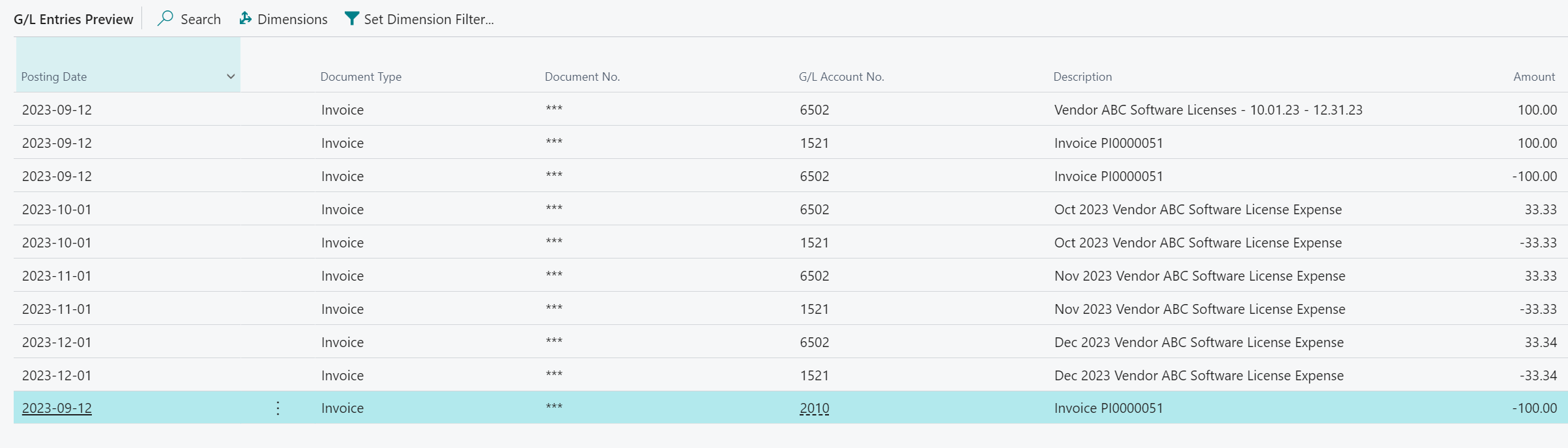
We've encountered a couple issues here, namely, the fact that Business Central does an /in and out/ entry (Dr & Cr expense account for the prepaid addition), as well as the Invoice # as a description for the /out/ portion of the entry to the expense account (which makes it confusing as to what that entry relates to). I've posted a screenshot below, GL 6502 is our expense account, 1521 is the prepaid account (deferral account). In this example scenario I'm trying to defer $100 of expense over the 3 month period of Oct - Dec 2023.
 
I have 2 questions: 
 
1. Is there any way to prevent Business Central from doing an /in and out/ entry in the posting month? Line 1 & 3 are unnecessary as they net out and just create extra transactions. 
2. If there's no way to prevent this behavior, is there any way to change the description on Line 2 & 3 (aside from using the Edit function after it's posted)? I'd like them to have the same description as Line 1 but instead it seems to default to what the assigned Purchase Invoice # is. This way it will be clear that these 2 lines net each-other out in GL 6502 (while the balance nets out, it's not clear that these 2 entries are related to each-other based on description). Relevant screenshots below. 
 

G/L Entries Preview
 
Purchase Invoice Description
 
Deferral Schedule Descriptions
I have the same question (0)
  • JP-10032319-0 Profile Picture
    7 on at
    Have you found a solution for this yet?
  • Suggested answer
    YUN ZHU Profile Picture
    102,361 Super User 2026 Season 1 on at
    As far as I know, this is standard behavior and is not recommended to be modified by customization because of the high risk.
     
    Thanks.
    ZHU
  • Suggested answer
    Saif Ali Sabri Profile Picture
    2,791 Moderator on at

    “AI was used in this reply”.
    Solution for Business Central Vendor Deferral Entries Issue

    Your concerns involve the unnecessary "in and out" transactions and the default description applied to the deferral entries. Below are solutions for both issues:

    1. Prevent "In and Out" Entries in the Posting Month

    Unfortunately, Business Central requires the initial expense posting before deferring it, meaning that the Dr/Cr to the expense account in the posting month is system-driven and cannot be disabled. However, you can try these workarounds:

    Option 1: Post Directly to the Prepaid (Deferral) Account

    • Instead of posting the expense initially to GL 6502 (expense account), post it directly to GL 1521 (prepaid/deferral account).
    • This way, Business Central will only generate the deferral entries for the following periods and skip the in-and-out posting to the expense account.
    • However, this requires adjusting your default account selection for vendor invoices.

    Option 2: Use Accruals Instead of Deferrals

    • If you want cleaner journal entries, you might consider setting up accrual postings instead of deferrals.
    • With accruals, you would post directly to 1521 (Prepaid) and manually recognize the expense monthly via a Recurring Journal.

    2. Change the Description of the Deferral Entries

    Since Business Central defaults the description of the deferral entry to the Invoice No., you cannot change this through standard settings. However, you have these options:

    Option 1: Modify Deferral Template

    • Go to Deferral Templates (Deferral Templates page).
    • In the "Description" field, you can try adding a dynamic reference, but standard BC does not allow extensive customization here.

    Option 2: Use a Customization (Extension) to Override the Description

    • A developer can create a Business Central Extension that modifies the "Description" field in deferral entries to match the original transaction description (instead of the invoice number).
    • This requires modifying Codeunit 1720 - Deferral Posting Management to dynamically copy the description from the purchase invoice line.

    Option 3: Manually Update the Entries

    • Unfortunately, the only built-in method is manually editing the descriptions after posting, which is time-consuming but feasible for small volumes.

    Conclusion & Best Approach

    • Prevent "In and Out" Posting?Post directly to the deferral account (1521) instead of the expense account (6502).
    • Change Deferral Entry Description?Requires a customization or manual editing.
    Would you like guidance on setting up an extension to automate the description update?
  • Suggested answer
    Gavin Profile Picture
    2,510 on at
    Hi,
     
    You can change the description of Line 1 by personalising the Purchase Invoice page and adding the "Posting Description" field. This will default to the Invoice number which you can overtype with the detail you like.
     
    See below. This is the default text you can overtype.


    So I overtype is as per below:


    Which is now reflected in the postings:
     
     
    Hope this helps


    Thanks
    Gavin
  • Gerardo Rentería García Profile Picture
    27,507 Most Valuable Professional on at
    Hi
    You can modify the description by subscribing to this event.
    Best
    GR
  • Suggested answer
    Khushbu Rajvi. Profile Picture
    23,132 Super User 2026 Season 1 on at

Under review

Thank you for your reply! To ensure a great experience for everyone, your content is awaiting approval by our Community Managers. Please check back later.

Helpful resources

Quick Links

Season of Sharing Community Challenge Winners!

Congratulations to our community stars!

Women in Power Builds Momentum

Expanding mentorship, skilling, and AI innovation

Congratulations to the June Top 10 Community Leaders

These are the community rock stars!

Leaderboard > Small and medium business | Business Central, NAV, RMS

#1
OussamaSabbouh Profile Picture

OussamaSabbouh 647 Super User 2026 Season 1

#2
Gerardo Rentería García Profile Picture

Gerardo Rentería Ga... 447 Most Valuable Professional

#3
YUN ZHU Profile Picture

YUN ZHU 366 Super User 2026 Season 1

Last 30 days Overall leaderboard

Featured topics

Microsoft Training Manuals

Product updates

Dynamics 365 release plans
