web
You’re offline. This is a read only version of the page.
close
Skip to main content

Announcements

No record found.

News and Announcements icon
Community site session details

Community site session details

Session Id :
Finance | Project Operations, Human Resources, ...
Unanswered

Deleting a vendor row in payment journal

(0) ShareShare
ReportReport
Posted on by 30

Please help. So I was in the payment journal doing our check run. I initially had a check set up for one of our vendors and the Document number WAS 38 
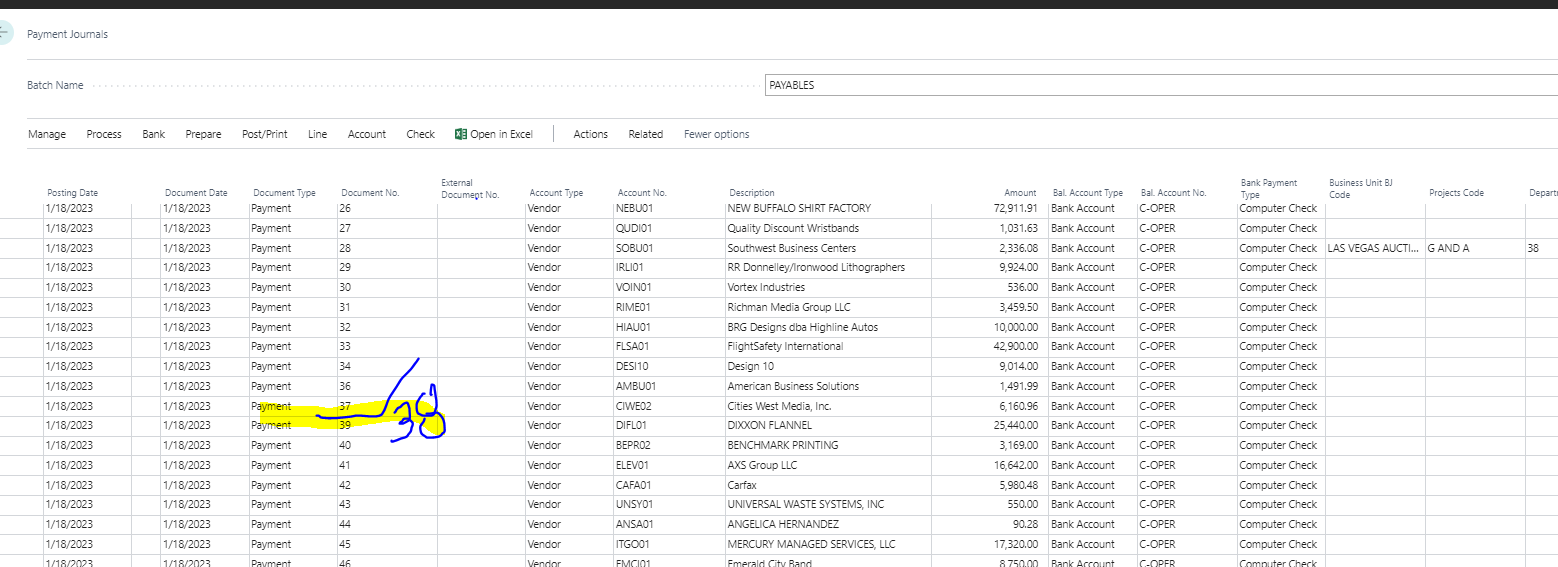
pastedimage1674147161841v1.png

So, prior to there not being a 38 Document number there was and i clicked on the three little vertical dots in between posting date and document date a clicked on delete line. Now my numbers are out of order and it goes from 37 to 39. We DO NOT use workflows and that is what I have been reading these numbers are about...please correct me if I am wrong.

I noticed after cruising through the payment journal that under       ACTIONS > FUNCTIONS > RENUMBER DOCUMENT NUMBERS....

If I don't renumber will it mess anything up??

Please help I need to do this check run!!!!

I have the same question (0)
  • BillurSamdancioglu Profile Picture
    20,521 Most Valuable Professional on at

    Hi,

    Is this form from D365 FO?

  • NatRRam Profile Picture
    30 on at

    How would I find that information out??

  • NatRRam Profile Picture
    30 on at

    We are using Dynamics 365 Business Central...

    Is that what you mean? Sorry this is my first time every using this program

  • BillurSamdancioglu Profile Picture
    20,521 Most Valuable Professional on at

    So that would be better if you use the BC forum.

  • NatRRam Profile Picture
    30 on at

    Im new to this i dont know any different

  • BillurSamdancioglu Profile Picture
    20,521 Most Valuable Professional on at

    Business Central is different than Dynamics Finance.

    You may find Business Central forum from the path below.

    Screenshot-2023_2D00_01_2D00_19-at-21.34.40.png

Under review

Thank you for your reply! To ensure a great experience for everyone, your content is awaiting approval by our Community Managers. Please check back later.

Helpful resources

Quick Links

Introducing the 2026 Season 1 community Super Users

Congratulations to our 2026 Super Stars!

Congratulations to our 2025 Community Spotlights

Thanks to all of our 2025 Community Spotlight stars!

Leaderboard > Finance | Project Operations, Human Resources, AX, GP, SL

#1
André Arnaud de Calavon Profile Picture

André Arnaud de Cal... 517 Super User 2026 Season 1

#2
Giorgio Bonacorsi Profile Picture

Giorgio Bonacorsi 440

#3
Adis Profile Picture

Adis 266 Super User 2026 Season 1

Last 30 days Overall leaderboard

Product updates

Dynamics 365 release plans
