web
You’re offline. This is a read only version of the page.
close
Skip to main content

Notifications

Announcements

No record found.

Community site session details

Community site session details

Session Id :
Small and medium business | Business Central, N...
Suggested Answer

Unable to connect to NAV 2017 Local server with a restored database in Microsoft SQL Server

(0) ShareShare
ReportReport
Posted on by 55

Hi Everyone,

I am currently restoring a database from another PC to my PC. However I have been stuck for hours trying to solve an issue related to connecting my NAV client to the database. 

I am getting two different error messages when I am trying to connect to my Database from the NAV client:

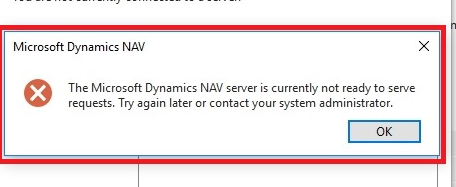
pastedimage1680084834599v1.png

pastedimage1680084910718v2.png

I have checked different forums and settings with no help. 

ClientUserSettings with port "9046", DynamicsNAV100 Status running. 

I have collected all different bits of information and currently I am leaning towards the permission settings (As the database copied had different Users.).

I tried to drop the users and added my local user but still couldnt connect. My local user has dbo permissions and super permissions.

I have the same question (0)
  • Suggested answer
    Marco Mels Profile Picture
    on at

    Hello,

    The error of this issue can be found in the application log file (event viewer).

    Hope it helps.

  • Dopnezz Profile Picture
    55 on at

    Hi,

    The error log states that it may be caused by the current user does not have access- I have added the name for the pc as a user, with all priviledges, still does not work.

    Once Microsoft SQL Management Studio is connected to a local database, it means it should be online if I am not mistaken?

  • ShanAbeywicrema Profile Picture
    948 on at

    Hi Dopnezz,

    Can you open database from development environment ?  

  • Suggested answer
    YUN ZHU Profile Picture
    95,729 Super User 2025 Season 2 on at

    Hi, I agree with Marco. Please check the Windows logs in the Event Viewer first. Generally, there will be detailed error messages in it.

    pastedimage1680476911143v1.png

    pastedimage1680476930169v2.png

    Another thing to note is that the CU must be consistent. And if you have installed multiple versions of NAV and want to start them at the same time, please ensure that the ports are different.

    In addition, I have encountered problems when installing a higher version first and installing a lower version. It seems that there is NAV2018 in your environment, you need to install NAV2017 now, it is recommended to uninstall NAV2018 and try again.

    Hope this helps.

    Thanks.

    ZHU

Under review

Thank you for your reply! To ensure a great experience for everyone, your content is awaiting approval by our Community Managers. Please check back later.

Helpful resources

Quick Links

Responsible AI policies

As AI tools become more common, we’re introducing a Responsible AI Use…

Neeraj Kumar – Community Spotlight

We are honored to recognize Neeraj Kumar as our Community Spotlight honoree for…

Leaderboard > Small and medium business | Business Central, NAV, RMS

#1
OussamaSabbouh Profile Picture

OussamaSabbouh 2,238

#2
YUN ZHU Profile Picture

YUN ZHU 773 Super User 2025 Season 2

#3
Sumit Singh Profile Picture

Sumit Singh 630

Last 30 days Overall leaderboard

Featured topics

Product updates

Dynamics 365 release plans



