web
You’re offline. This is a read only version of the page.
close
Skip to main content

Announcements

No record found.

News and Announcements icon
Community site session details

Community site session details

Session Id :
Microsoft Dynamics AX (Archived)

Displaying a date field from a table in a form

(0) ShareShare
ReportReport
Posted on by 565

Hi everyone. I am trying to display an expiry date editable field which is present in Item details (InventTable) in a form On-Hand. 

I have added InventTable as data source in the form. The remaining fields are from InventSum table. The relation is mapping of the itemid field which is common to both tables as attached below. 
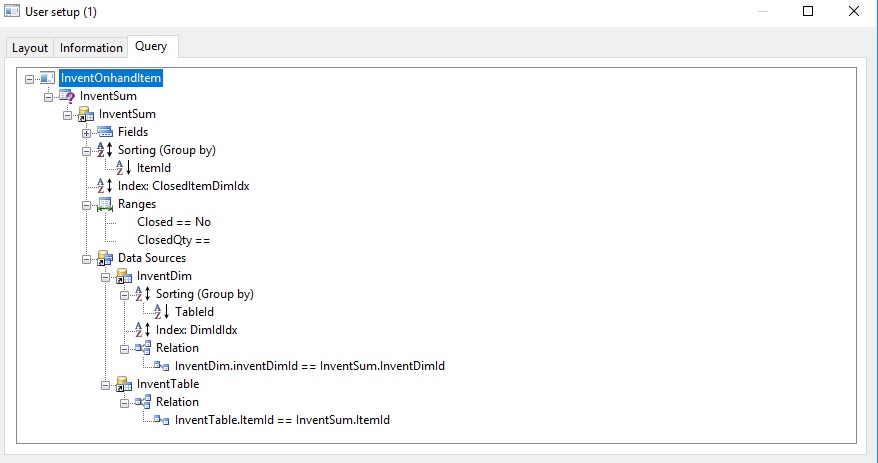
Relations.jpg

I am using the following to display the expiry date into date field ExpDate using the following: 

display Date ExpDate()
{
    return InventTable::find(Inventsum.ItemId).ExpiryDate;
}

The field is showing up in the form but none of the entered expiry dates are being shown. 

Please advice on how I could fix this or where I have gone wrong. Thanks! 

*This post is locked for comments

I have the same question (0)
  • André Arnaud de Calavon Profile Picture
    304,711 Super User 2026 Season 1 on at

    Hi Iron,

    The data on this form is being managed by a class. You have to interact with data in this class to be able to populate the correct values.

  • Suggested answer
    Alex Voytsekhovskiy Profile Picture
    on at

    Can you simply add InventTable.ExpiryDate instead of using the display method?

  • oldman.logan Profile Picture
    565 on at

    [quote user="Alex Voytsekhovskiy"]

    Can you simply add InventTable.ExpiryDate instead of using the display method?

    [/quote]

    I tried that with InventTable as DataSource and ExpiryDate as DataField to a control field DateEdit but to no avail. 

Under review

Thank you for your reply! To ensure a great experience for everyone, your content is awaiting approval by our Community Managers. Please check back later.

Helpful resources

Quick Links

Introducing the 2026 Season 1 community Super Users

Congratulations to our 2026 Super Stars!

Meet the Microsoft Dynamics 365 Contact Center Champions

We are thrilled to have these Champions in our Community!

Congratulations to the April Top 10 Community Leaders

These are the community rock stars!

Leaderboard > 🔒一 Microsoft Dynamics AX (Archived)

#1
CP04-islander Profile Picture

CP04-islander 39

#2
Michel ROY Profile Picture

Michel ROY 14

#3
imran ul haq Profile Picture

imran ul haq 8

Last 30 days Overall leaderboard

Featured topics

Product updates

Dynamics 365 release plans
