web
You’re offline. This is a read only version of the page.
close
Skip to main content

Notifications

Announcements

No record found.

Community site session details

Community site session details

Session Id :
Supply chain | Supply Chain Management, Commerce
Suggested Answer

Error AADSTS50011: The redirect URI specified in the request does not match on login to Commerce Store in Cloud Hosted Environment (development)

(0) ShareShare
ReportReport
Posted on by 42

When logging into the Store Commerce (Houston-40) in our Cloud Hosted Development environment, I get the error message 

Request Id: 1a0b3d53-5fd0-440d-9c0a-71086f834e00
Correlation Id: deb69964-8ba5-49c7-8c3d-32b36cxxxxx
Timestamp: 2023-03-07T14:39:16Z
Message: AADSTS50011: The redirect URI 'stell-developmentdxxxxxxx.cloudax.eu.dynamics.com/' specified in the request does not match the redirect URIs configured for the application 'xxxxxxxx-3bc8-4e63-b5b3-606dc14747e9'. Make sure the redirect URI sent in the request matches one added to your application in the Azure portal. Navigate to aka.ms/redirectUriMismatchError to learn more about how to fix this.

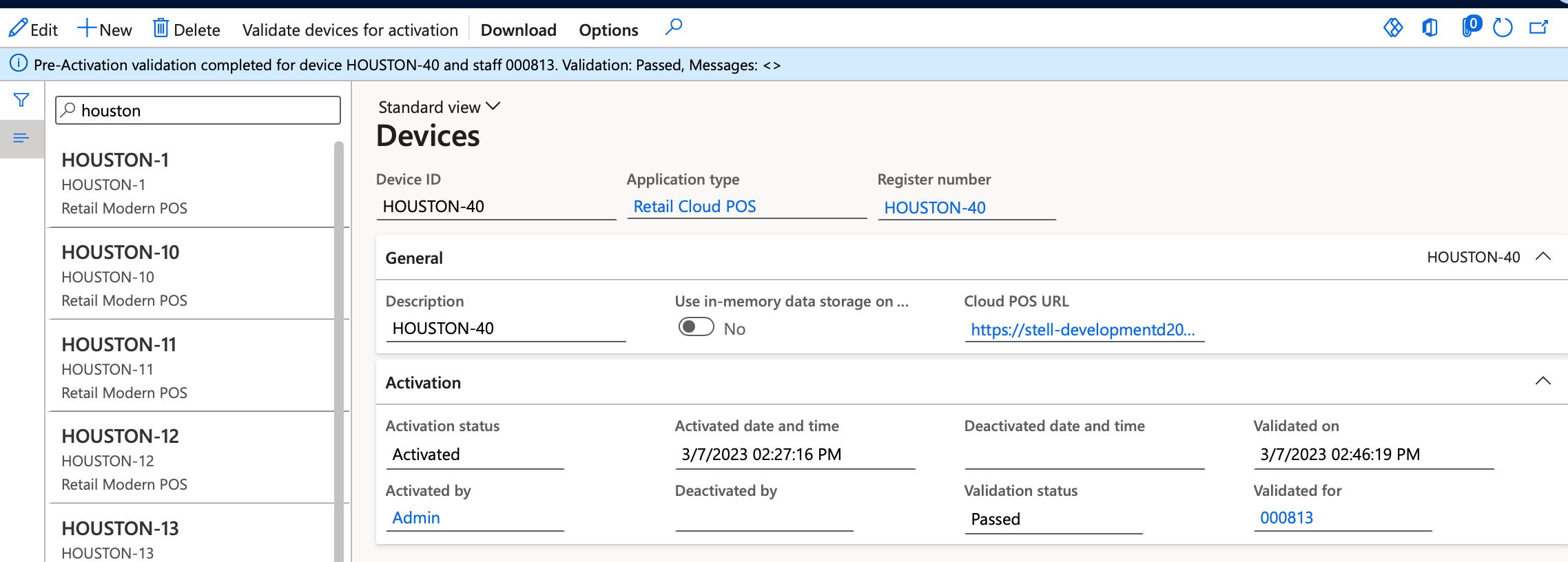
I am logging in with my Azure AD user, and have also validated the user for the device:
pastedimage1678200442420v1.png

I have searched for any relevant settings, unsuccessfully.

I have the same question (0)
  • huijij Profile Picture
    19,811 on at

    Hi sir,

    This error message is included in the list of issues, and you can refer to the MS documentation to see if it helps to resolve the problem.

    learn.microsoft.com/.../error-code-aadsts50011-redirect-uri-mismatch

  • Harald Grannes Profile Picture
    42 on at

    Thank you. I will try the steps in the article and let you know how it goes.

  • Harald Grannes Profile Picture
    42 on at

    I tried the steps in the article, but it did not help. Also tried to create a new Cloud Hosted environment of type demo. The result is the same.

  • Suggested answer
    Shafeeque P. Profile Picture
    6,533 Moderator on at

    Could you please refer to the retail server event viewer logs? You should be able to see what is the expected value.

    If you have another environment where you are able to activate the POS, please compare the values in the "Identity Providers" screen line by line and make sure that they match. Make sure that you verify the Relying Parties and Server Resource IDs for each line.

    pastedimage1678311237977v1.png

    After updating, 1110 to the channel DB. Close and Reopen Store Commerce App and try the activation

  • Harald Grannes Profile Picture
    42 on at

    Thanks. We have a working environment created for "Default: Standard Acceptance test"

    pastedimage1678707315472v1.png

    In the development environment we have setup on our Azure account, we still have problems with the activating the cloud pos. I tried to modify the Identity settings in the Shared parameters. I also tried a to do a new installation. So far no luck, but I will go through our Azure AD setup again, since I also have problems setting up access tokens to the Commerce APIs.

Under review

Thank you for your reply! To ensure a great experience for everyone, your content is awaiting approval by our Community Managers. Please check back later.

Helpful resources

Quick Links

Responsible AI policies

As AI tools become more common, we’re introducing a Responsible AI Use…

Neeraj Kumar – Community Spotlight

We are honored to recognize Neeraj Kumar as our Community Spotlight honoree for…

Leaderboard > Supply chain | Supply Chain Management, Commerce

#1
Siv Sagar Profile Picture

Siv Sagar 283 Super User 2025 Season 2

#2
Laurens vd Tang Profile Picture

Laurens vd Tang 213 Super User 2025 Season 2

#3
André Arnaud de Calavon Profile Picture

André Arnaud de Cal... 152 Super User 2025 Season 2

Last 30 days Overall leaderboard

Featured topics

Product updates

Dynamics 365 release plans



