
You’re offline. This is a read only version of the page.



 20
20
Hi all,
I have created a Business Process Flow and edited the form of the enitty through the modern editor.
However I saw that it is possible to edit the top bar of the form, for example looking at the right top of this screenshot that I found (the fields: Number of ideas, Accept ideas, Status, Status reason..).
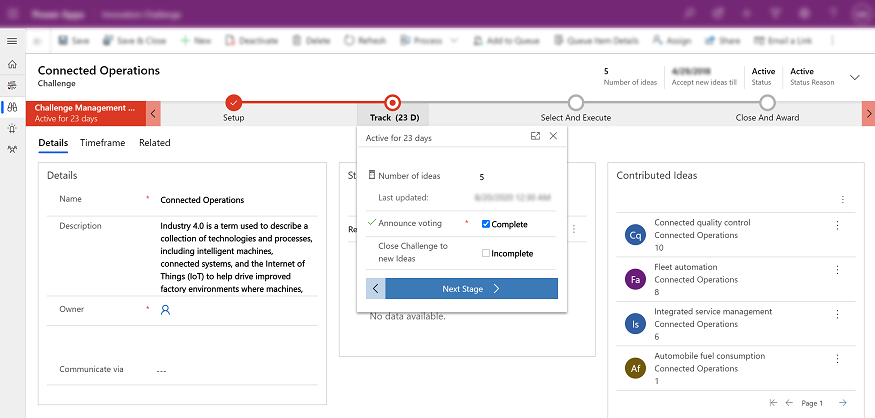
But when I try to add a section on the right top myself that seems impossibble.
Is there any special setting/requirement in order to do this?
Thanks in advance.

Hi Codingbridge,
Unfortunately, you can’t add a section on the right top yourself, you just add fields to it instead original fields.
In fact, the top bap name is header, which is the part of the form that is visible even as the user scrolls down or moves across tabs. Only four fields are available to be places in the header.
1.Navigate to the form for the entity header you want to change. And click on the Header icon on top which will bring up your header
2.When the Header area is highlighted as above you can select one existing field, then add fields to it.
3.When you add fifth field, it will get an error.
4.Also, you can click change properties to adjust many of it’s properties such as width as well as formatting.
Regards,
Leah Ju
Please mark as verified if the answer is helpful. Welcome to join hot discussions in Dynamics 365 Forums.






 Share
Share Report
 All responses (
 Answers (






