web
You’re offline. This is a read only version of the page.
close
Skip to main content

Announcements

No record found.

News and Announcements icon
Community site session details

Community site session details

Session Id :
Microsoft Dynamics NAV (Archived)

Finding the right record

(0) ShareShare
ReportReport
Posted on by

I have a report which is creates a barcode from the Item Ledger fields, Item No + Variant Code.  It's printed from a page which uses the Item Ledger table. When you select a record from the page you wish to print and press the print button, the report is finding the wrong record. 
95.PNG

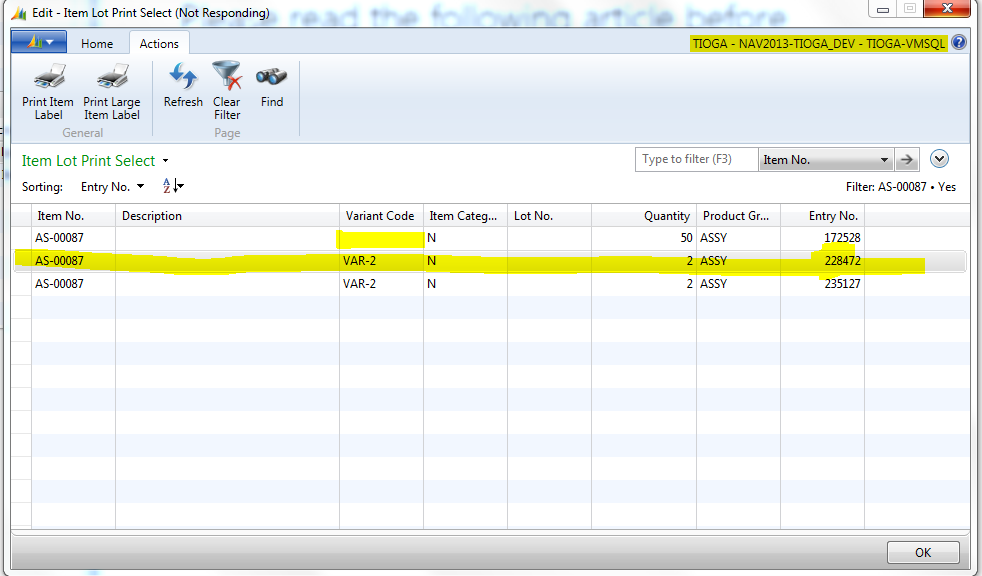
*Page to print from.

As you can see the entry No for the record Selected is 228472.

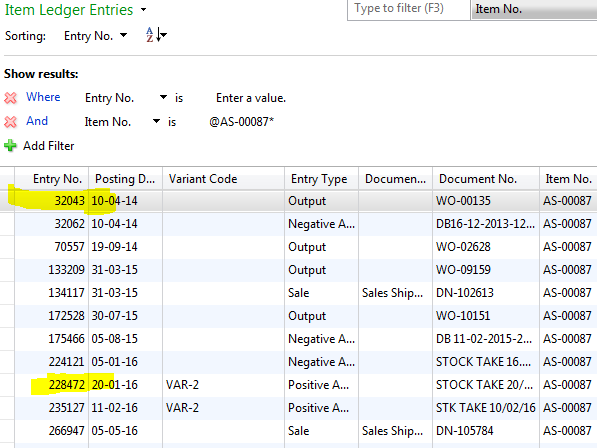
On the Item Ledger Entry table  for the Item No it's finding the first record and using that, not the record you select from the Print page
96.PNG

How Can I change the code below to stop this and make it select the correct record. 
my assumption is to setrange on the entry Number but my efforts have failed. And there are some FIND FIRSTS should these be changed to find sets? 


recInvtSetup.FINDFIRST;

CLEAR(gstrItemVariant);
gstrItemVariant := "Item Ledger Entry"."Item No.";


"Item Variant".RESET;
"Item Variant".SETRANGE("Item No.", "Item Ledger Entry"."Item No.");
"Item Variant".SETRANGE(Code, "Item Ledger Entry"."Variant Code");
IF "Item Variant".FINDFIRST THEN BEGIN
Manufacturer := "Item Variant".Manufacturer;
"Manufacturer Part No." := "Item Variant".ManufacturerPN;
END ELSE BEGIN
Manufacturer := '';
"Manufacturer Part No." := '';
END;
"Item Ledger Entry".RESET;
"Item Ledger Entry".SETRANGE("Entry No.", "Item Ledger Entry"."Entry No.");
"Item Ledger Entry".GET("Item Ledger Entry"."Entry No.");
IF "Item Ledger Entry"."Variant Code" <> '' THEN BEGIN
LotNo :=
"Item Ledger Entry"."Item No."+
' - ' +
"Item Ledger Entry"."Variant Code";
EncodedBarCode :=
cuCPUtils.EncodeBarcode128(
"Item Ledger Entry"."Item No."+
'|' +
"Item Ledger Entry"."Variant Code"
);
END ELSE BEGIN
LotNo := "Item Ledger Entry"."Item No.";
EncodedBarCode :=
cuCPUtils.EncodeBarcode128(
"Item Ledger Entry"."Item No."
)
END;

*This post is locked for comments

I have the same question (0)
  • Suggested answer
    Amol Salvi Profile Picture
    18,698 on at

    [quote user="Lewishhh"]

    I have a report which is creates a barcode from the Item Ledger fields, Item No + Variant Code.  It's printed from a page which uses the Item Ledger table. When you select a record from the page you wish to print and press the print button, the report is finding the wrong record. 

    96.PNG

    *Page to print from.

    As you can see the entry No for the record Selected is 228472.

    On the Item Ledger Entry table  for the Item No it's finding the first record and using that, not the record you select from the Print page

    96.PNG

    How Can I change the code below to stop this and make it select the correct record. 
    my assumption is to setrange on the entry Number but my efforts have failed. And there are some FIND FIRSTS should these be changed to find sets? 


    recInvtSetup.FINDFIRST;

    CLEAR(gstrItemVariant);
    gstrItemVariant := "Item Ledger Entry"."Item No.";


    "Item Variant".RESET;
    "Item Variant".SETRANGE("Item No.", "Item Ledger Entry"."Item No.");
    "Item Variant".SETRANGE(Code, "Item Ledger Entry"."Variant Code");
    IF "Item Variant".FINDFIRST THEN BEGIN
    Manufacturer := "Item Variant".Manufacturer;
    "Manufacturer Part No." := "Item Variant".ManufacturerPN;
    END ELSE BEGIN
    Manufacturer := '';
    "Manufacturer Part No." := '';
    END;
    "Item Ledger Entry".RESET;  ---> 
    "Item Ledger Entry".SETRANGE("Entry No.", "Item Ledger Entry"."Entry No.");
    "Item Ledger Entry".GET("Item Ledger Entry"."Entry No.");
    IF "Item Ledger Entry"."Variant Code" <> '' THEN BEGIN
    LotNo :=
    "Item Ledger Entry"."Item No."+
    ' - ' +
    "Item Ledger Entry"."Variant Code";
    EncodedBarCode :=
    cuCPUtils.EncodeBarcode128(
    "Item Ledger Entry"."Item No."+
    '|' +
    "Item Ledger Entry"."Variant Code"
    );
    END ELSE BEGIN
    LotNo := "Item Ledger Entry"."Item No.";
    EncodedBarCode :=
    cuCPUtils.EncodeBarcode128(
    "Item Ledger Entry"."Item No."
    )
    END;

    [/quote]

    The red color marked is problem. You are resetting Item ledger entry again. It is not required.

  • Community Member Profile Picture
    on at

    Hi thank you I've removed those, however it is still finding the first record in the Item Ledger relating to that Item No. I need it to find the one referring to the entry No.

  • Suggested answer
    HoangNam Profile Picture
    322 on at

    From "Item Lot Print Select", focus on your line.

    Then, from an action of this page, declare ILEntry as Item Ledger Entry.

    You only use:

        ILEntry.Get(Rec."Entry No.");

    You should get correct Item Ledger Entry.

  • Community Member Profile Picture
    on at

    Hi Thankyou, I can see thats worked on the printing page, However on the Report it's still choosing the Wrong Line.

  • Community Member Profile Picture
    on at

    How can I Pass this value into the report if it's possible?

  • Suggested answer
    Rajasekhar@MS Profile Picture
    5,569 on at

    Hi

    Use Setrange and Findfirst when working with reports instead of Get.

  • Community Member Profile Picture
    on at

    Can you help with this, I've set the Entry Number on the page action code to a variable EntryNo.

    ILEntry.GET(Rec."Entry No.");

    "EntryNo" := Rec."Entry No.";

    I've then called attempted to pass this variable into my report code

       rptlewistest.GetCorrectEntryNo(EntryNo);

    Then on my report code I've created a function to set this value in the report

    GetCorrectEntryNo(EntryNo : Code[10])

    "Item Ledger Entry"."Entry No." := EntryNo;

    The value isn't however passing to the report code?

  • Suggested answer
    Mohana Yadav Profile Picture
    61,214 Super User 2026 Season 1 on at

    Pass

    rptlewistest.GetCorrectEntryNo(ILEntry."Entry No.");

    I am not sure why do you need this code

    "EntryNo" := Rec."Entry No.";

    and add Message(ILEntry."Entry No.");

    calling the report and check whether you have right entry no.

  • Verified answer
    Community Member Profile Picture
    on at

    Thank you for this help, it's great;y appreciated!

    I Have the Entry No. Passed into the report. How Can I set it so it filters to that item ledger Entry.

    In my current code

    CLEAR(gstrItemVariant);

    //gstrItemVariant := "Item Ledger Entry"."Item No.";

    "Item Variant".RESET;

    "Item Variant".SETRANGE("Item No.", "Item Ledger Entry"."Item No.");

    "Item Variant".SETRANGE(Code, "Item Ledger Entry"."Variant Code");

    IF "Item Variant".FINDFIRST THEN BEGIN

     Manufacturer := "Item Variant".Manufacturer;

     "Manufacturer Part No." := "Item Variant".ManufacturerPN;

    END ELSE BEGIN

     Manufacturer := '';

     "Manufacturer Part No." := '';

    END;

    IF "Item Ledger Entry"."Variant Code" <> '' THEN BEGIN

     LotNo :=

       "Item Ledger Entry"."Item No."+

       ' - ' +

       "Item Ledger Entry"."Variant Code";

     EncodedBarCode :=

       cuCPUtils.EncodeBarcode128(

        "Item Ledger Entry"."Item No."+

         '|' +

        "Item Ledger Entry"."Variant Code"

         );

    END ELSE BEGIN

     LotNo := "Item Ledger Entry"."Item No.";

     EncodedBarCode :=

       cuCPUtils.EncodeBarcode128(

         "Item Ledger Entry"."Item No."

         )

    END;

    How can I write to to set the Item ledger Entry to the Value of the Entry No I Have passed in?

    The Variable Holding the Entry No I want to use is called EntryNo2?

Under review

Thank you for your reply! To ensure a great experience for everyone, your content is awaiting approval by our Community Managers. Please check back later.

Helpful resources

Quick Links

Introducing the 2026 Season 1 community Super Users

Congratulations to our 2026 Super Stars!

Meet the Microsoft Dynamics 365 Contact Center Champions

We are thrilled to have these Champions in our Community!

Congratulations to the April Top 10 Community Leaders

These are the community rock stars!

Leaderboard > 🔒一 Microsoft Dynamics NAV (Archived)

#1
TAHER_El_Mehdi Profile Picture

TAHER_El_Mehdi 2

#1
sliderxb Profile Picture

sliderxb 2

#1
broberts Profile Picture

broberts 2

Last 30 days Overall leaderboard

Featured topics

Product updates

Dynamics 365 release plans