web
You’re offline. This is a read only version of the page.
close
Skip to main content

Notifications

Announcements

No record found.

Community site session details

Community site session details

Session Id :
Microsoft Dynamics CRM (Archived)

Visibility Price Per Unit Product in Product Bundle

(0) ShareShare
ReportReport
Posted on by 800

Hi,

I created a several products and several product bundles (all published). To make a long story short, I also created all the necessary records that are mandatory. I created the Unit Groups with Units and the Price Lists with Price List Items.

Here comes the weird behaviour. When I have an Opportunity I select the appropriate Price List and then I add the appropriate Bundle. So far so good.

I can see the Bundle in the Product Line Item subgrid. I can also expand the Bundle and see the two Products that belong to that Bundle.

Now comes the strange thing. The field Price Per Unit behind the Bundle is filled with an amount which is the appropriate amount.

But behind the two Products the field Price Per Unit is empty.
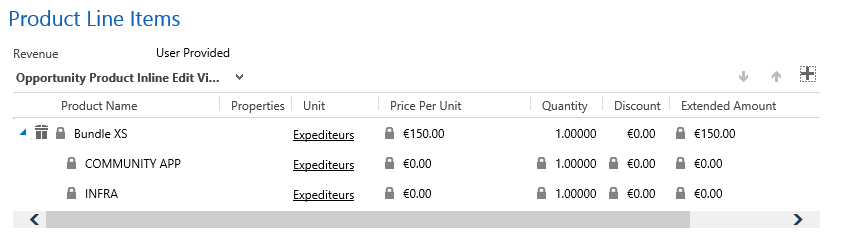
These should have an amount. When looking at these two Products in the Product Catalog, the amount is there.

When I add these two Products separately in the Product Line Item subgrid, the field Price Per Unit is filled with the right amount.

To conclude it, when adding a Bundle in the Product Line Item subgrid the Products that belong to it have an empty Price Per Unit field behind it. Adding them separately will show a filled Price Per Unit field.

I'll hope somebody has an answer to this.

Br,

Jacques

*This post is locked for comments

I have the same question (0)
  • Verified answer
    Community Member Profile Picture
    on at

    Hello Jacques:

    This has to do with the Options within the Bundle Products.  ie Cumminity Apps

    So when you place a Product  ie Cumminity Apps  for you Bundle ie  Bundle XS

    You will have two settings for Required: Required or Options

    If you select Required you will get the 0.00

    if you select Options you will get the price that you listed within that Product; which you can modify the price.

    Note this will add cost to your Total Amount when you are creating a Opportunity or a Quote

    If you use the Option setting you can set your Price for the Bundle to $0.00 amount. So when you create an Opportunity or a Quote you will only get the Total Amount for the bundle products ie

    Community Apps 10.00  

    Infra 140.00

    Total 150.00

    If you were are a Price to the Bundle 150.00 and you had the products with Options then the Total Amount would be 300.00

    I would show a photo of what I mean but right now I can not delete any products, bundles because I get an error code.


    Hope this helps

    _damon

  • JacquesNL Profile Picture
    800 on at

    Hi _damon,

    Thank you for the quick response. Tried it and it works.

    But indeed it adds up the Total Amount. I only want the Bundle Price to be the Total Amount. So it will be a workflow to fill the original Total Amount field based on the Bundle Price or a custom Total Amount field.

    Thnx again!

    Br,

    Jacques

Under review

Thank you for your reply! To ensure a great experience for everyone, your content is awaiting approval by our Community Managers. Please check back later.

Helpful resources

Quick Links

Responsible AI policies

As AI tools become more common, we’re introducing a Responsible AI Use…

Neeraj Kumar – Community Spotlight

We are honored to recognize Neeraj Kumar as our Community Spotlight honoree for…

Leaderboard > 🔒一 Microsoft Dynamics CRM (Archived)

#1
SA-08121319-0 Profile Picture

SA-08121319-0 4

#1
Calum MacFarlane Profile Picture

Calum MacFarlane 4

#3
Alex Fun Wei Jie Profile Picture

Alex Fun Wei Jie 2

Last 30 days Overall leaderboard

Featured topics

Product updates

Dynamics 365 release plans



