web
You’re offline. This is a read only version of the page.
close
Skip to main content

Notifications

Announcements

Community site session details

Community site session details

Session Id :
Microsoft Dynamics 365 | Integration, Dataverse...
Suggested Answer

Invalid Argument Error on Bulk Edit

(0) ShareShare
ReportReport
Posted on by

Hi, I am trying to edit the bulk records from entity view but getting an Invalid Argument Error.

This is only for this particular entity and the same is working fine in the Sandbox Environment.

Recently I moved the solution to Live with this Entity but that only contains Onload Script and one Plugin(Post Update) and some Roll up fields.  

Please let me know what I need to do for resolving this issue.

Thank you.
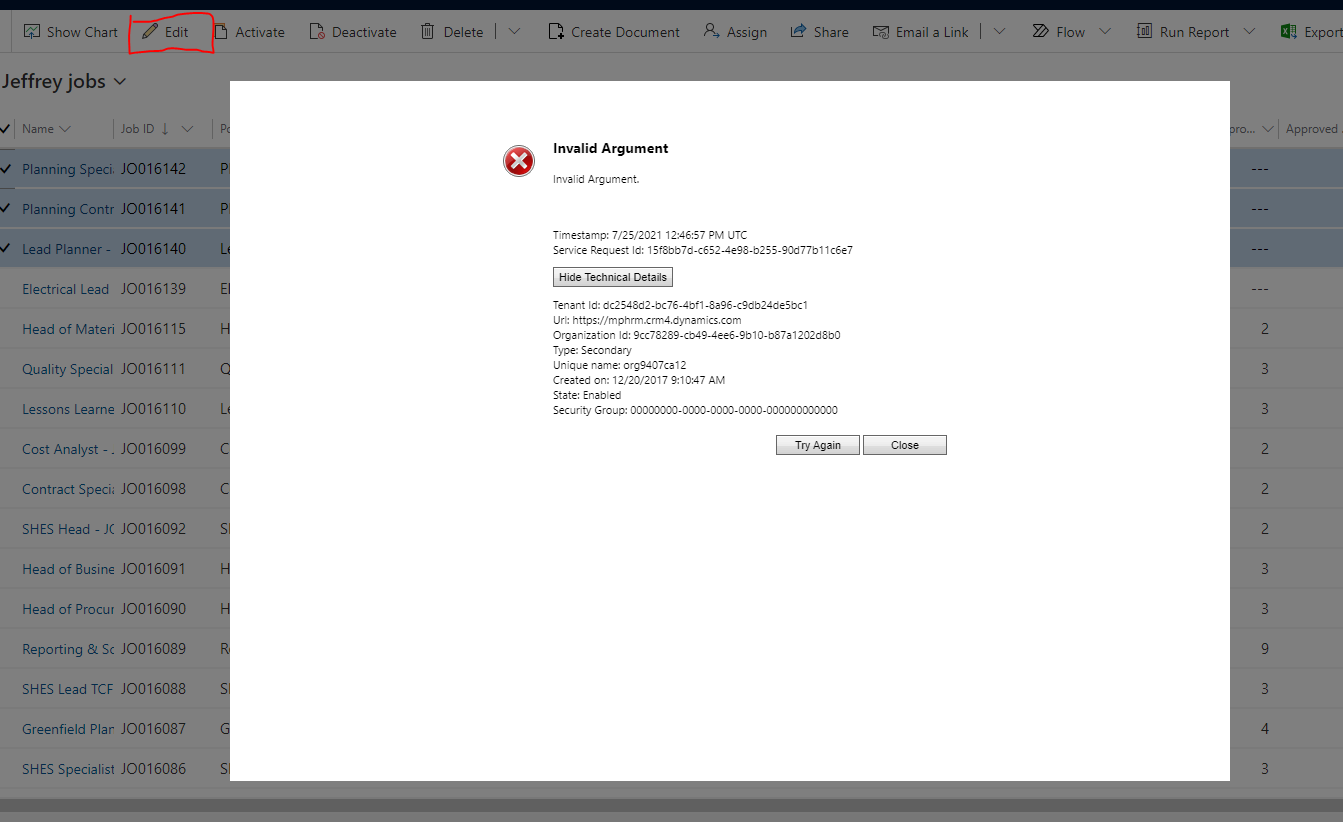
pastedimage1627217849800v2.png

I have the same question (0)
  • Suggested answer
    Wahaj Rashid Profile Picture
    11,321 on at

    Hi,

    Thank you for your query.

    Do you have any plugins or real-time workflow on this entity?

  • Community Member Profile Picture
    on at

    Hi,

    Could you please try to re-import your solution to prevent the problem caused by some errors during the solution import process?

    If this helped you, I'd appreciate it if you'd mark this as a Verified Answer, which may in turn help others as well.

    Best Regards,

    Frank Gong

  • Community Member Profile Picture
    on at

    Hi Wahaj, yes there are many real-time workflow and Plugins on this entity.

  • Community Member Profile Picture
    on at

    Hi Frank, Thanks for the reply.

    I will re-import it again.

  • erhan.keskin Profile Picture
    2,253 on at

    Hi Mohd Danish,

    Did re-import resolve your issue?

    You can use System Comparer to confirm if the entity and its relations are up to date in terms of deployment.

    www.xrmtoolbox.com/.../

    Regards,

    Erhan

  • Community Member Profile Picture
    on at

    Yesterday, I re-import the solution and It did not resolved the issue.

    Still facing the same issue. Could you help me more in this?

  • AriaConsulting Profile Picture
    2 on at

    ,

    Based on your statement "there are many real-time workflow and Plugins on this entity", I would suggest filing a ticket with MS support.  Plugins in D365 CE Horrified Interface (excuse me...Unified Interface) are a very thorny problem as they sit on top of each other in what I think of as a Frankenstein modern version of a procedural dev pattern (yeah, from the 90's), rather than sitting "side by side" such as the architecture used in SPFx for SharePoint addins.

  • Community Member Profile Picture
    on at

    Thanks for the reply, Lorne. The same is working fine in the Sandbox environment.  However, I will raise a ticket with MS support.

  • AriaConsulting Profile Picture
    2 on at

    To be clear, Prod and SBX are not "pixel-perfect" clones in D365 CE.  MS doesn't even guarantee that the 2 instances will be in the same DC.

    The same DC region, yes.  But not necessarily the same DC. So, they are obviously very close, but not perfect.  And all it takes is one setting somewhere in Prod to be different and something that works in SBX may run into issues in Prod.

Under review

Thank you for your reply! To ensure a great experience for everyone, your content is awaiting approval by our Community Managers. Please check back later.

Helpful resources

Quick Links

Responsible AI policies

As AI tools become more common, we’re introducing a Responsible AI Use…

Congratulations to our 2025 Community Spotlights

Thanks to all of our 2025 Community Spotlight stars!

Leaderboard > Microsoft Dynamics 365 | Integration, Dataverse, and general topics

#1
BillurSamdancioglu Profile Picture

BillurSamdancioglu 95 Most Valuable Professional

#2
André Arnaud de Calavon Profile Picture

André Arnaud de Cal... 76 Super User 2026 Season 1

#3
Abhilash Warrier Profile Picture

Abhilash Warrier 55 Super User 2026 Season 1

Last 30 days Overall leaderboard

Product updates

Dynamics 365 release plans
