web
You’re offline. This is a read only version of the page.
close
Skip to main content

Notifications

Announcements

No record found.

Community site session details

Community site session details

Session Id :
Microsoft Dynamics CRM (Archived)

CSV Formatting issue while exporting Report from CRM

(0) ShareShare
ReportReport
Posted on by 266

Hi All, 

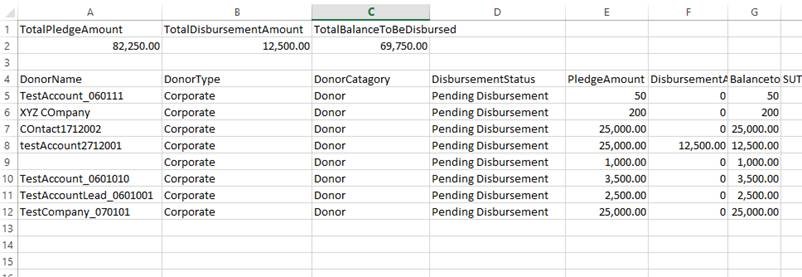
I am facing a issue while exporting a Report from CRM in CSV format. The issue is when i try to open the Report in Excel it shows the proper formatting but when exported in CSV format the formatting is not proper. I am attaching the screenshots of both Excel and CSV exported files. Do let me know if you know how to resolve this formatting issue. Please find the screenshot attached with this. 

Excel_5F00_Format.jpgCSV_5F00_Format.jpg

*This post is locked for comments

I have the same question (0)
  • Abby Kong Profile Picture
    6 on at

    Hi dhawal,

    If by proper formating you mean things like header color, font bolding, it's not really an issue.

    CSV is data only. Right click on the csv file and open in a text editor you should only see data values inside.

    Regards,

    Abby

  • dhawal Profile Picture
    266 on at

    Hi Abby thanks for the response. Proper formatting here doesn't mean color of font or bold. Please check the screenshot which i have provided in my example. The CSV file doesnt show the Total Amount column and other columns similar to Excel rather it shows at the beginning. Hope you got what i m trying to explain here. Let me know in case you have any solution for this.

  • Abby Kong Profile Picture
    6 on at

    Hi dhawal,

    Apologize I misunderstood your question.

    ------------------------------------------------------------------------

    Looked closely on your screenshot I can see three problems:

    1.  Three total amount has heading shown which is different as on excel

         SSRS reporting server has a config with which you can add an extension for CSV No header.

         By default, export csv files are with headers.

         If you are using Dynamics on-premise and have access to SSRS server, you may try above setting and then you see an extra option when you export report csvnoheader.png

         If you are using Dynamics online, you may have to export csv with codes  as you won't have access to the server.

    2. Column names are a little bit different in csv and excel, and Total amount column only shows in Excel. Are you able to check in rdl on property DataElementName? CSV export file should take DataElementName setting of textboxes in RDL. Is DataElementName empty for text box 'Total Amount'

    3. Three total fields showing at the top. I don't have a clue on this, are these 2 part wrapped in different rectangles in RDL?

    ----------------------------------------------------------------------------

    My opinion is CSV export is better for structured tabular data, not ideal for a report with complex layout.

    Regards,

    Abby 

    Regards,

    Abby

Under review

Thank you for your reply! To ensure a great experience for everyone, your content is awaiting approval by our Community Managers. Please check back later.

Helpful resources

Quick Links

Responsible AI policies

As AI tools become more common, we’re introducing a Responsible AI Use…

Neeraj Kumar – Community Spotlight

We are honored to recognize Neeraj Kumar as our Community Spotlight honoree for…

Leaderboard > 🔒一 Microsoft Dynamics CRM (Archived)

#1
SA-08121319-0 Profile Picture

SA-08121319-0 4

#1
Calum MacFarlane Profile Picture

Calum MacFarlane 4

#3
Alex Fun Wei Jie Profile Picture

Alex Fun Wei Jie 2

Last 30 days Overall leaderboard

Featured topics

Product updates

Dynamics 365 release plans