web
You’re offline. This is a read only version of the page.
close
Skip to main content

Notifications

Announcements

No record found.

Community site session details

Community site session details

Session Id :
Customer experience | Sales, Customer Insights,...
Answered

Updating "Date of last activity" field from posts on timeline

(0) ShareShare
ReportReport
Posted on by 265

Hello, 

I have followed this guide for setting up the ability to track the last interaction on certain entities. 

This guide is for when an email, appointment, phone call, or task is created or completed it will update the Last Activity Date field on the contact, which will in turn update the Last activity Date on that contacts parent account. Here is one example of how I did this with tasks. I added the ability to update this field for leads and opportunities as well. 
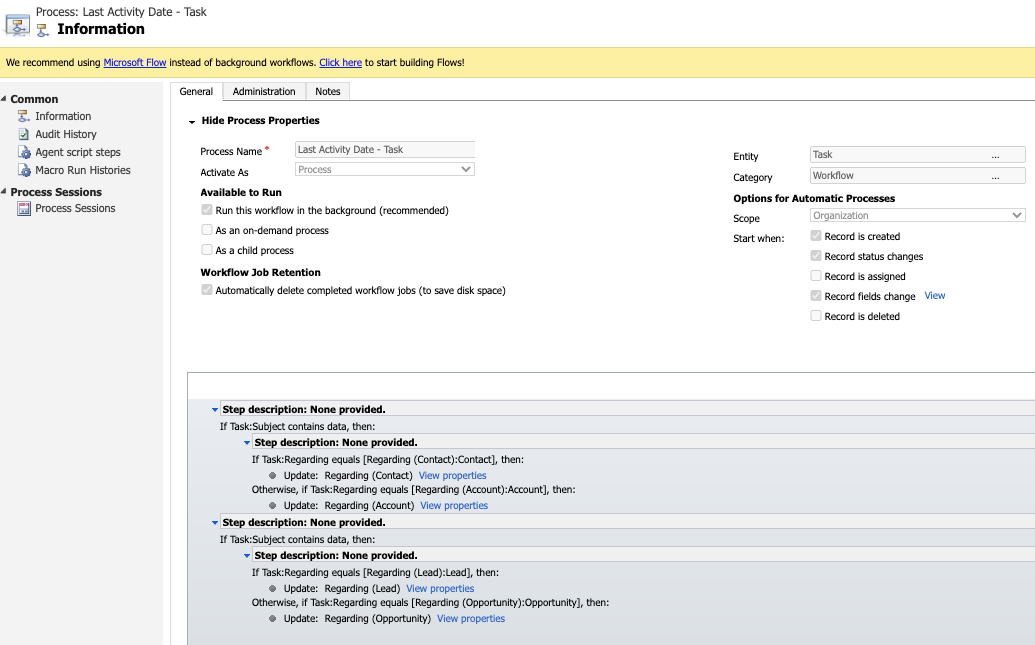
4118.Screen-Shot-2020_2D00_09_2D00_14-at-8.40.07-PM.png

I then created a workflow that updates the account "Date of last activity" when the opportunity "Date of last activity" is updated. 

  • What I need now is a workflow that updates the field "date of last activity" when a post is added to the timeline. 
    • I couldn't figure out what entity to pull anything relevant from post entities in the CRM to make this happen
    • Additionally, if possible I would like to make a field of "Last Post" viewable on my views pages for entities. 
      • Is this possible? 

Thank you for all of your help! 

You all are awesome, 

Josh 

I have the same question (0)
  • Verified answer
    Bipin D365 Profile Picture
    28,983 Moderator on at

    Hi,

    All posts which you see on Timline stored in Post Entity in CRM.

    We have the option to create workflow on Post Entity when record is created. However to update the regarding record which you have done in earlier workflow is not possible. I have tried this.

    One other option is to Use Flow/Plugin to achieve this.

    Please mark my answer verified if i were helpful

  • Dribblej Profile Picture
    265 on at

    Thank you for your response. How would you write the workflow to tigger on post created on date. I did not see that available when I tried.

  • Suggested answer
    Bipin D365 Profile Picture
    28,983 Moderator on at

    Hi,

    As I said workflow is not viable option to achieve your requirement.

    You should consider using Flow-Power Automate/Custom Plugin.

    Please mark my answer verified if i were helpful

  • Verified answer
    LuHao Profile Picture
    40,892 on at

    Hi Dribblej,

    This requirement cannot be achieved through workflow.

    I test it via power automate successfully.

    Here is my flow.

    Overview:

    3603.pastedimage1600153595199v3.png

    Detail:

    5148.pastedimage1600153852694v1.png

    3056.pastedimage1600153459623v2.png

    1754.pastedimage1600153617311v4.png

    8562.pastedimage1600153633907v5.png

    2117.pastedimage1600153645874v6.png

  • Dribblej Profile Picture
    265 on at

    Hao, Thank you. You need a tip jar! THANK YOU!

  • Dribblej Profile Picture
    265 on at

    Bipin, Thank you so much for your help! I wish I could tip yoU!

  • Dribblej Profile Picture
    265 on at

    In addition to the flow above which I named:

    "Update "Date of Last Activity" from Post [on Opp -> Account]"

    • Updates the last activity field on my account views when a post is made in the opp related 

    I added two more flows.

    Update "Date of Last Activity" from Post [on Lead -> Lead]

    • Updates the last activity field on lead view when a post is made on lead entity

    Update "Date of Last Activity" from Post -> [on account -> account]"

    • Updates the last activity field on account view when a post is made on the account entity

     I think I may have been able to do this all on the same original flow but I'm not sure. Should I have done this in one flow?

    Thank you for any help!

  • Verified answer
    LuHao Profile Picture
    40,892 on at

    Hi Josh,

    Yes, you can add these two new conditional branches to the original flow.

    8154.pastedimage1600222862442v1.png

  • Dribblej Profile Picture
    265 on at

    Hao, You are an incredible helper. Thank you friend.

Under review

Thank you for your reply! To ensure a great experience for everyone, your content is awaiting approval by our Community Managers. Please check back later.

Helpful resources

Quick Links

Responsible AI policies

As AI tools become more common, we’re introducing a Responsible AI Use…

Neeraj Kumar – Community Spotlight

We are honored to recognize Neeraj Kumar as our Community Spotlight honoree for…

Leaderboard > Customer experience | Sales, Customer Insights, CRM

#1
Tom_Gioielli Profile Picture

Tom_Gioielli 70 Super User 2025 Season 2

#2
Gerardo Rentería García Profile Picture

Gerardo Rentería Ga... 33 Most Valuable Professional

#3
Daniyal Khaleel Profile Picture

Daniyal Khaleel 32 Most Valuable Professional

Last 30 days Overall leaderboard

Product updates

Dynamics 365 release plans
