web
You’re offline. This is a read only version of the page.
close
Skip to main content

Announcements

No record found.

News and Announcements icon
Community site session details

Community site session details

Session Id :
Microsoft Dynamics AX (Archived)

Duplicate lines in view

(0) ShareShare
ReportReport
Posted on by

Hello All,

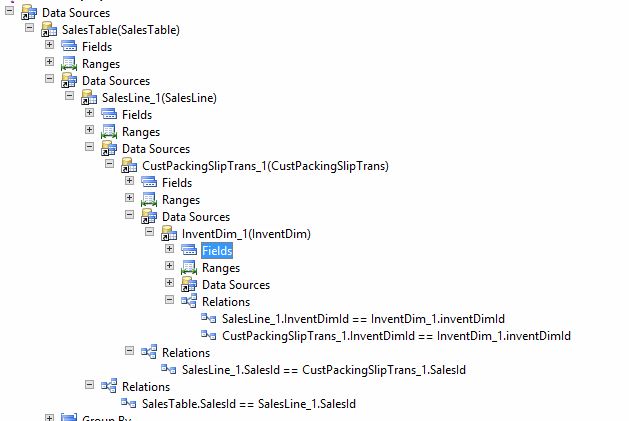
I am trying to create a view using Sales Table, Sales Line, Invent Dim & Cust Packing Slip Trans. In this view, majority of fields are from Sales Line. The problem I have is that for Instance, a SO has 3 lines, view is duplicating 3 lines and making each line appear twice!!

I'm sure it is because of me linking the tables wrong was perhaps? I think it is to do with Invent Dim Table however, I need that table to be get InventLocation correct.

Can anyone help me find how can I link those table together?
3302.View.JPG

Thank you in advance

*This post is locked for comments

I have the same question (0)
  • Martin Dráb Profile Picture
    239,082 Most Valuable Professional on at

    I see two problems.

    You join SalesLine to CustPackingSlipTrans just by SalesId - you completely miss any identification of the concrete line! Also, don't forget that one line can be used in several packing slips,

    Also, filtering InventDim.InventDimId by two different tables is really strange. I think your intention was joining InventDim for both tables, therefore you need two InventDim datasources, one for dimensions of SalesLine and one for CustPackingSlipTrans.

  • Community Member Profile Picture
    on at

    Thanks Martin, I have now fixed those 2 problems, and Now I only see single line not double which is good. However I have another problem. I have an order which has 3 lines with 2 lines being same Item Number but dispatched from different warehouse.

    When I look at the view, It is only showing me 2 lines but does not show the 3rd line! The Invent Location I have taken from Invent Dim Table.

    Can you help me with this?

  • Community Member Profile Picture
    on at

    View2.JPG

  • Martin Dráb Profile Picture
    239,082 Most Valuable Professional on at

    Sorry, I don't have access to your data, so I can't say what's filtered out and why. The picture also doesn't tell me (nor you) how the complete query looks like.

    Looking at the query string will help you to understand what query you've generated and how it works. You can also tune the query and see what changes you must make to get the result you want. And you'll be able to share the code with us if you fail to fix it by yourself.

    Therefore go to SQL Server Management Studio, find the view, right-click it and select Design. If you don't know it, each view is backed up a SQL query, which you'll see there (and you can copy it and start playing with it).

  • dynamics developer Profile Picture
    2 on at

    Are you sure all three lines are shipped? i.e there is a CustPackingSlipTrans line for all the 3 sales lines?

Under review

Thank you for your reply! To ensure a great experience for everyone, your content is awaiting approval by our Community Managers. Please check back later.

Helpful resources

Quick Links

Introducing the 2026 Season 1 community Super Users

Congratulations to our 2026 Super Stars!

Meet the Microsoft Dynamics 365 Contact Center Champions

We are thrilled to have these Champions in our Community!

Congratulations to the March Top 10 Community Leaders

These are the community rock stars!

Leaderboard > 🔒一 Microsoft Dynamics AX (Archived)

#1
Joris dG Profile Picture

Joris dG 5

#2
Andrew Jones a1x Profile Picture

Andrew Jones a1x 2

#3
Basit Profile Picture

Basit 1

Last 30 days Overall leaderboard

Featured topics

Product updates

Dynamics 365 release plans
