web
You’re offline. This is a read only version of the page.
close
Skip to main content

Notifications

Announcements

No record found.

Community site session details

Community site session details

Session Id :
Supply chain | Supply Chain Management, Commerce
Answered

Install NuGet for Services, error ?

(0) ShareShare
ReportReport
Posted on by

Hi,

I'm just learning about Services in D365 FinOps. In one of the book, they say I need to install a NuGet. Like this: 

- Install some NuGet packages. Within Visual Studio, navigate toTools | NuGet Package Manager | Package Manager Console.
- In the Package Manager console, type in the following command:Install-Package Microsoft.IdentityModel.Clients.ActiveDirectory

I follow this instruction, then I got this message, If I'm right, it is error, can I say that ? If yes, anyone can help what is wrong ? 
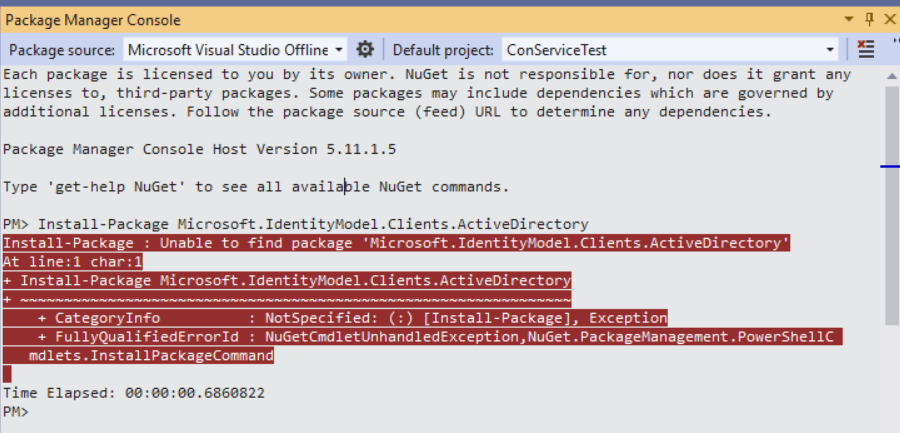
pastedimage1662488234643v1.png

Thanks

I have the same question (0)
  • Suggested answer
    Komi Siabi Profile Picture
    13,093 Most Valuable Professional on at

    Hello,

    Can you confirm that you have the package successfully installed on your C# project ?

    Check 'Your project' -> Dependencies -> NuGet

  • VoltesDev Profile Picture
    on at

    Hi,

    I think no, I just open Project -> ProjectDependencies, only listed my own project : 

    pastedimage1662490256844v1.png

    Sorry it is hidden, but as the 1st letter I think can see there is no such NuGet, or I'm looking at the wrong place ?

    Thanks

  • Komi Siabi Profile Picture
    13,093 Most Valuable Professional on at

    Here.

    Project.png

  • VoltesDev Profile Picture
    on at

    Looks like I don't have it ->

    pastedimage1662490764386v1.png

    Thanks

  • Suggested answer
    Komi Siabi Profile Picture
    13,093 Most Valuable Professional on at

    Hello,

    This means you have not actually installed the package.

    You should install using the package installer.

    installer.png

  • VoltesDev Profile Picture
    on at

    Hmm, may I know how to get to this screen ?

    Since in the book it only says :

    Within Visual Studio, navigate to

    Tools | NuGet Package Manager | Package Manager Console.

    Then  In the Package Manager console, type in the following command:

    Install-Package Microsoft.IdentityModel.Clients.ActiveDirectory

    Thanks

  • Suggested answer
    Komi Siabi Profile Picture
    13,093 Most Valuable Professional on at

    Right click your project then go to manage NuGet packages.

  • VoltesDev Profile Picture
    on at

    Ok, now I see the same screen as yours, but there is no selection with that name, I search the same thing as yours ->

    pastedimage1662492727709v1.png

  • Suggested answer
    Komi Siabi Profile Picture
    13,093 Most Valuable Professional on at

    That's because, your Package source is different from mine.

    You should add nuget. follow the below screenshot. 

    Package.png

  • VoltesDev Profile Picture
    on at

    Hi Thank You Very Much.

    Found it. But just curious, I noticed there is a statement that it is deprecated, Will it still ok to use ? 

    pastedimage1662493531316v1.png

    Well the book said I should install that, so I just wondering should I install it anyway, or the 2nd row looks like the new one (my guess only). I'm just afraid if I install different then I will get different result so cannot follow the book any more. But to install the same, I'm concern about "deprecated" so it will not usable or error later.

    But anyway thanks again, learn a new thing today.

Under review

Thank you for your reply! To ensure a great experience for everyone, your content is awaiting approval by our Community Managers. Please check back later.

Helpful resources

Quick Links

Responsible AI policies

As AI tools become more common, we’re introducing a Responsible AI Use…

Neeraj Kumar – Community Spotlight

We are honored to recognize Neeraj Kumar as our Community Spotlight honoree for…

Leaderboard > Supply chain | Supply Chain Management, Commerce

#1
Siv Sagar Profile Picture

Siv Sagar 266 Super User 2025 Season 2

#2
Laurens vd Tang Profile Picture

Laurens vd Tang 213 Super User 2025 Season 2

#3
André Arnaud de Calavon Profile Picture

André Arnaud de Cal... 140 Super User 2025 Season 2

Last 30 days Overall leaderboard

Featured topics

Product updates

Dynamics 365 release plans



