web
You’re offline. This is a read only version of the page.
close
Skip to main content

Notifications

Announcements

No record found.

Community site session details

Community site session details

Session Id :
Microsoft Dynamics 365 | Integration, Dataverse...
Answered

Can't Download and Install Required Components in Dynamics 365 Version 9

(0) ShareShare
ReportReport
Posted on by 20

Hi,

I am unable to install CRM Dynamic 365 Server 9 Czech version, from this link - https://www.microsoft.com/cs-CZ/download/details.aspx?id=57478
When instalator try to download requied components, download always failed.
SQL System Clr Types
SQL Server Management Objects

I checked setup log. Url adresses does not work on Microsoft website

Requesting download of SQL System Clr Types installer from http://go.microsoft.com/fwlink/?LinkId=2033106&clcid=0x405.
Requesting download of SQL Server Management Objects installer from http://go.microsoft.com/fwlink/?LinkId=2033060&clcid=0x405.

SQL System Clr Types did not download successfully.  To try again, ensure your internet connection is working, then try again.
08:53:59|  Error|   hr=0xc0040202
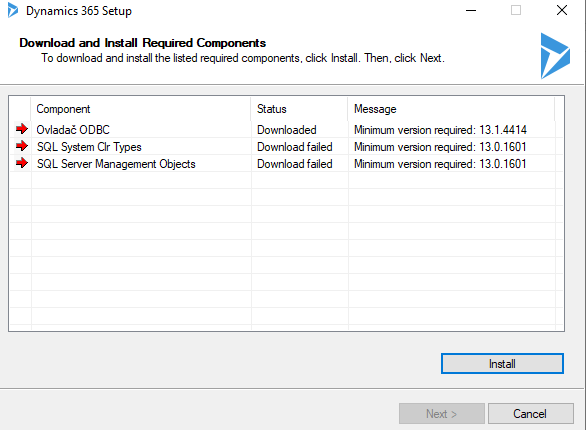
 SQL Server Management Objects did not download successfully.  To try again, ensure your internet connection is working, then try again.
08:53:59|  Error|   hr=0xc0040202

pastedimage1605169498651v1.png


I installed these components separately on the server, but it did not help.

What I can do next? Only wait on rights links on MS download website?

I have the same question (0)
  • Verified answer
    a33ik Profile Picture
    84,331 Most Valuable Professional on at

    Hello,

    I experienced similar issues. Check following video:

  • Martin Dolezel Profile Picture
    20 on at

    Thanks a lot, it helps. I have tried it before, but without _x64 postfix. :-)

  • venkatcrm Profile Picture
    10 on at

    Hi Andrew Butenko,

    I have followed your steps and created folders and installed  SQLNativeClient,SQL System Clr and QLSharedManagementObjects. All  above three validations passed but i got issue while downloading SQL Server Management objects . I have tried a lot of work arounds to resolve the

    issue but no luck.  Any help appreciated on this issue.

    I am using Windows 2016 Server and SQL Server 2016.

    Thanks,

    Venkat Kota.

  • Abarao Bhople Profile Picture
    445 on at

    To get it done try below steps , which worked for me.

    Download the required features from below URL 

    www.microsoft.com/.../details.aspx

    Select the setup for "SharedManagementObjects" for both the articiture (X86 and X64)

    once downloaded , install them manually as below step.

    first install X86 setup of SharedManagementObjects

    then install X64 setup of SharedManagementObjects

    hope this will help you.

    Thank you.

    Abarao Bhople

Under review

Thank you for your reply! To ensure a great experience for everyone, your content is awaiting approval by our Community Managers. Please check back later.

Helpful resources

Quick Links

Responsible AI policies

As AI tools become more common, we’re introducing a Responsible AI Use…

Neeraj Kumar – Community Spotlight

We are honored to recognize Neeraj Kumar as our Community Spotlight honoree for…

Leaderboard > Microsoft Dynamics 365 | Integration, Dataverse, and general topics

#1
Martin Dráb Profile Picture

Martin Dráb 49 Most Valuable Professional

#2
André Arnaud de Calavon Profile Picture

André Arnaud de Cal... 38 Super User 2025 Season 2

#3
#ManoVerse Profile Picture

#ManoVerse 31

Last 30 days Overall leaderboard

Product updates

Dynamics 365 release plans
